00191021-02.pdf - 第90页
2 Functions for the Adj ustment of the Machine User’s Manual Test Program S ITEST 2.4 Head Continuous Run Software Version 403.xx Edition 12/ 97 2 - 26
User’s Manual Test Program SITEST 2 Functions for the Adjustment of the Machine
Software Version 403.xx Edition 12/97 2.4 Head Continuous Run
2 - 25
2.4 Head Continuous Run
This function is designed to perform a complete head test.
NOTE
Prior to starting the continuous run, the respective RV placement head must have been submitted to a refe-
rence run and the gantry must be so positioned that upon lowering the z-axis the (center) sleeve will either
make contact with the conveyor top edge or with a PCB located in the center conveyor.
●
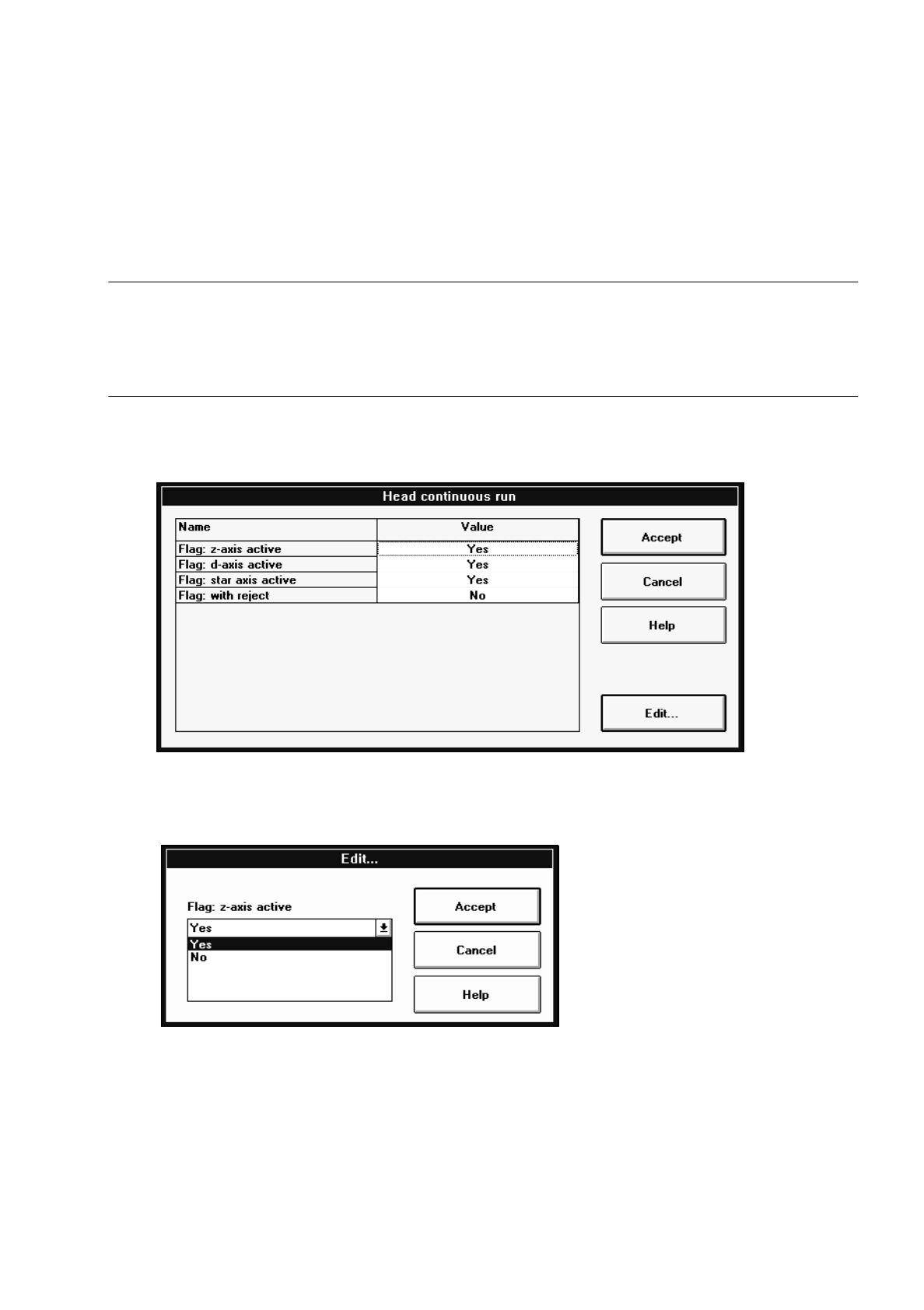
If you wish to activate or deactivate head components or options for the continuous run, click on the
Select continuous run options button. The "Head continuous run" setting box opens.
●
Click on the line containing the desired head component or option and then on the Edit... button (or
select the component or option directly by double-clicking on it).
The dialog box below opens.
●
Select the desired option by clicking on it.
●
In each case, click on the Accept button in the dialog box and in the setting box.
●
Click on the Head continuous run button.
The continuous run is started, and a dialog box displaying the start time opens.
●
Click on the Cancel button in the dialog box to terminate the continuous run.
The completion time of the continuous run is displayed in the dialog box. The label of the "Cancel" but-
ton changes to "OK".
●
Close the dialog box by clicking on OK.

2 Functions for the Adjustment of the Machine User’s Manual Test Program SITEST
2.4 Head Continuous Run Software Version 403.xx Edition 12/97
2 - 26
User’s Manual Test Program SITEST 2 Functions for the Adjustment of the Machine
Software Version 403.xx Edition 12/97 2.5 Conveyor Functions
2 - 27
2.5 Conveyor Functions
●
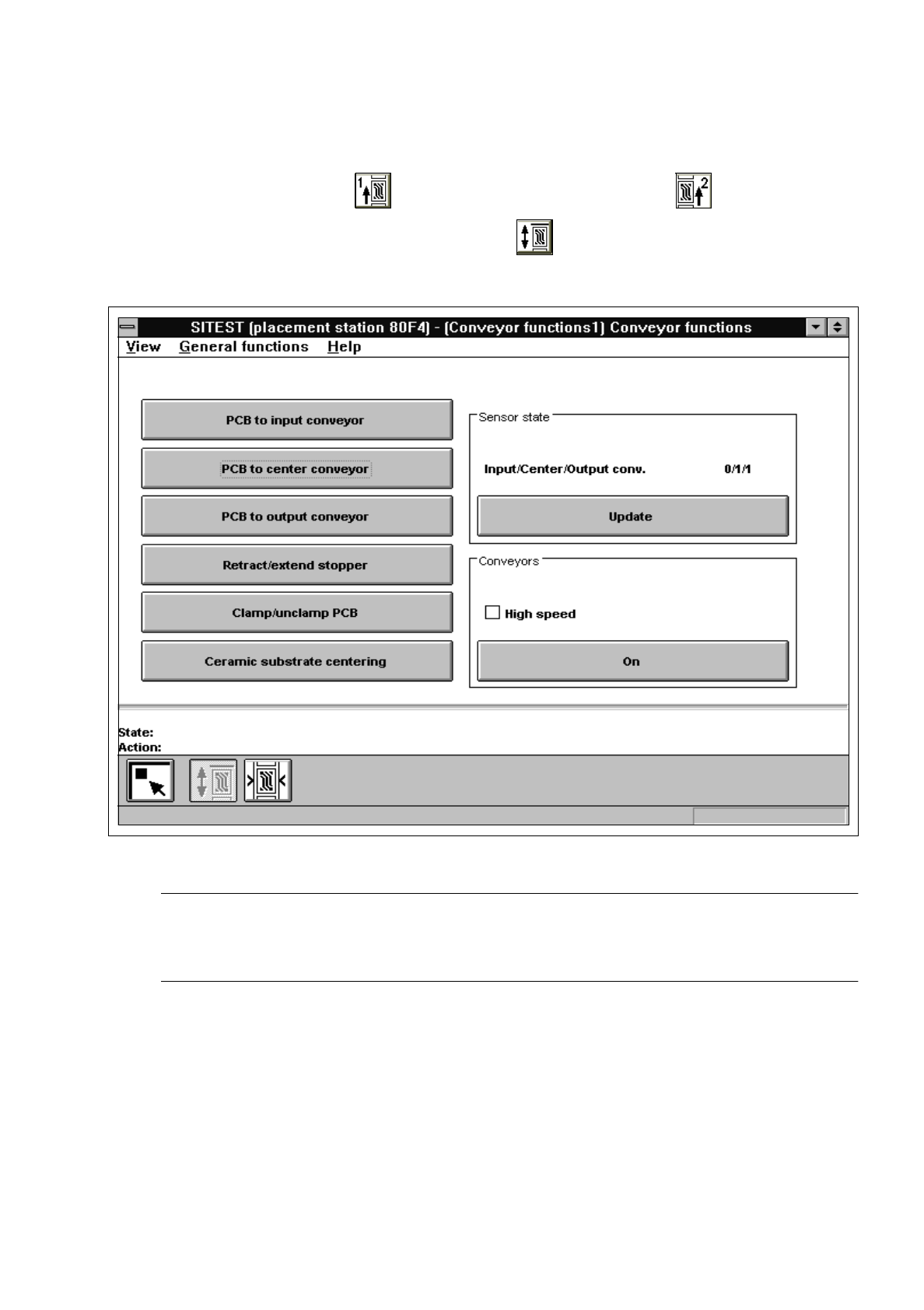
In the main view click on the icon for "PCB conveyor 1", or click on the icon for
"PCB conveyor2" and subsequently, (if required) the icon to switch to the "Conveyor functions"
display.
Fig. 2.5.1 "Conveyor functions" Display
NOTE
The transport functions can be tested for each PCB conveyor (single or dual conveyor) installed in the
machine. The same functions are available for each transport type (see chapt. 1, section 1.3).
The following functions are available in the "Conveyor functions" display:
–
PCB to input conveyor to transport the PCB to the input conveyor
–
PCB to center conveyor to transport the PCB from the input to the center conveyor
–
PCB to output conveyor to transport the PCB from the center to the output conveyor
–
Retract/extend stopper to retract and extend the PCB stopper
–
Clamp/unclamp PCB to open/close the conveyor clamping system
–
Ceramic substrate centering to activate the ceramic substrate centering device