00191021-02.pdf - 第93页
User’s Manual Test Program S ITEST 2 Functions for the Adjustment of the Machine Software Version 403.xx Edition 12/97 2.5 Conveyor Functions 2 - 29 2.5.1 Width Adjustment ● If yo u wish to te st the width adjust ment fu…

2 Functions for the Adjustment of the Machine User’s Manual Test Program SITEST
2.5 Conveyor Functions Software Version 403.xx Edition 12/97
2 - 28
–
Update to display the current sensor state for the input, center and
output conveyors
–
On to activate the conveyors (normal or high speed)
●
Click on the corresponding button for the desired function.
The function will be performed.
●
To update the sensor states of the conveyor sections (input, center, output), click on the
Update
button. The current state of the sensors will be displayed above the button.
●
If you wish to have the conveyors run at low and high speed for testing purposes, activate or deacti-
vate, respectively, the check box
High speed
in the "Conveyors" field by clicking on it.
●
Prior to starting the run, make sure that the conveyor is empty.
●
Click on the
On
button in the "Conveyors" field.
The run starts, and a dialog box displaying the start time opens.
NOTE
The conveyors will run at low speed if the check box
High speed
is not activated.
The conveyors will run at high speed if the check box
High speed
is activated.
The conveyor belts of the input conveyor will run at high speed only.
●
Click on the
Cancel
button in the dialog box if you wish to stop the operation of the conveyors.
User’s Manual Test Program SITEST 2 Functions for the Adjustment of the Machine
Software Version 403.xx Edition 12/97 2.5 Conveyor Functions
2 - 29
2.5.1 Width Adjustment
●
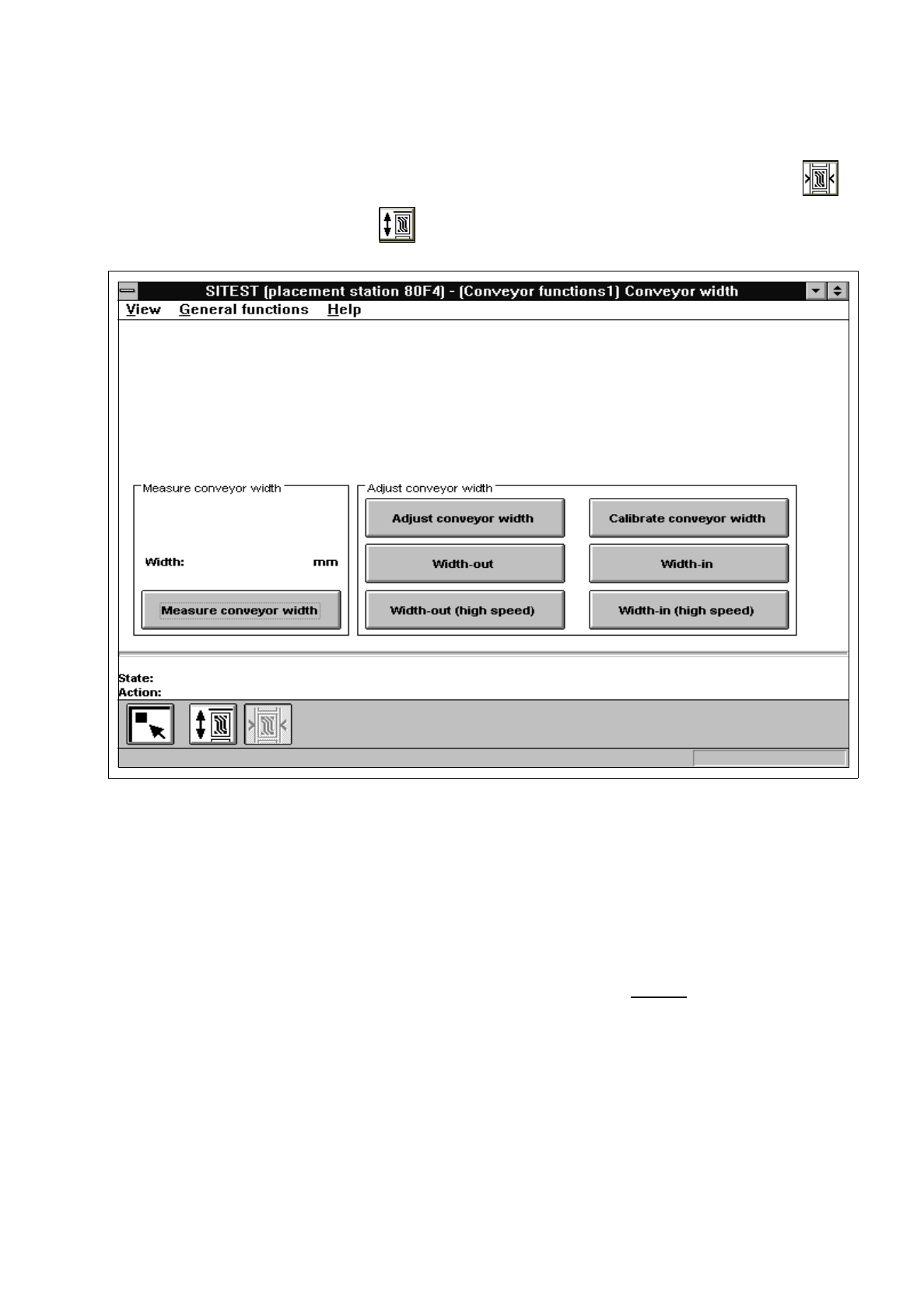
If you wish to test the width adjustment functions or to calibrate the conveyor width, click on the
icon in the "Conveyor functions" display (see Fig. 2.5.1) to switch to the "Conveyor width" display.
Fig. 2.5.2 "Conveyor width" Display
The following functions are available in this display:
–
Measure conveyor width to measure the current conveyor width
(the width measured is displayed above the
"Measure conveyor width" button)
–
Adjust conveyor width to adjust the width to the value entered
–
Calibrate conveyor width to determine the gantry position for a 100 mm-wide PCB
–
Width-out to increase the conveyor width
–
Width-in to decrease the conveyor width
–
Width-out (high speed) to increase the conveyor width in large steps
–
Width-in (high speed) to decrease the conveyor width in large steps

2 Functions for the Adjustment of the Machine User’s Manual Test Program SITEST
2.5 Conveyor Functions Software Version 403.xx Edition 12/97
2 - 30
NOTE
For the performance of all functions of the width adjustment system, the lifting table must be in the
lowered
position!
●
If you wish to calibrate the conveyor width, adjust the width of the currently active conveyor to 100 mm
using the
Adjust conveyor width
function, prior to the calibration procedure.
●
Check that a 100 mm-wide PCB can be transported through the entire conveyor system without any
problem.
●
Click on the
Calibrate conveyor width
button and acknowledge the dialog box displayed by clicking
on
OK
. The function will be performed on the selected conveyor.
●
If you wish to carry out further width adjustment functions, click on the corresponding button for the
desired function.