Printer 710_810 v8 Machine Overview.pdf - 第17页
MACHINE OVER VIEW MODULE OVERVI EWS Chapter Issue 8 Oct 06 Technical Reference Manual 4.17 Foreign Machine Inte rface (FMI) Module The FMI provides a communications link between up line/downline machines and the DEK mach…
MACHINE OVERVIEW
MODULE OVERVIEWS
4.16 Technical Reference Manual Chapter Issue 8 Oct 06
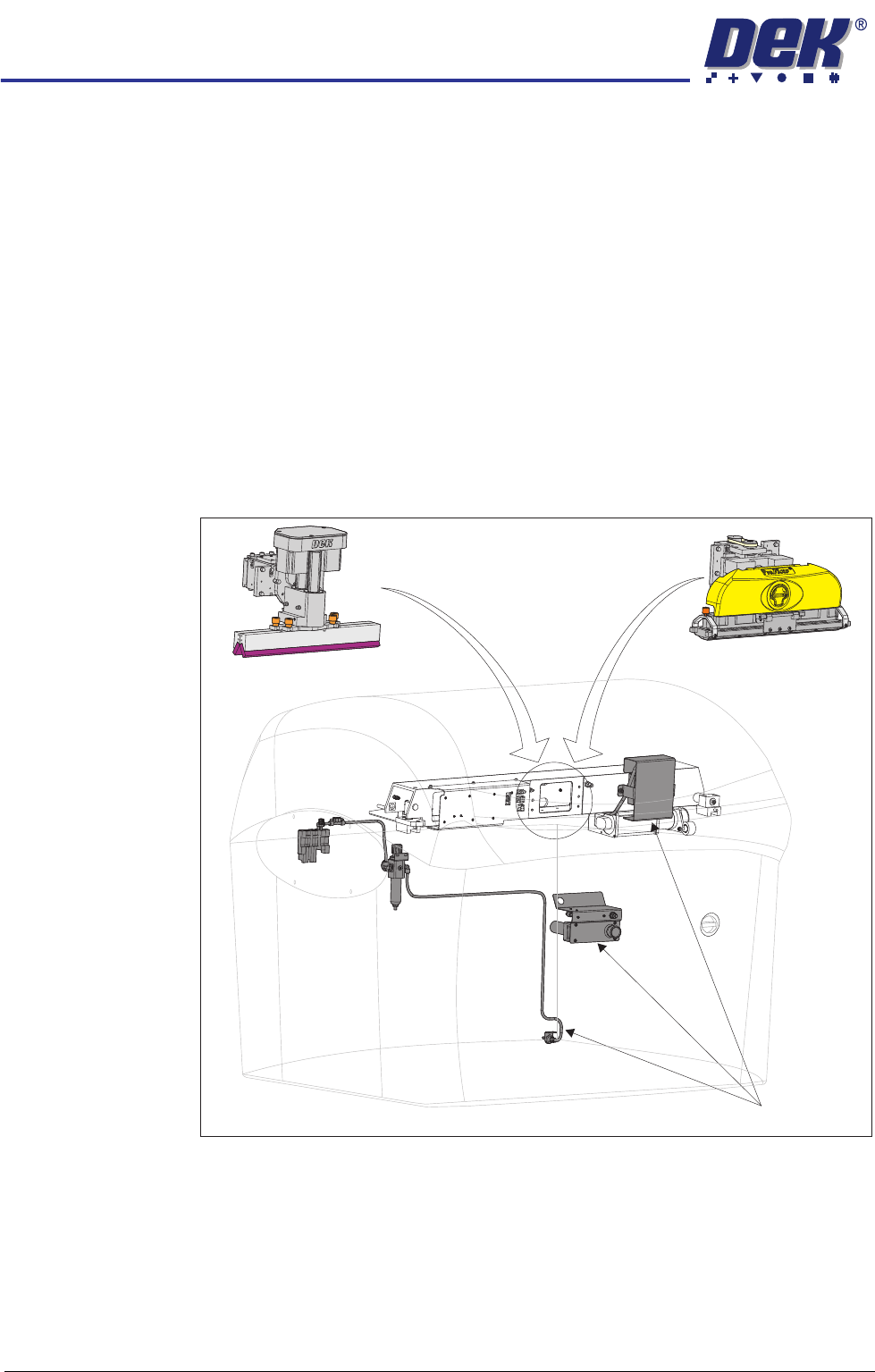
Pneumatics
Module
The function of the pneumatics module is to supply regulated air pressure to the
pneumatic devices throughout the machine. The air supply is routed to the
required pneumatic device via an electrically operated solenoid valve controlled
by the machine control system.
There are two banks of pneumatic solenoids, one located on the rear frame of
the machine and the other located on the print carriage.
Squeegee Module The function of the squeegee module is to apply the print material through the
screen image onto the board in a controlled manner. Squeegee height and
downward pressure is monitored during the print stroke to optimize the print
quality.
ProFlow Module The ProFlow module is an optional self contained paste transfer unit, employed
to apply print material directly to a screen, alleviating the need for squeegees
and the paste dispenser.
Figure 4-19 Pneumatics - Squeegee - ProFlow
Squeegees
ProFlow
Pneumatics
MACHINE OVERVIEW
MODULE OVERVIEWS
Chapter Issue 8 Oct 06 Technical Reference Manual 4.17
Foreign Machine
Interface (FMI)
Module
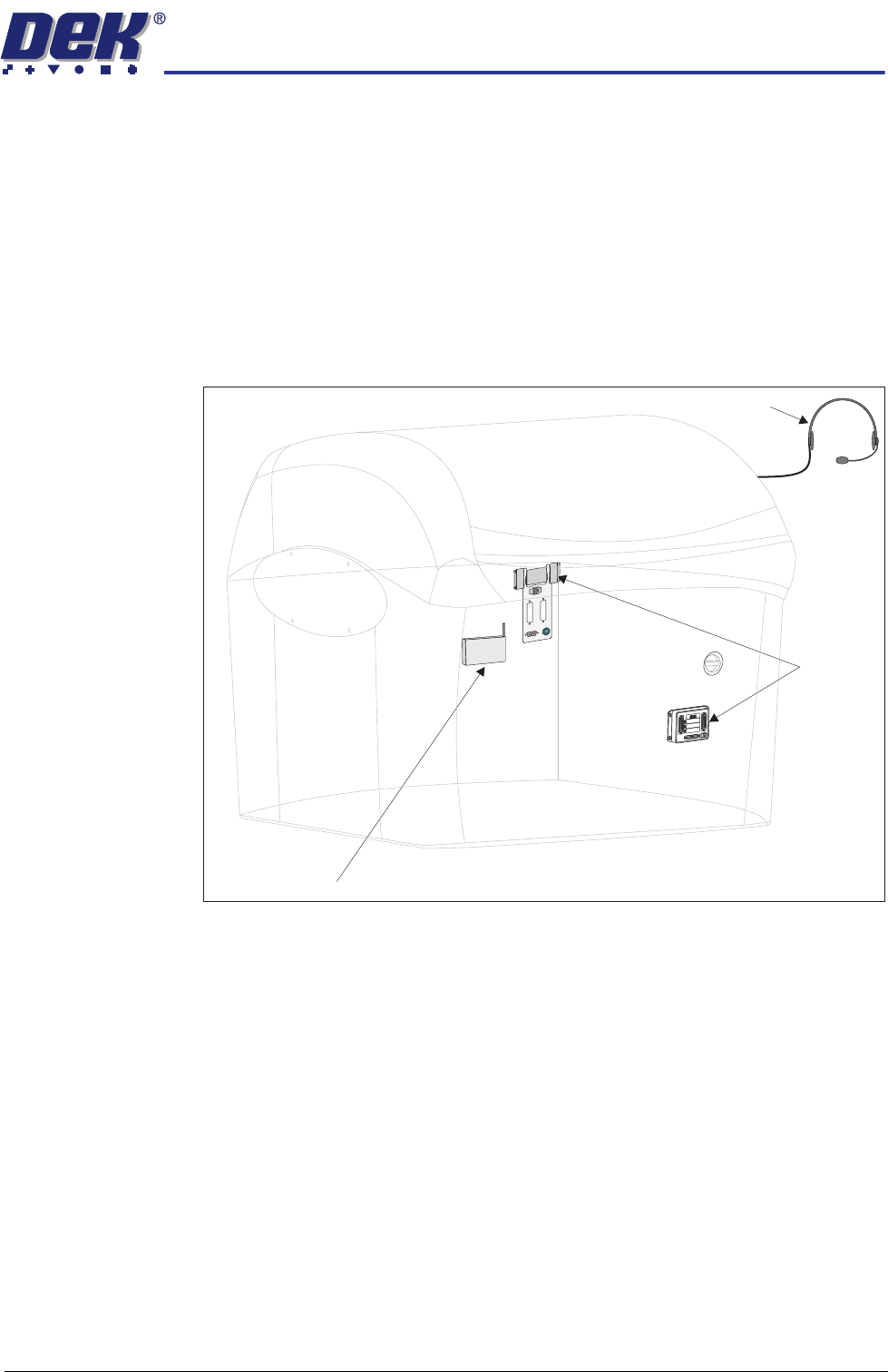
The FMI provides a communications link between upline/downline machines
and the DEK machine.
The FMI pod, fitted to the rear of the machine, is used to communicate with
upline/downline machines using SMEMA, Fuji or Panasonic interfaces.
The Multi-Interface Unit (MIU), fitted to the front of the machine, is used to
communicate with upline/downline machines using all other protocols.
DEK Interactiv The DEK Interactiv module provides an engineer with a wireless real time link
between the DEK machine and the DEK call centre, via the internet, for fault
diagnosis.
Figure 4-20 Foreign Machine Interface - DEK Interactiv
Foreign
Machine
Interface
DEK Interactiv
DEK Interactiv
M
1SK
1
U
PLINE
M
1S
K
2
D
OW
N
LIN
E
M
1P
L
3
DEK
M/
C
M
1S
K4
D
EK
U
S
B
+12V
+24V
+24VSW
SEN
DUPLINE
SENDDOWNLINE
C
ONTROL
IN
UPLINEREADY
DOWNLINEREADY
CONTROLOUT
PO
W
ER
I/P'S
O
/P
'S
PR
OT
OCOLSELEC
TIO
N
UP
LINE
DOWN
LINE
MIU 191114
4
8
0
4
8
0

MACHINE OVERVIEW
MACHINE PRINT CYCLE
4.18 Technical Reference Manual Chapter Issue 8 Oct 06
MACHINE PRINT CYCLE
The following is a typical machine print cycle with camera mounted board stop
in step mode:
1. Run is pressed on the DUI, the printhead cover lock is engaged and the
rising table carries out a rail lifted check.
2. The camera positions itself at the board stop co-ordinates.
3. The print carriage moves to the start of the print stroke and both squeegees
drive to their set dwell height. The chase clamps are applied clamping the
chase in position.
4. Auto Board is pressed and the board stop lowers into position ready for the
incoming board. The board is transported into the machine stopping at the
board stop.
5. The transport belts stop running as soon as the board stop sensor detects
the board.
6. The board clamp mechanism operates, clamping the board in position and
the board stop retracts.
7. The camera carriage drives to the position determined by Fiducial 1 X & Y
co-ordinates.
8. The print carriage is driven to its enhanced start position and the appropriate
squeegee is driven down to start height.
9. The rising table carries out a rail lift check and drives up to vision height.
10. The vision data window displays the board fiducial on the left and the stencil
fiducial on the right of the split display.
11. The fiducials are located and a small blue cross with the fiducial outline
appears in the centre of each fiducial on the split display indicating success-
ful location.
12. While the camera drives to Fiducial 2 X and Y coordinates, the location of
the Fiducial 1 board and stencil fiducials are copied to the align data
structure.
13. Fiducial 2 board and stencil fiducials are located.
14. The chase clamps are de-energised and the screen actuators carry out a
rough alignment on the screen. The chase clamps are re-applied securing
the screen.
15. The camera relocates Fiducial 1 and 2. On completion, the camera carriage
drives to its home position.
16. The chase clamps are de-energised and fine alignment on the screen is
carried out. On completion, the chase clamps are re-applied.
17. The relevant squeegee is driven down to make contact with the screen with
0.5kg force.
18. The rising table drives up to the print height.
19. The appropriate squeegee is driven down to the calculated pressure setting,
as set in the board parameter menu.
20. The print carriage drives in the appropriate direction to perform a print
stroke.