ASM_MANUAL_TYPHOON_USC_en_100620_online.PDFA.pdf - 第51页
4 TYPHOON SOFTWARE 4.1 SOFTWARE SETUP STANDALONE MANUAL TYPHOON UNDER STENCIL CLEANER 06/2020 51 4 TYPHOON SOFTWARE 4.1 SOFTWARE SETUP The Typhoon USC must be selected and setup in the machine software before it can be u…

3 TYPHOON UNDER STENCIL CLEANER
3.11 TROUBLESHOOTING
50 STANDALONE MANUAL TYPHOON UNDER STENCIL CLEANER 06/2020
16. Remove the stencil from the chase to allow access to the USC assembly.
17. Investigate and perform necessary actions to free the USC assembly.
18. Close the front cover.
19. Press the System button on the front of the machine.
20. Repeat Steps 9 to 14.
If the error persists, escalate to an ASM support engineer.
4 TYPHOON SOFTWARE
4.1 SOFTWARE SETUP
STANDALONE MANUAL TYPHOON UNDER STENCIL CLEANER 06/2020 51
4
TYPHOON SOFTWARE
4.1 SOFTWARE SETUP
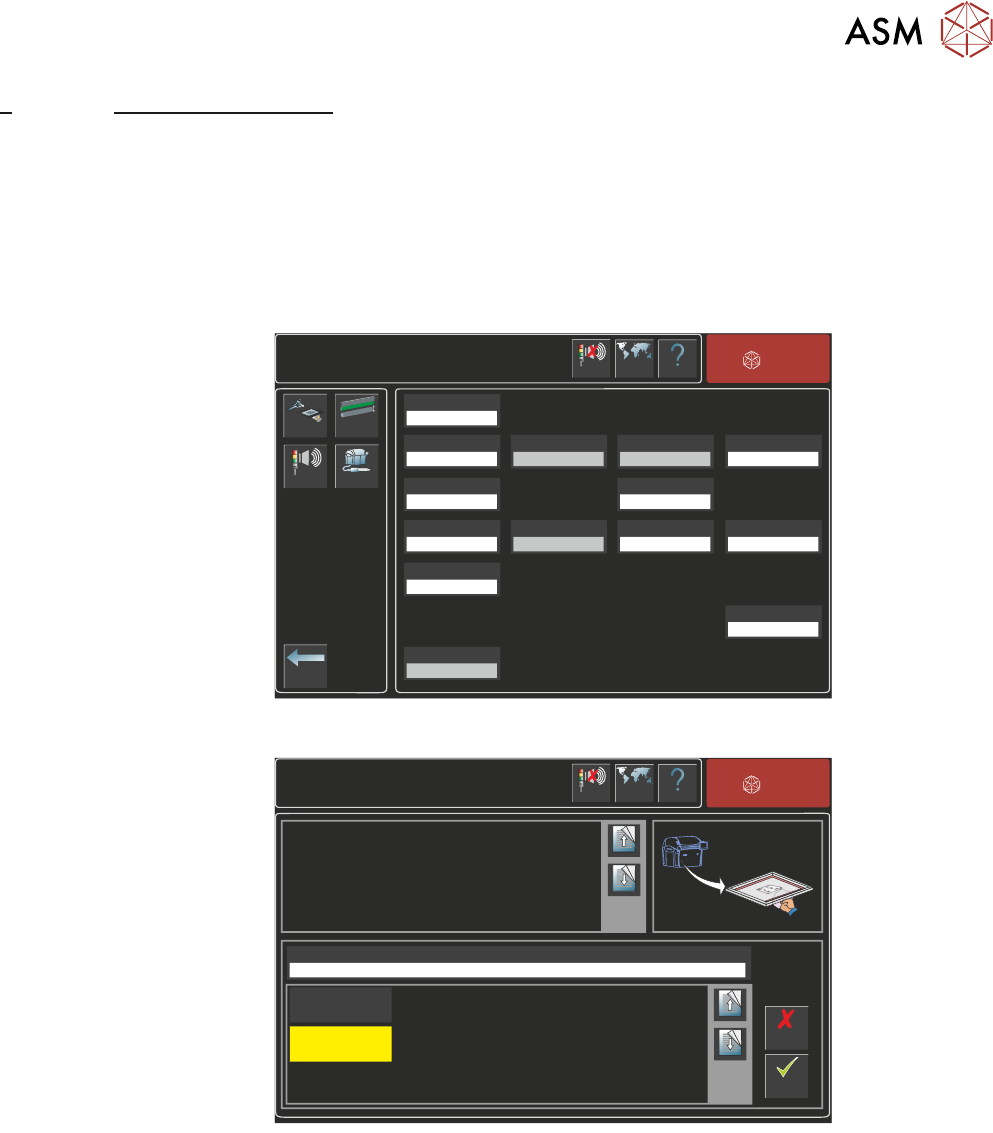
The Typhoon USC must be selected and setup in the machine software before it can be used.
From the software ready page:
1. Select Maintenance.
2. Select Machine Setup.
3. Select Options.
Maintenance\Machine Setup\Options
Back
Cleaner
Options
PRHM 2
Options
Beacon
Plug-ins
Help
Language
Cancel
Buzzer
Screen Cleaner
Not Fitted
Auto Roll Width
Enabled
Paste Dispenser
Enabled
Pressure Hardware
Fitted
Tooling Monitoring
0 boards
Board Quality Signal
Disabled
TTG and BTG Estimates
Disabled
Programmable Beacon
Enabled
Paste Roll Height Monitor
Hardware Options
Not Fitted
Remote Board Stop
Fitted
Paste Check Offset
20.0 mm
TTG Alert
30 minute
Roll Height Monitor
Disabled
BTG Alert
200 boards
ASM
4. Select Screen Cleaner parameter.
Maintenance\Machine Setup\Options
Accept
Cancel
Help
Language
Screen Cleaner
Fitted
ASM
Cancel
Buzzer
Sets whether an under screen cleaner is fitted to the machine.
Page Up
Page
Down
Page Up
Page
Down
Not Fitted
Fitted
5. Select Fitted.
6. Select Accept.
4 TYPHOON SOFTWARE
4.1 SOFTWARE SETUP
52 STANDALONE MANUAL TYPHOON UNDER STENCIL CLEANER 06/2020
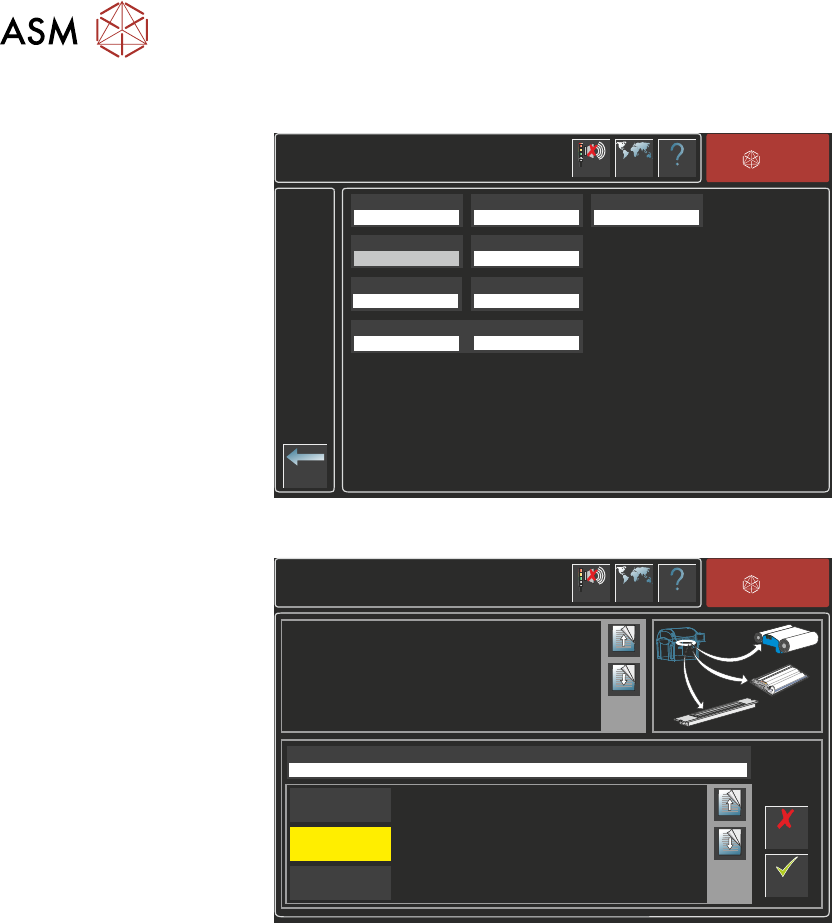
7. Select Cleaner Options.
Maintenance\Machine Setup\Options\Cleaner Options
Back
Help
Language
Cleaner Model
Blue
Cleaner Vacuum
Vacuum
Solvent Dispense
0.40 s
Paper Advance
20 mm
Advance At Initialisation
4 mm
Auto Clean Count Reset
Disabled
USC Vacuum Sensing
Disabled
Prime After Downtime
Prime Duration
0 minute
0.4 s
ASM
Cancel
Buzzer
8. Select Cleaner Model.
Maintenance\Machine Setup\Options\Cleaner Options
Accept
Cancel
Help
Language
Cleaner Model
Typhoon
ASM
Cancel
Buzzer
Enables which model of under screen cleaner is fitted to the machine.
Page Up
Page
Down
Page Up
Page
Down
Blue
Typhoon Duo
Typhoon
9. Select either Typhoon or Typhoon Duo dependent on the hardware installed.
10. Select Accept.
11. Set any/all parameters on the Cleaner Options page as required.
12. Select Back three times.
A Cleaner Model Warning page will be displayed, warning the user to check cleaner paramet-
ers in Product Setup as the cleaner model has been changed. The printer will need to be re-
started.
13. Select Shut Down.
14. Restart the printer.
15. Select Setup Product.