ASM_SIPLACE_SplitTableMode_DB_EN_V4.pdf - 第2页
The information in this specification consists o nly of general descriptions and / or performance features, w hich is not contractually binding. Any specific performance features / capabilities will only be binding if co…
CHANGE PRODUCTS WITH NO LINE STOPS
Quick and easy: The new
“floating” SIPLACE Split Table
Mode setup concept for SIPLACE X
feeders lets you insert rush orders
into the production order without
having to stop the line.
It also provides software support
for product changeovers without
the need for additional changeover
tables. The SIPLACE Split Table
Mode is a welcome innovation for
electronics manufacturers with
a broad product spectrum and for
high-mix EMS providers with many
products and few or no component
overlaps.
To keep their production running without major
interruptions, electronics manufacturers must often
keep several sets of component carts with the
corresponding number of feeders on hand.
If your plant is one of these, SIPLACE’s Split Table
Mode software is the right choice for you, because
it eliminates the need to switch out entire
component carts when the setup changes. You only
replace the feeders you need for the new product,
and you can do this without interrupting the line.
This is made possible by virtually separated
component changeover carts. You can set up the
new product on the line while the previous product
is still running.
The highlights of SIPLACE Split Table Mode at a
glance:
Significantly less downtime, because product
changeovers become simply recipe changeovers
Significantly fewer feeders and changeover
tables
Short-term production schedule changes become
possible without having to stop the line
SIPLACE Software
SIPLACE Split Table Mode
The information in this specification consists only of general descriptions and / or performance features, which is not contractually binding.
Any specific performance features / capabilities will only be binding if contractually agreed. Subject to changes without notice.
A10011-ASM-G96-EN Edition 4-04/2011
ASM Assembly Systems GmbH & Co. KG
Rupert-Mayer-Str. 44
81379 Munich, Germany
Phone: +49 89 20800-27819
Fax: +49 89 20800-36692
smt-solutions.de@asmpt.com
www.asm-smt.com
SIPLACE Split Table Mode
Quick, simple and uncomplicated
The Split Table Mode adds another floating setup
option to the broad range of SIPLACE setup
concepts.
SIPLACE Split Table Mode makes it possible to
change setups on the line without having to set up
and tear down a second set of component carts.
Instead, only individual feeders need to be replaced
without having to stop the line.
This saves money not only because it eliminates
downtime, but because you need fewer changeover
tables and feeders.
With SIPLACE Split Table Mode you can set up
new products on the line while the old product is
still being produced. Once the recipe has been set
up, all it takes to start the new product is a
command in SIPLACE Pro.
SIPLACE Split Table Mode is ideal for:
Electronics manufacturers with small to medium-
sized lot sizes and great product diversity
Flexible EMS companies with only minor
component overlaps
Split Table Mode: How its works
With Split Table Mode, SIPLACE X component
tables can be split into separate virtual tables
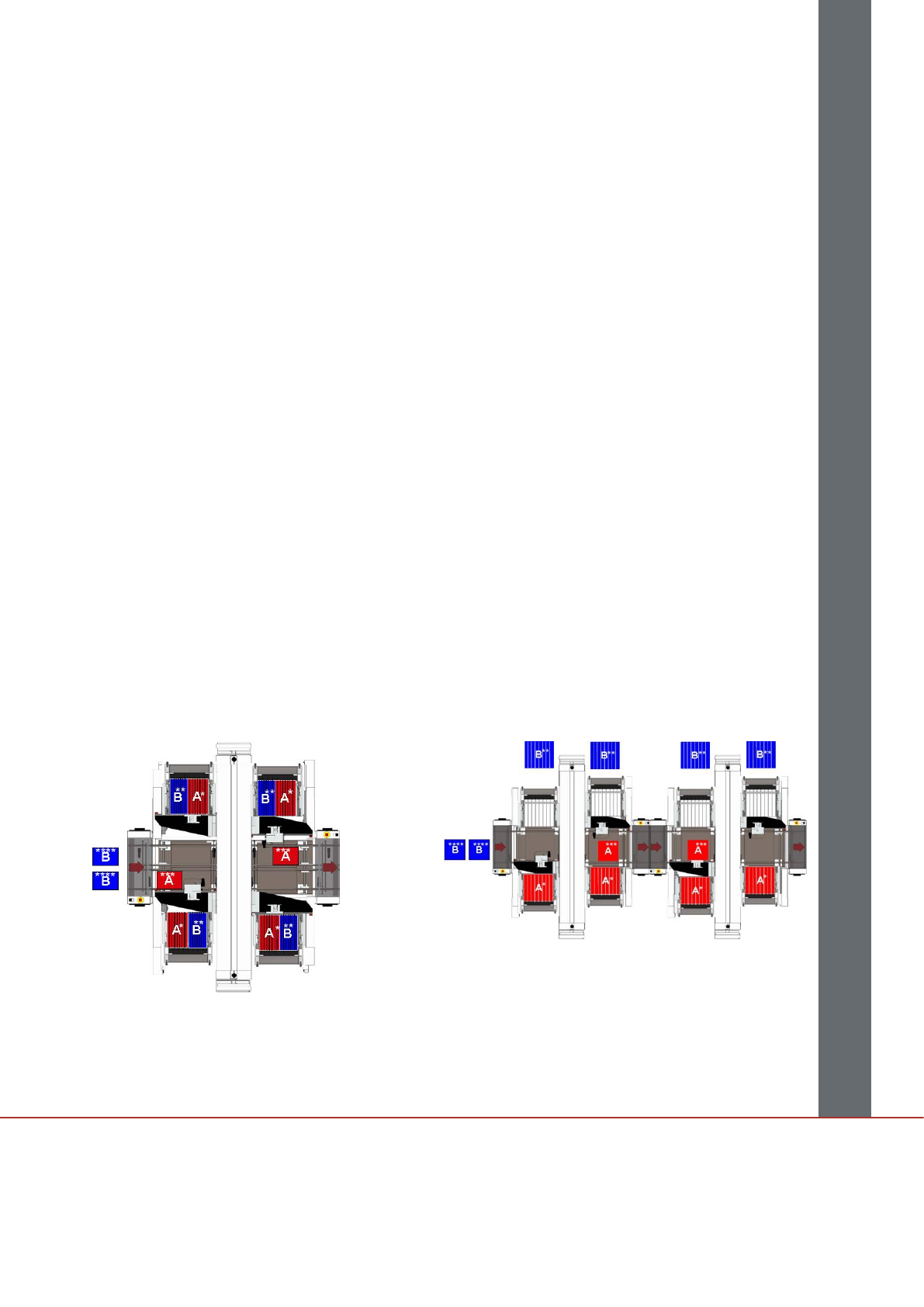
(such as tables A and B in Fig. 1).
That way, the SIPLACE Optimizer will optimize only
a defined sub-area of the component tables for the
placement process for product A, while the other
sub-area is reserved for another product or product
family (product B).
While the first sub-area is used production of
optimized products, the second sub-area can be
prepared for the production without having to stop
the line.
Your benefits:
Only one set of component tables and feeders
Very little downtime, since product changeovers
are also recipe changeovers
Easy insertion of rush jobs with no downtime
Split Table Mode in single-side mode
With the SIPLACE SX1 and SX2 (which have only
one head per placement area), operating with
single-side mode is recommended (Fig. 2). This is
where all the feeders for a product or product family
are set up either entirely on the left side or entirely
on the right side of the line. During the production
run, the components are picked up from one side
only while the other side is being prepared for the
next setup.
Advantages of single-side mode:
You need fewer feeders than with two sets of
changeover tables
Rush orders are much easier to handle
Fig. 1: SIPLACE Split Table Mode with split placement sections
Fig. 2: SIPLACE Split Table Mode in single-side mode
Legend:
* A = Setup table for product family A
** B = Setup table for product family B
*** A = Product A
**** B = Product B