00195044-11_UM_VisionTeachStation_DE EN.pdf - 第172页
10 Exchange of data between the vision teach station and the production line Vision Teach Station User Manual 10.2 Measurement contexts 11/2013 Edition 172 10.2.5 Display of station measurement contexts As of the SIPLACE…
Vision Teach Station User Manual 10 Exchange of data between the vision teach station and the production line
11/2013 Edition 10.2 Measurement contexts
171
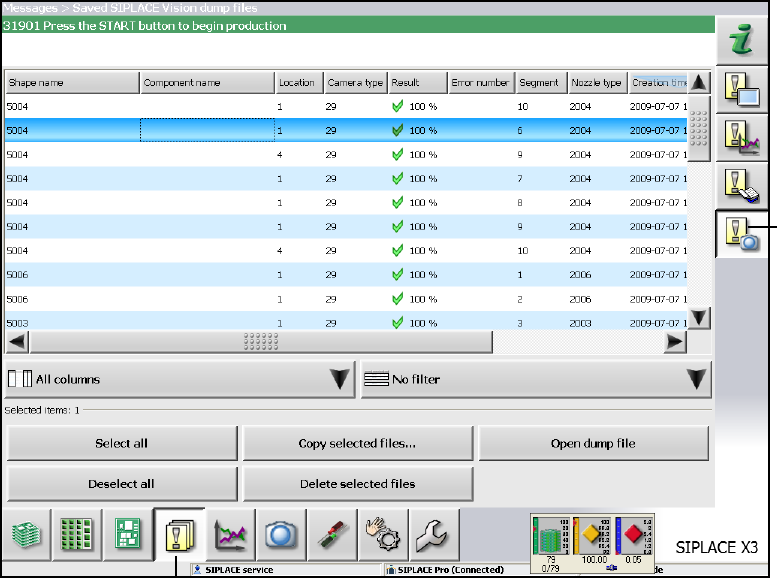
First switch to the messages view at the bottom (1) and then to Vision measurement contexts
to the right (2).
Check the desired measurement context (multiple checking is possible) and click on the "Copy
selected files…" button.
Select the desired drive and confirm with "Save".
10.2.3 Loading measurement contexts
Press the "Measurement contexts" button from the bottom button bar in the vision teach station
software.
Select the directory that contains the measurement context from the tree structure in the left-
hand pane.
Double-click on a measurement context to select it.
10.2.4 Compatibility
With vision teach station version 4.3.1 you can open measurement contexts from all previous
station software versions (60x and 70x), i.e. it is backwards-compatible.
(2)
(1)
10 Exchange of data between the vision teach station and the production line Vision Teach Station User Manual
10.2 Measurement contexts 11/2013 Edition
172
10.2.5 Display of station measurement contexts
As of the SIPLACE Vision Teach Station Version 5.0.2, the software attempts to access the
measurement contexts of the placement machines (the stations).
This access is supported for all SIPLACE Pro server with SIPLACE Pro 10.1.0.26 (and higher).
The station software version has to be 701 or higher.
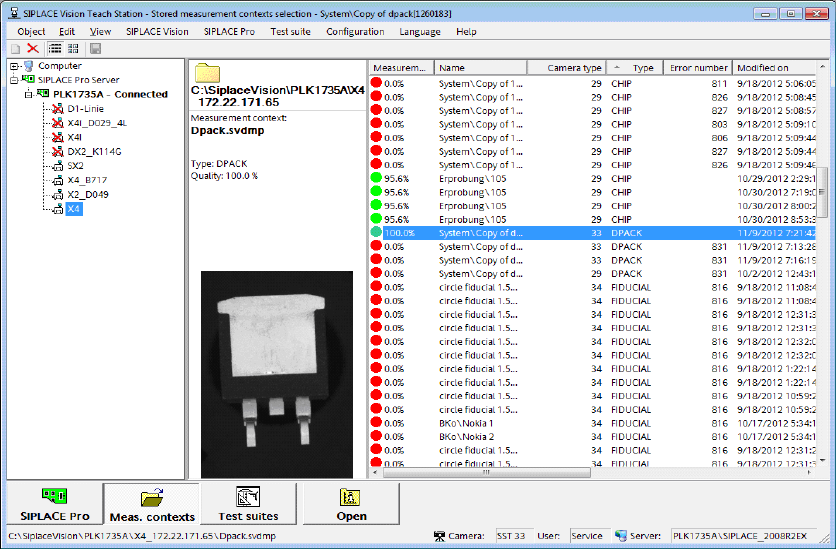
Fig. 10.2 - 1 Measurement contexts of the station computers
The new "SIPLACE Pro Server" entry is displayed in the tree view of the "Measurement contexts"
view. In this entry, all SIPLACE Pro servers are listed that are or once were accessible in the
network.
The respective stations are displayed under the SIPLACE Pro servers.
If no online connection is possible to the station, the measurement contexts that are locally avail-
able on the SIPLACE Vision Teach Station computer are displayed only.
If the station is online and automatic update of the station measurement contexts is configured,
all measurement contexts that have been added since the last access to the station computer will
be copied.
The measurement contexts of the selected station will be copied to a local folder, even if the
measurement contexts might be stored in different folders on the station computers.
The local station measurement contexts may be edited, copied and deleted as usual.
Vision Teach Station User Manual 10 Exchange of data between the vision teach station and the production line
11/2013 Edition 10.2 Measurement contexts
173
10.2.5.1 Local storage of the station measurement contexts
All station measurement contexts are stored in a structured root folder. C:\SIPLACE Vision is pre-
installed. The root folder is configurable. 10
Folders are added for each SIPLACE Pro server in the root folder. Under each SIPLACE Pro
server, folders are added for each station of the SIPLACE Pro server. 10
The station measurement contexts are stored in the station folders.
The information of the folders is loaded when the SIPLACE Vision Teach Station is started. The
station measurement contexts can be displayed in the SIPLACE Vision Teach Station although
the SIPLACE Pro server is offline.
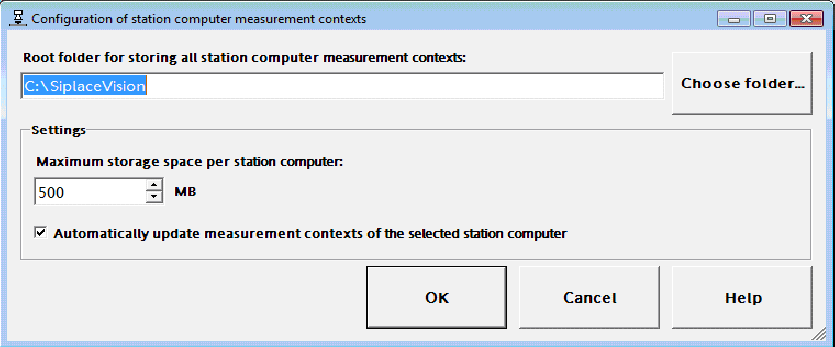
The following dialog to configure the local storage of the station measurement contexts can be
started in the "Configuration -> Station computer measurement contexts..." menu.
Fig. 10.2 - 2 Configuring the local storage of station measurement contexts
If another root folder is selected, all information and folders of the SIPLACE Pro server and the
station computers will be copied to the new folder.
After query, existing measurement contexts will be copied, as well.
Under "Maximum storage space per station computer", the space size for storing the local
measurement contexts of each station may be specified.
Minimum storage space = 100 MB, default value = 500 MB.
The storage space is checked whenever new measurement contexts are copied from the station
computer. If the maximum storage space has been exceeded, a dialog is displayed in which the
user can decide to delete the oldest measurement contexts automatically. In this case, the respec-
tively oldest measurement context will be deleted until the occupied storage space lies within the
allowed range.