0771445_7708_Mar2018_077144500.pdf - 第18页
Model 7708 M ultiplexer M odule I nstructions for use with DAQ6510 18 077144500 / April 2018 2. Install the m odule in Slot 1 of the DAQ6510. 3. Turn on the power. 4. Allow the instrum ent to warm up for one hour. 5. Mak…
Model 7708 Multiplexer Module Instructions for use with DAQ6510
077144500 / April 2018 17
Range
Applied DC voltage
Reading limits (1 year, 18 °C to 28 °C)
100 mV
100.0000 mV
99.9935 to 100.0065 mV
1 V
1.000000 V
0.999969 to 1.000031 V
10 V
10.00000 V
9.99970 to 10.00030 V
100 V
100.0000 V
99.9955 to 100.0045 V
1000 V
300.000 V
299.983 V to 300.017 V
Verifying AC voltage
To check AC voltage accuracy, apply accurate AC voltages at specific frequencies from the AC voltage
calibrator to the module inputs. Verify that the displayed readings fall within specified ranges.
Do not exceed 300 V
RMS
between the INPUT H and L terminals or between adjacent channels,
or 8
10
7
V•Hz input. Failure to observe this precaution may result in instrument damage.
To verify AC voltage accuracy:
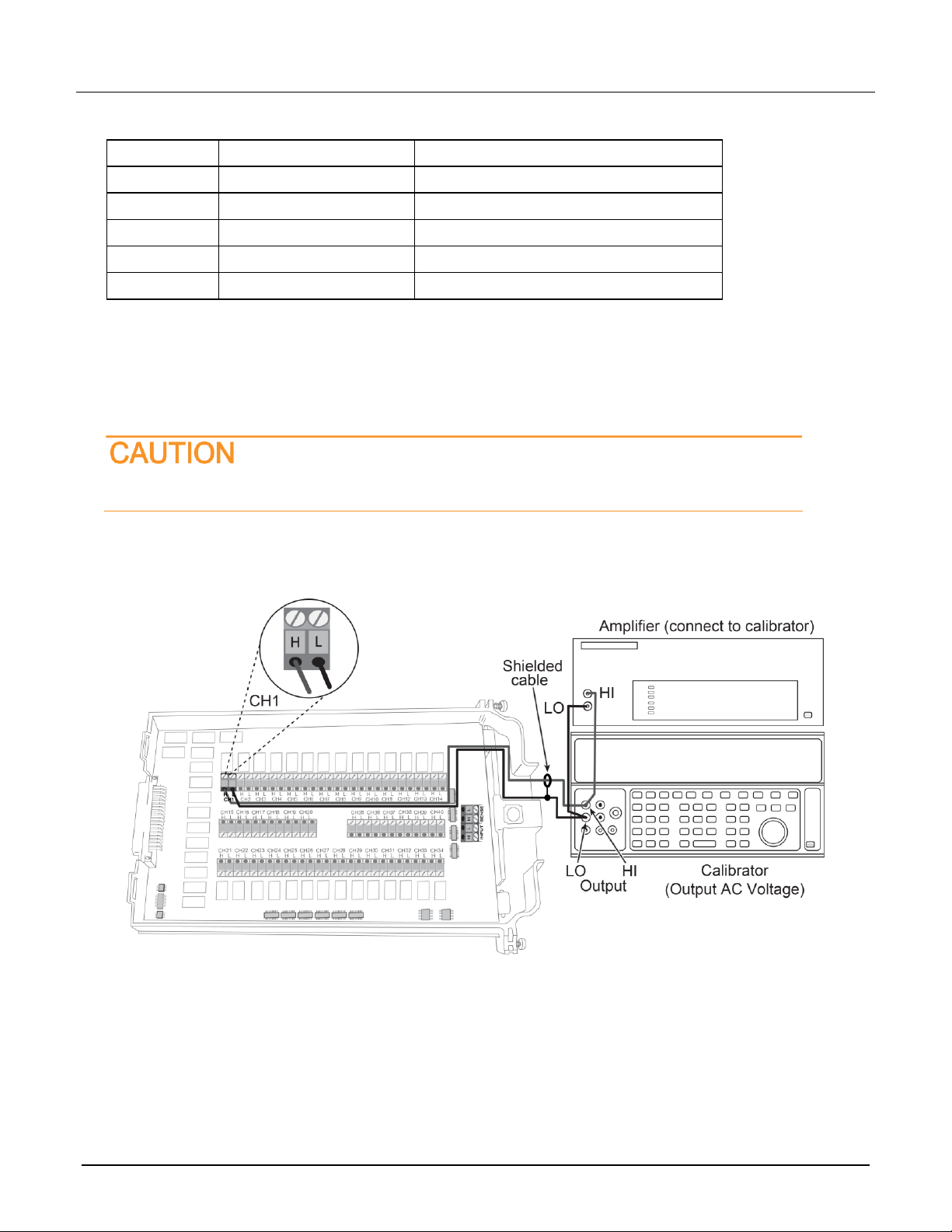
1. Connect the CH1 H and L INPUT terminals of the module to the AC voltage calibrator, as shown in the next
figure.
Model 7708 Multiplexer Module Instructions for use with DAQ6510
18 077144500 / April 2018
2. Install the module in Slot 1 of the DAQ6510.
3. Turn on the power.
4. Allow the instrument to warm up for one hour.
5. Make sure that the front-panel TERMINALS switch is set to REAR.
6. On the front panel of the instrument, select the FUNCTION key and then select AC Voltage.
7. On the Home screen, swipe to the CHANNEL swipe screen.
8. Close channel 101.
9. Set the range to 100 mV.
10. Swipe to the Settings screen.
11. Disable Rel.
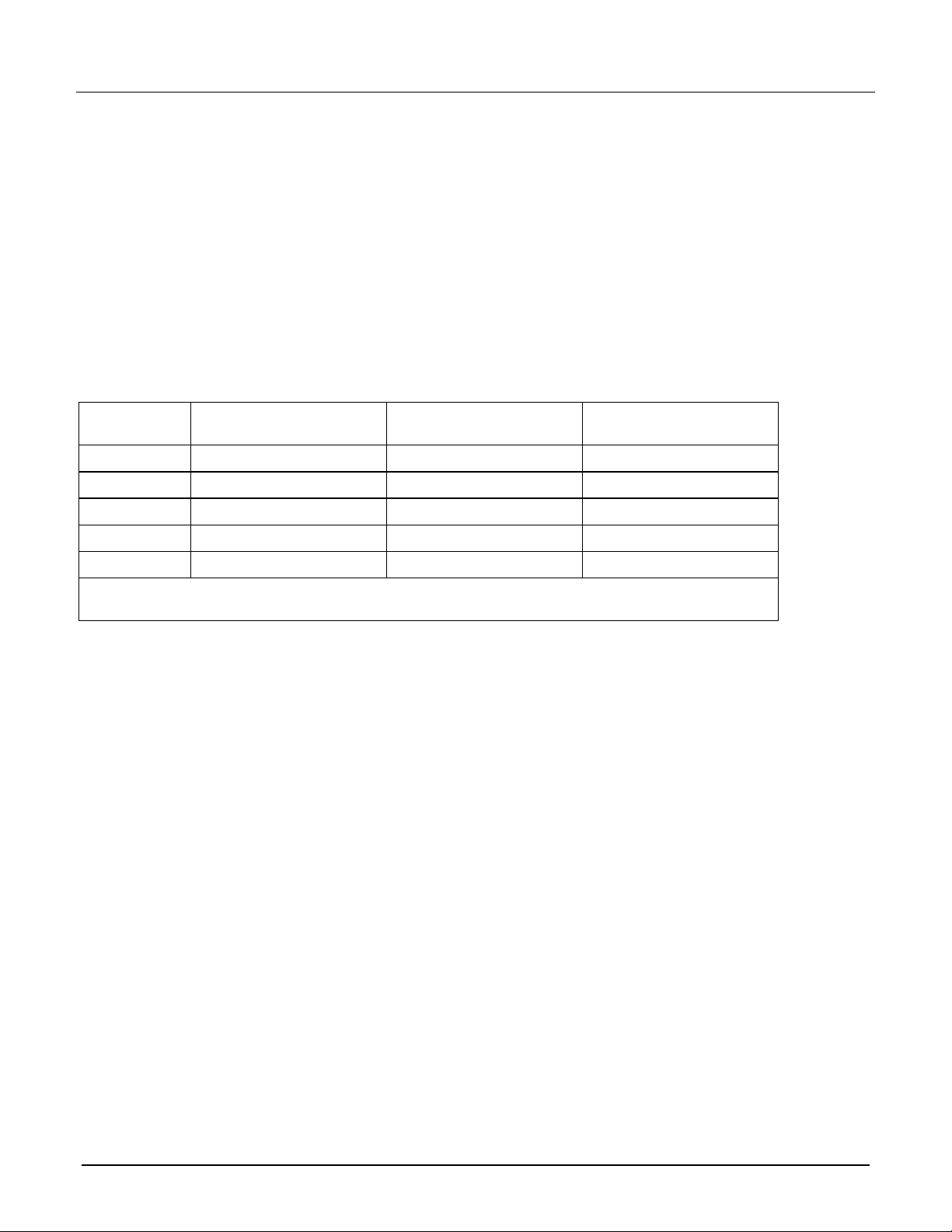
12. Source 1 kHz and 50 kHz AC voltages for each of the ranges summarized in the table below. Make sure
that the respective DAQ6510 readings are within stated limits.
13. Return to the CHANNEL swipe screen and open Channel 1.
ACV range
Applied AC voltage
1 kHz reading limits
(1 year, 18 °C to 28 °C)
50 kHz reading limits
(1 year, 18 °C to 28 °C)
100 mV
100.0000 mV
99.910 to 100.090 mV
99.830 to 100.170 mV
1 V
1.000000 V
0.99910 to 1.00090 V
0.99830 to 1.00170 V
10 V
10.00000 V
9.9910 to 10.0090 V
9.98300 to 10.0170 V
100 V
100.0000 V
99.910 to 100.090 V
99.830 to 100.170 V
750 V
300.000 V*
299.60 to 300.40 V
299.27 to 300.73 V
* If the 5725A amplifier is not available, change the 300 V @ 50 kHz step to 220 V @ 50 kHz. Reading limits
for 220 V @ 50 kHz = 219.36 V to 220.64 V.
Model 7708 Multiplexer Module Instructions for use with DAQ6510
077144500 / April 2018 19
Verifying resistance
Check resistance by connecting accurate resistance values to the module and verifying that its resistance
readings are within the specified limits.
Do not apply more than 300 VDC between the module INPUT or SENSE H and L terminal
or between any adjacent channels. Failure to observe this precaution can cause
instrument damage.
To verify resistance accuracy:
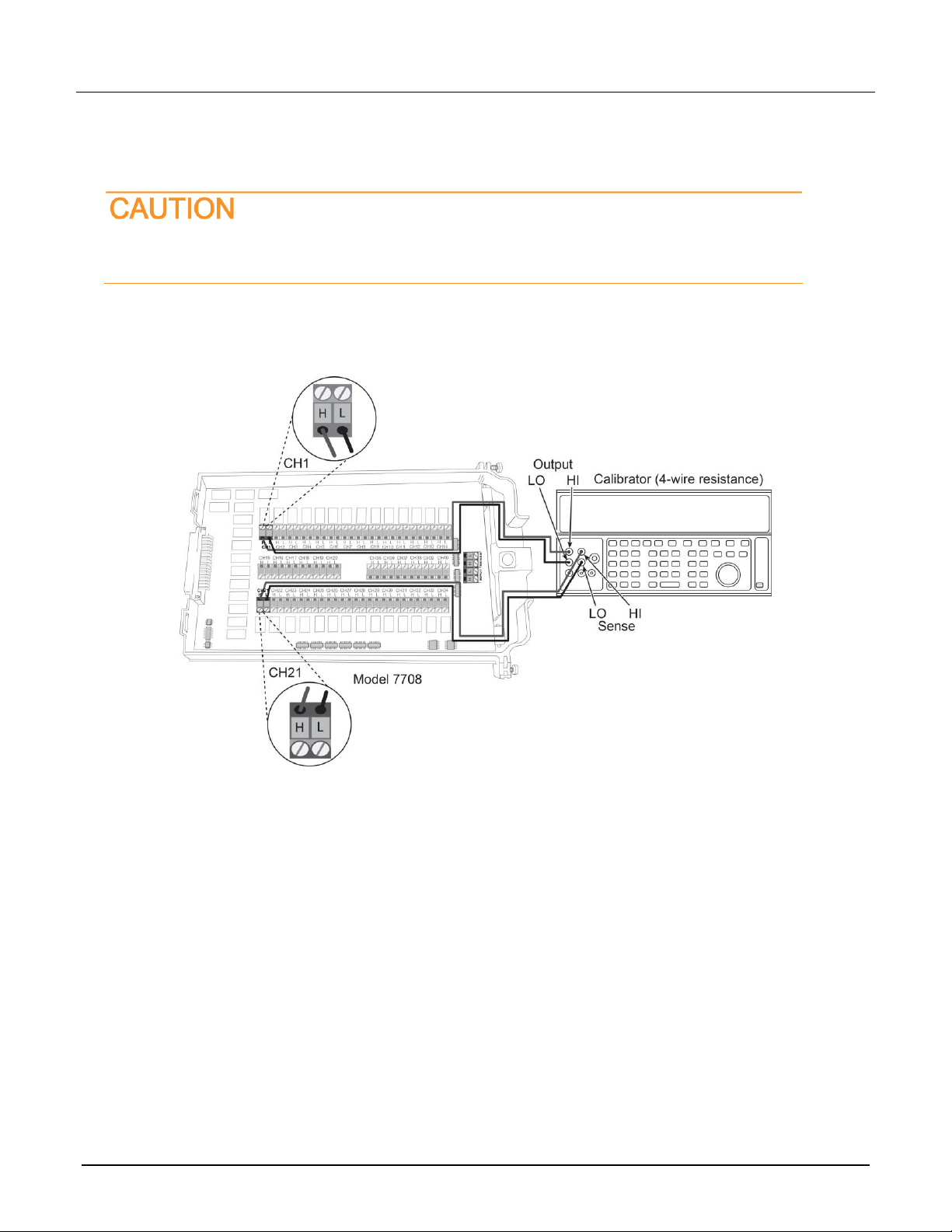
1. Using shielded Teflon or equivalent cables in a 4-wire configuration, connect the 7700 CH1 H and L INPUT
terminals and CH11 H and L SENSE terminals to the calibrator as shown in the next figure.
2. Install the module in Slot 1 of the DAQ6510.
3. Turn on the power.
4. Allow the instrument to warm up for one hour.
5. Make sure that the front-panel TERMINALS switch is set to REAR.
6. Set the calibrator for 4-wire resistance with external sense on.
7. On the front panel of the instrument, select the FUNCTION key and then select 4W Resistance.
8. On the Home screen, swipe to the CHANNEL swipe screen.
9. Set the range to 100 Ω range.
10. Swipe to the Settings screen.
11. Enable the Filter.
12. For the 100 Ω range, select the MENU key, select Channel Settings, and set Offset Compensation to On.
13. Recalculate reading limits based on actual calibrator resistance values.
14. Source the nominal full-scale resistance values for the 100 Ω to10 MΩ ranges listed in the table below.
Verify that the readings are within calculated limits.