TM6211.SmartRecognition.pdf - 第2页
S M T S o f t w a r e E n g i n e e r i n g G r o u p I M O p e r a t i o n s Y A M A H A M O T O R C O . , L T D . MDOC-SOFT50185 1 . A p p l i c a b l e m o d e l s a n d s o f t w a r e v e r s i o n s Applicable item…
SMT Software Engineering Group
IM Operations YAMAHA MOTOR CO., LTD.
MDOC-SOFT50185
Smart Recognition
Contents
Contents ........................................................................................................................................ 1
1. Applicable models and software versions ................................................................................. 2
2. Restrictions ................................................................................................................................ 2
3. Outline ....................................................................................................................................... 2
4. Using Method ............................................................................................................................ 3
4.1. Create parts data ................................................................................................................ 3
4.2. Create model data .............................................................................................................. 4
4.3. Error Message .................................................................................................................. 15
5. Setting ..................................................................................................................................... 17
Revision
Version Chapter Revised Contents
00 V3.31STD R2.000 All Created
01 V3.42STD R1.000
V4.42STD R1.000
Chapter 1
Chapter 2
YSM40 was added to applicable models.
In newly created smart recognition parts,
restrictions of the pick up group and the
recognition time were abolished.
The change parts by revision are written with [* (revision number)].
SMT Software Engineering Group
IM Operations YAMAHA MOTOR CO., LTD.
MDOC-SOFT50185
1. Applicable models and software versions
Applicable items and software version are as below.
Fig 1. Applicable models and software version
Item Name Software Version Remarks
YS series mounters
YG12 series mounters
YSH20
VGOS V3.31 STD R2.000 or later
YSM40 VGOS V4.42 STD R1.000 or later [*1]
2. Restrictions
There are restrictions on use of this function as described below.
The system board with a memory capacity of 1GB or more is required.
In the case of Smart Recognition parts created before VGOS V3.42STD R1.000 or
V4.42STD R1.000 [*1], number of Smart Recognition parts to be recognized is up
to “1” in each pick up group. When Smart Recognition parts are mounted
continuously, the mounting is performed one by one.
In the case of Smart Recognition parts created before VGOS V3.42STD R1.000 or
V4.42STD R1.000 [*1], when the Smart Recognition parts have many edges, it
takes time to recognize. Therefore, sometimes the recognition doesn’t finish until
the head arrives at the mounting position and needs to wait to start mounting.
The parts data for Smart Recognition is saved only in the following environment.
VGOS V30 and P-TOOL Only YGX file type
3. Outline
“Smart Recognition” is a function to execute vision algorithms of general versatility and
higher robustness.
A template(model) is created from a vision image, and the parts are positioned based on
the model. This makes it possible to recognize complicated shape of parts that was unable
or difficult to be recognized with the existing algorithms.
Parts not applicable to Smart Recognition
The following parts are not applicable to Smart Recognition.
Parts with data that can be created with an alignment group, “Chip”, “IC”, or
“Connector”.
Parts with data that can be created with an alignment group, “Special” and
alignment type, “Special”, “Odd Chip”, “Mark”, “Sq. Quad”, or “Gravity”.
Ball parts
Parts with leads less than 0.3mm
Too small or too large parts that can’t satisfy the conditions to register as parts
shape models Number of registration points must be 100 or more and less than
1000
SMT Software Engineering Group
IM Operations YAMAHA MOTOR CO., LTD.
MDOC-SOFT50185
4. Using Method
4.1. Create parts data
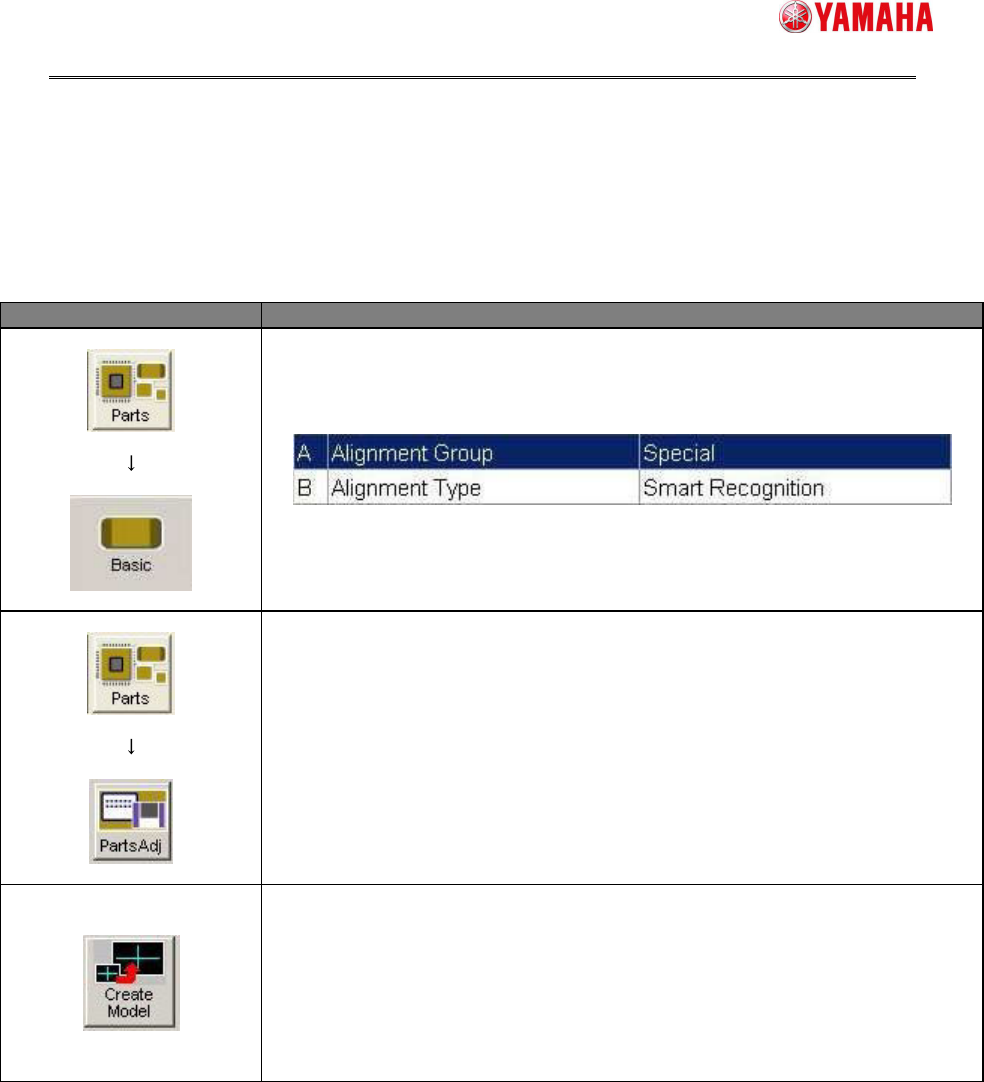
First, create parts data for Smart Recognition as follows.
Menu Item
Set [Alignment Group] to “Special”,
and [Align Type] to “Smart Recognition”.
Modify the parameters such as [Body Size], [Search Area (mm)],
and [Lighting Level] which are necessary for parts recognition
Press the [Parts Adj] button to open the [Parts Adjust] screen.
Press the [Create Model] button.
Create model data, referring to the next section.