TP1787_Change Explanation of Fixed Board Matching.pdf - 第2页
SMT Software Engineering Group IM Operations Y AMAHA MOTOR CO., L TD. MD OC-SOFT50075 2/3 1. Introductio n The target m odel and version are as foll ows. T able1.1 T arget model and versio n Item Object Re…
SMT Software Engineering Group
IM Operations YAMAHA MOTOR CO., LTD.
MDOC-SOFT50075
1/3
Change Explanation of “Fixed Board Matching”
Contents
Change Explanation of “Fixed Board Matching” ......................................... 1
1. Introduction ......................................................................2
2. Summary ........................................................................2
3. Limitations ....................................................................... 2
4. The Change of Board Fixed Matching ............................................... 3
4.1. Additional Item ................................................................ 3
5. Notice ........................................................................... 3
5.1. Auto update of the setting at upgrading the version ................................ 3
Revision No.
Upgrade Changes
000 2010/05/24
Create
SMT Software Engineering Group
IM Operations YAMAHA MOTOR CO., LTD.
MDOC-SOFT50075
2/3
1. Introduction
The target model and version are as follows.
Table1.1 Target model and version
Item Object Remarks
Target Model YS Series Mounter
YG12 Series Mounter, YG300
Target version V3.21STD R1.000 or later
2. Summary
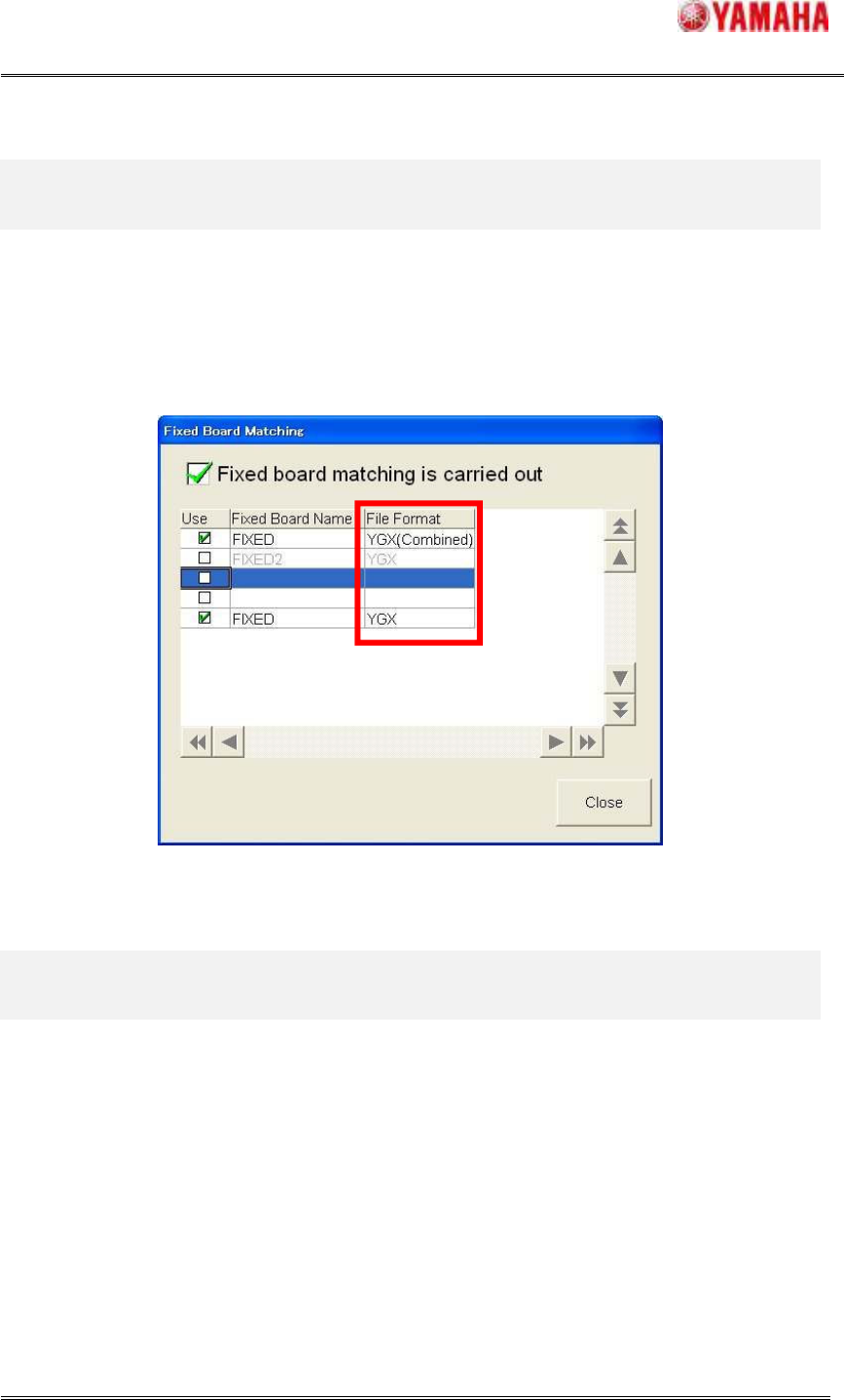
The setting of “File Format” has been added to the fixed board list of Fixed Board Matching
function.
Before this version, the setting of “File Format” of “Fixed Board Name” was set by that of
selected board data. And fixed board data matching was executed by this setting. Therefore it
was necessary to make the fixed board of each “File Format” individually when it was operated
with the board data of the different “File Format”.
However, after this version, fixed boards can be set with their “File Format”. So, when matching
is operated with the board data of the different “File Format”, the board data can be used as it is.
3. Limitations
There are no limitations.
SMT Software Engineering Group
IM Operations YAMAHA MOTOR CO., LTD.
MDOC-SOFT50075
3/3
4. The Change of Board Fixed Matching
4.1. Additional Item
An item “File Format” is newly added (see Fig.4.1).
Fig4.1 An item “File Format”
5. Notice
5.1. Auto update of the setting at upgrading the version
At the time of starting the machine after updating the version, the fixed board file format which is
already registered is automatically decided depending on that of the board previously loaded
before updating.
Therefore, after upgrading the version, please confirm the setting of the “Fixed Board Matching”,
and change it when there is an incorrect setting in file format. If not confirmed this setting, it
might occur that the error message [Ea721: FIXED BOARD READ ERROR] is displayed, or
fixed board matching is performed with the board data which you do not aim at.