fx3r.pdf - 第186页
FX-3R Maintenance Guide 13-17 Rev . 1.00 13-4-2. CPU Board (40107372) [Functions] This is a circuit board that controls the equipment totally. This circu it board is connected to other circuit boards by the Compact PCI (…
FX-3R Maintenance Guide
13-16
13-4. Control Unit
13-4-1. Structure of Control Unit
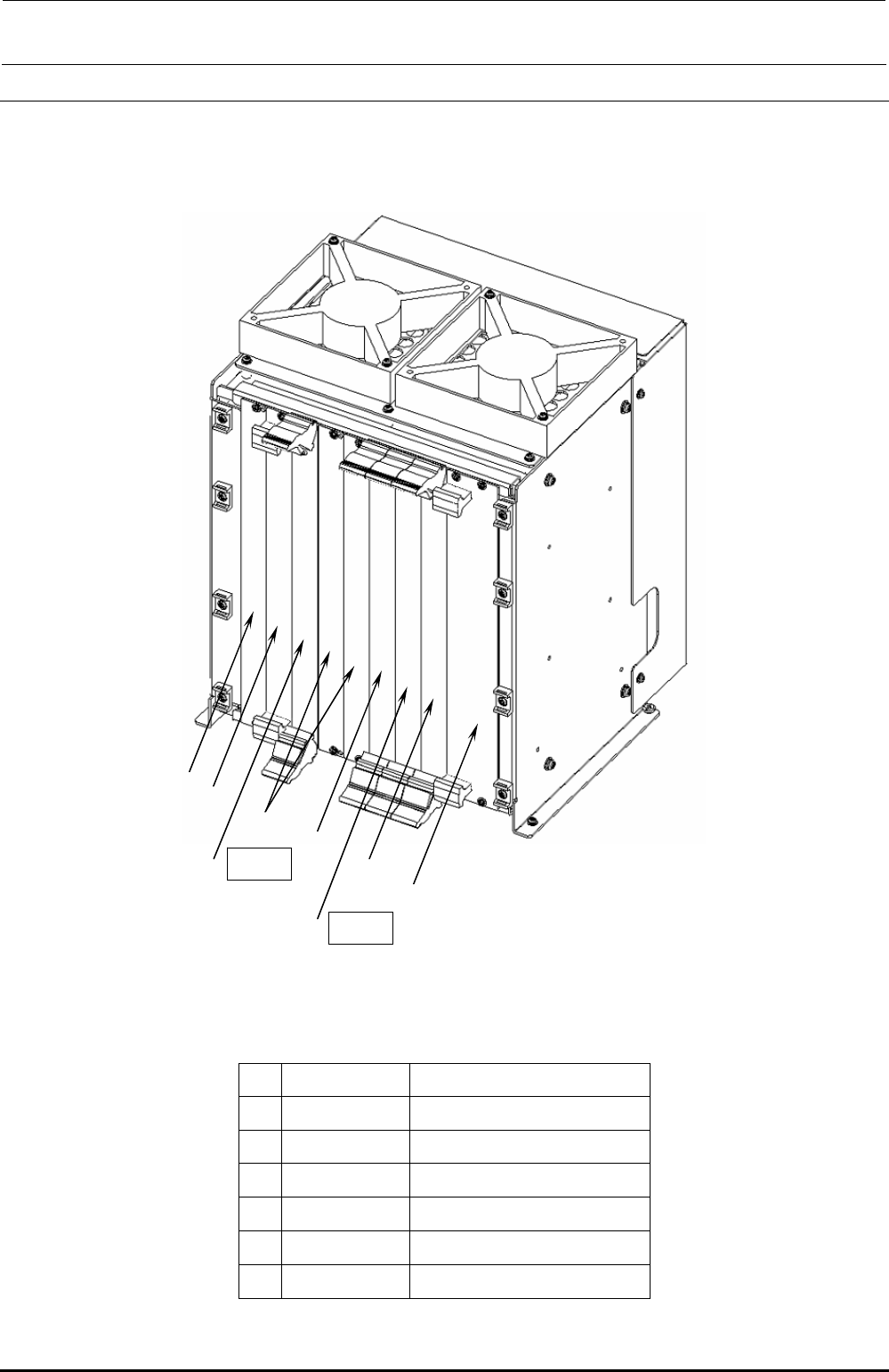
Figure 13-4-1-1 shows the board layout drawing of the control unit. Check that the boards are
mounted correctly while referring to these figures.
c
h
g
e POS2
h
f
e POS1
d
Figure 13-4-1-1 Board Layout Drawing (FX-3R)
Table 13-4-1-1 Boards Used for Control Unit
Part No. Part name
c
40107342 CPU BOARD
d
40048066 ETHER MAIN BOARD
e
40044540 POSITION BOARD
f
40048003 cPCI-8994
g
40047528 IP-X5 PCB ASM
h
E1649729000 BLANK PANEL B
Rev. 1.00

FX-3R Maintenance Guide
13-17
Rev. 1.00
13-4-2. CPU Board (40107372)
[Functions]
This is a circuit board that controls the equipment totally. This circuit board is connected to other
circuit boards by the Compact PCI (hereafter referred to as “cPCI”) bus.
[DIP switch settings]
This CPU board is used with the dip switch settings made before shipment.
[Meaning of LED]
PW: Shows the power supply status using the lighting status.
Lit in green.............Normal operation status
Flashing in green...Standby status
Off..........................Shutdown status
HDD: Flashes in green when accessing to the SSD.
RESET: Push switch with LED. This switch functions as the reset switch. The LED functions as
the Power ON LED.
Do not press this switch.
Lit in green.............Shows that the power is supplied.
Off..........................Shows that the power is not supplied.
[Replacement of battery]
A backup battery is mounted on the CPU board to save the BIOS settings.
Replace the battery at reference intervals of 5 years.
After the battery has been replaced, it is necessary to set up the BIOS.
[Adjustment items after replacement]
After the CPU board has been replaced, it is necessary to set up the BIOS.
Make the settings while referring to section 12-2-2, Setting Up the BIOS.
FX-3R Maintenance Guide
13-18
13-4-3. Position Board (40044540)
[Functions]
This POSITION board is applicable to the CPCI bus and intended to control servomotors
through the SSCNET III, Mitsubishi Electric’s high-speed synchronous communication network.
The POSITION board can control up to 32-axis servomotors per board.
The POSITION board is connected to the servo amplifier of each axis through daisy chain
connections of optical fiber cables.
c A command is received from the CPU board software to control the XYZθ-axis servomotor.
d The home position sensor and limit sensor of each axis are detected.
e An alarm is detected that occurs in the servo amplifier or magnescale.
f The emergency stop switch is detected to stop the XY-axis and Zθ-axis.
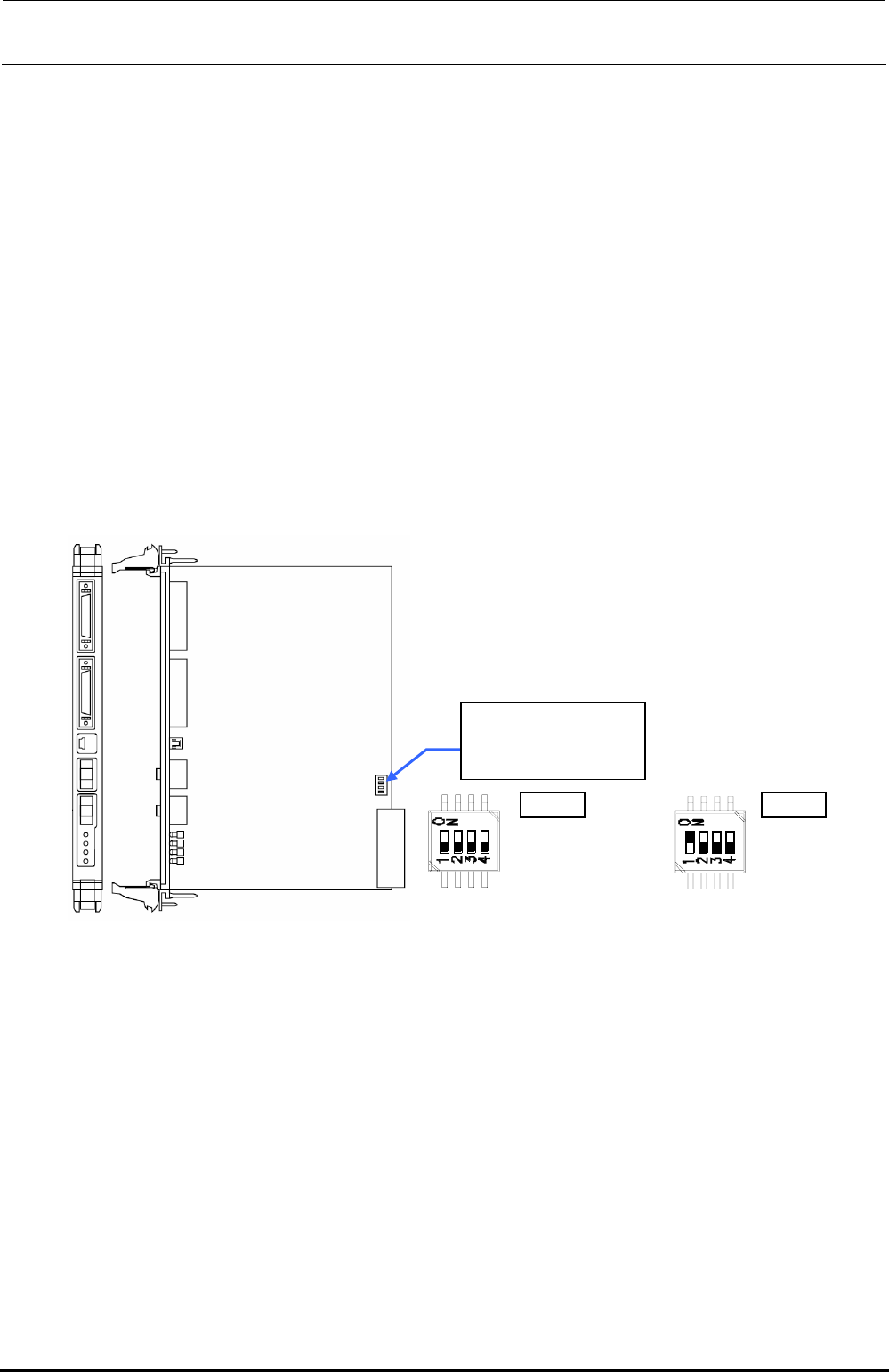
[Switch settings]
Since the FX-3R uses two position boards, the settings may vary depending on the position
board, which has been replaced.
The settings are shown below. ( portions show the switch positions.)
Change the settings
with the POS1 or
POS2 switch.
POS1
SW-1 :OFF
SW-1 :OFF
SW-1 :OFF
SW-1 :OFF
POS2
SW-1 :ON
SW-1 :OFF
SW-1 :OFF
SW-1 :OFF
POS1 POS2
Figure 13-4-3-1 DIP switch on Position Board
∗ POS1 switch is used for the left station while POS2 switch is used for the right station.
[Meaning of LED]
Operation indicator LED (Green): Lights up when the power is turned ON, flashes when the
system is started up, goes off when the power is shut-down.
Error indicator LED (Red): Off during normal operation, Lights up if an error occurs.
[Adjustment items after replacement]
There are no particular adjustment items.
Rev. 1.00