00196283_Install_WinXP_unattended_CD.pdf - 第7页
Installation Manual for Windows XP (unattended setup) CD V3.0 02/2011 US+DE Installationsanleitung für Windows XP (unattended setup) CD V3.0 7 Interfaces 2.1 Network Cards for HFx The station computer PC 076 (1GHz) has a…
Installation Manual for Windows XP (unattended setup) CD V3.0 02/2011 US+DE
Installationsanleitung für Windows XP (unattended setup) CD V3.0
6
2 Scope of delivery
Two different Installation Packages are available:
• Complete Package with license (Item no. 00376350-09)
• Media Package without license (item no. 00376370-09)
Both packages contain:
• Software WinXP-SP2 and WinXP-SP3 for machines & SIPLACE Pro:
• Boot DVD-ROM for the operating system Windows XP Professional SP2 and SP3 (“Windows XP
Unattended Setup DVD 3.0”)
• Boot CDROM for operating system Windows XP Professional-SP2 (“Windows XP Unattended Setup 2.08”)
• Boot CDROM for operating system Windows XP Professional-SP3 (“Windows XP Unattended Setup CD
V3.0”)
• Installation manual for Windows XP (unattended setup) DVD V3.0
• Installation manual for Windows XP (unattended setup) CD V3.0
Installation Manual for Windows XP (unattended setup) CD V3.0 02/2011 US+DE
Installationsanleitung für Windows XP (unattended setup) CD V3.0
7
Interfaces
2.1 Network Cards for HFx
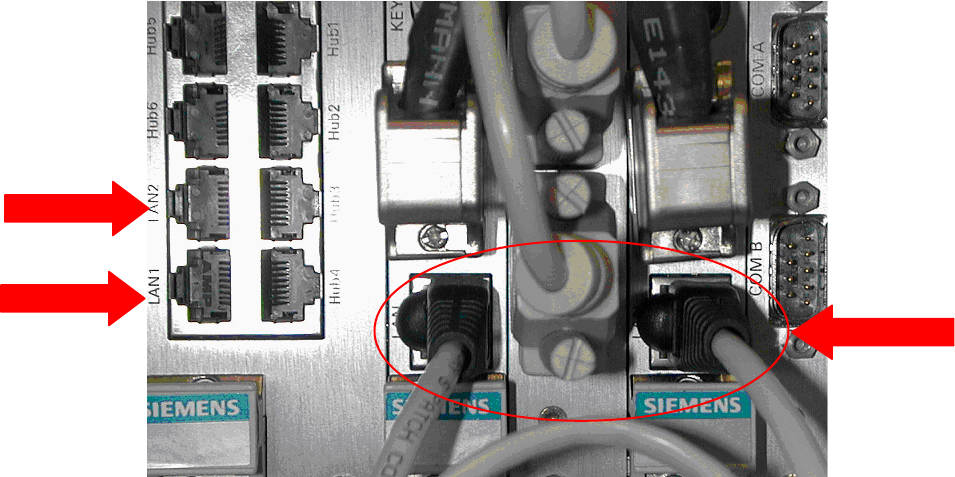
The station computer PC 076 (1GHz) has an integrated network card and a network card with two
separate network connections. For the communication with the Machine controller, only the integrated
network card will be used (see
Fig. 2-1:). The other network card will be used for the connection to the
programming system and for the GEM option.
1
3
2
Fig. 2-1: Connections
1 Legend:
• 1: Connection to the programming system
• 2: Connection to the GEM Host
• 3: Connection between station computer and machine controller a special cable is used)
Installation Manual for Windows XP (unattended setup) CD V3.0 02/2011 US+DE
Installationsanleitung für Windows XP (unattended setup) CD V3.0
8
2.2 Network Cards for X-Series
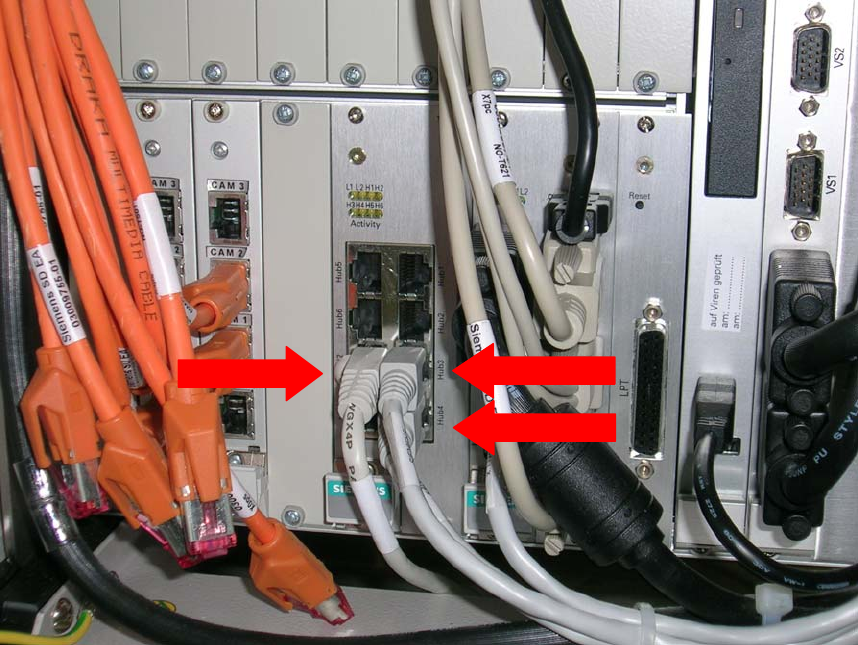
The station computer PC 086 has 2 LAN connections and an integrated hub. For the
communication with the Machine controller the “Hub4” connection will be used. “Hub3” is the
connection to the station itself. The “LAN2” connection is used to connect to the programming
system.
3
2
1
Fig. 2-2: Connections
2 Legend:
• 1: Connection to the programming system (“LAN 2”)
• 2: Connection from hub to the machine controller (“Hub4”)
• 3: Connection from hub to station (“Hub3”)