00195044-10_UM_VisionTeachStation_DE EN.pdf - 第148页
7 Software Vision Teach Station User Manual 7.3 Installing for the first time 12/2012 Edition 148 When the installation is completed, the computer restarts. 7 After restarting, log on as Administrator once more. Wait…
Vision Teach Station User Manual 7 Software
12/2012 Edition 7.3 Installing for the first time
147
The script installs the following components:
Tab. 7.2 - 3 Script components of theVisionTeachStation software CD
7
7.3 Installing for the first time
If the computer requires a complete reinstallation, follow the steps described under 7.2.4 to rein-
stall the Windows operating system.
7.3.1 Installing with "Software WIN XP-SPx..", item no. 00376350-xx
Until the end of 2010 the "Software WIN XP-SPx.." package, item no. 00376350-xx was enclosed
with the computer. 7
Use the "Windows unattended Setup SP3" operating system CD supplied with the PC and
follow the installation instructions provided.
Select the "Siplace Pro Server" option.
Configure the network parameters using the table below:
Tab. 7.3 - 4 Network parameters for the initial installation
7
Component Directory
CAN drivers \SvTeachStation\CAN\Setup.exe
SIPLACE Vision .\SvTeachStation\SiplaceVision\SiplaceVision.msi
SIPLACE Vision Teach
Station
.\SvTeachStation\SvTeachStation\Setup.exe
IP address
Workgroup
Name
Host name
Default
Gateway
Subnet
Mask
SN no. or
comment
172.22.172.187 SIPLACE PLK1395A empty 255.255.0.0 VTS1
7 Software Vision Teach Station User Manual
7.3 Installing for the first time 12/2012 Edition
148
When the installation is completed, the computer restarts. 7
After restarting, log on as Administrator once more.
Wait until the installation scripts have run.
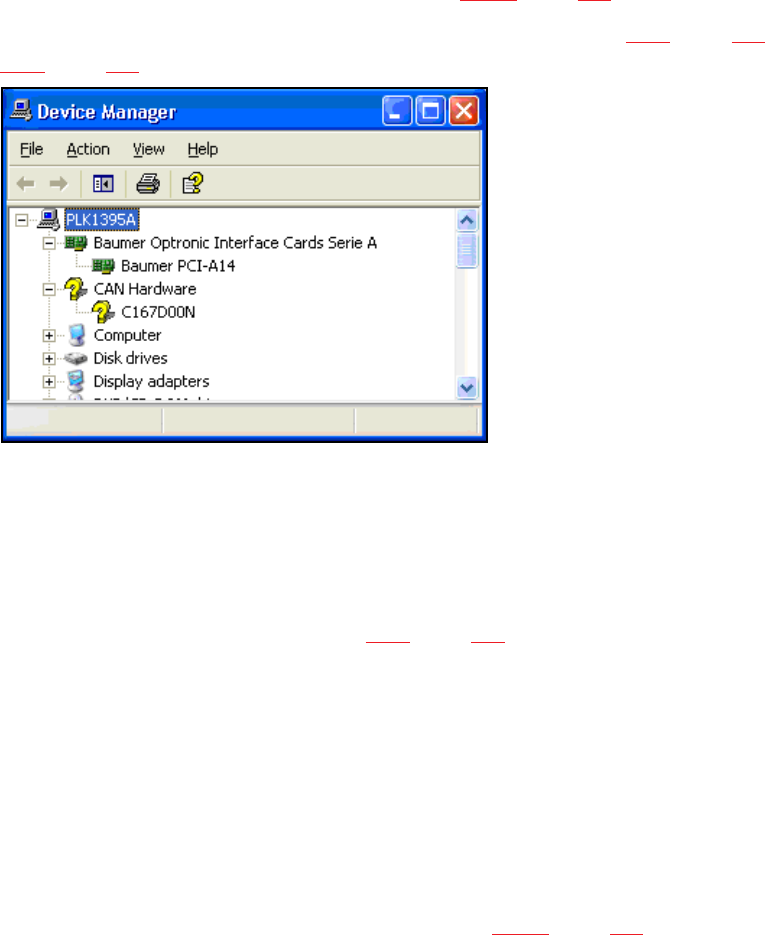
In the Device Manager, check that the drivers for the "Baumer PCI-A14" camera interface card
and the "C167D00N" CAN card were found (see Fig. 7.3 - 5, page 148).
If one of the drivers was not detected, follow the instructions in section 8.3.5, page 158 or
8.3.6, page 160. 7
7
Fig. 7.3 - 5Entries for the camera interface card and CAN card in Device Manager
(the question mark beside the CAN card is correct)
Log on as the user plr using password: plr.
Wait until the installation scripts have run.
Log back on as Administrator:
Then follow the steps described in section 7.2.4, page 143.
7.3.2 Installing with "Recovery Media - Celsius W380", item no. 03085500-xx
From the beginning of 2011 the Celsius W380 computer is delivered with recovery DVDs. Three
DVDs are enclosed with the package (WinXP 32bit, Win7 32bit and Win7 64bit). The VTS 4.3.1
version only supports WinXP 32bit and Win7 32bit. 7
Start the recovery DVD and follow the instructions on the screen.
Create an account with administrator privileges.
Configure the network parameters as described in Table 7.3 - 4, page 147.
The drivers for the hot link and CAN cards will be installed together with the VTS software. 7
Known problem: 7
The recovery installation does not always install the graphic driver. You will recognize this error, if
you try to move windows on the screen (slow performance). 7

Vision Teach Station User Manual 7 Software
12/2012 Edition 7.3 Installing for the first time
149
Troubleshooting: 7
Open the Device Manager.
Search for a deactivated device under "Display adapters".
Activate the adapter.
Select "no Internet access" and then "Automatical installation".
Restart the computer after the installation has been completed.
7.3.3 Installing with "Recovery Media" as of Celsius W510 computer
As of April 2012 the VTS is delivered with the Celsius W510 computer. The Recovery Media for
Windows 7, 32-bit and 64-bit are delivered ex works for this computer .
Celsius W510 is equipped with the new PowerCAN-PCI-II CAN card that supports the 32-bit and
64-bit operating systems.
The VTS software supports Windows 7, 32-bit and 64-bit as of the 5.0.1 version.
Start the Recovery DVD and follow the instructions on the screen.
Create a user account with administrator authorization.
Configure the network parameters as described in Tab. 7.3 - 4, page 147.
The drivers for the Hotlink and CAN cards get installed together with the VTS software.