iTAC Advance Issue 2, Mar 2018.pdf - 第2页
2 Issue 2 , Mar 18 Copyright 2010 DEK Interna tional, a bu siness of DTG Internat ional Gmb H. All Rights Reserved. T r a de m a r k A ck nowl edgm e nt Icon , Icon T e chnologies , ProFlow , V aridot DEK I nternatio nal…
iTAC advance training course
2
Issue 2, Mar 18
Copyright 2010 DEK International, a business of DTG International GmbH. All Rights Reserved.
Trademark Acknowledgment
Icon , Icon Technologies , ProFlow , Varidot
DEK International, a business of DTG International
GmbH and/or DEK Printing Machines Limited.
VectorGuard are registered trademarks of
, AutoFlex , Grid-Lok , PumpPrint , and
a business of DTG International DEK Printing Machines Limited.
Microsoft and MS-DOS are registered trademarks of Microsoft Inc.
Windows, Windows XP and Windows XP Embedded are trademarks of Microsoft Inc.
All other brand and product names are trademarks or registered trademarks of their respective
holders.
TM TM
International, GmbH and/or
DirEKt Ball Placement , HawkEye , Interactiv and PumpPrinting are trademarks of DEK
TM TM
Copyright Statement
In line with DEK Policy of continual improvement, this manual is periodically up-issued to reflect the
latest machine enhancements and provided with an issue state which is displayed at the bottom of
each hardcopy page.
DEK Worldwide
Contact us @ www.dek.com
3
Issue 2, Mar 18
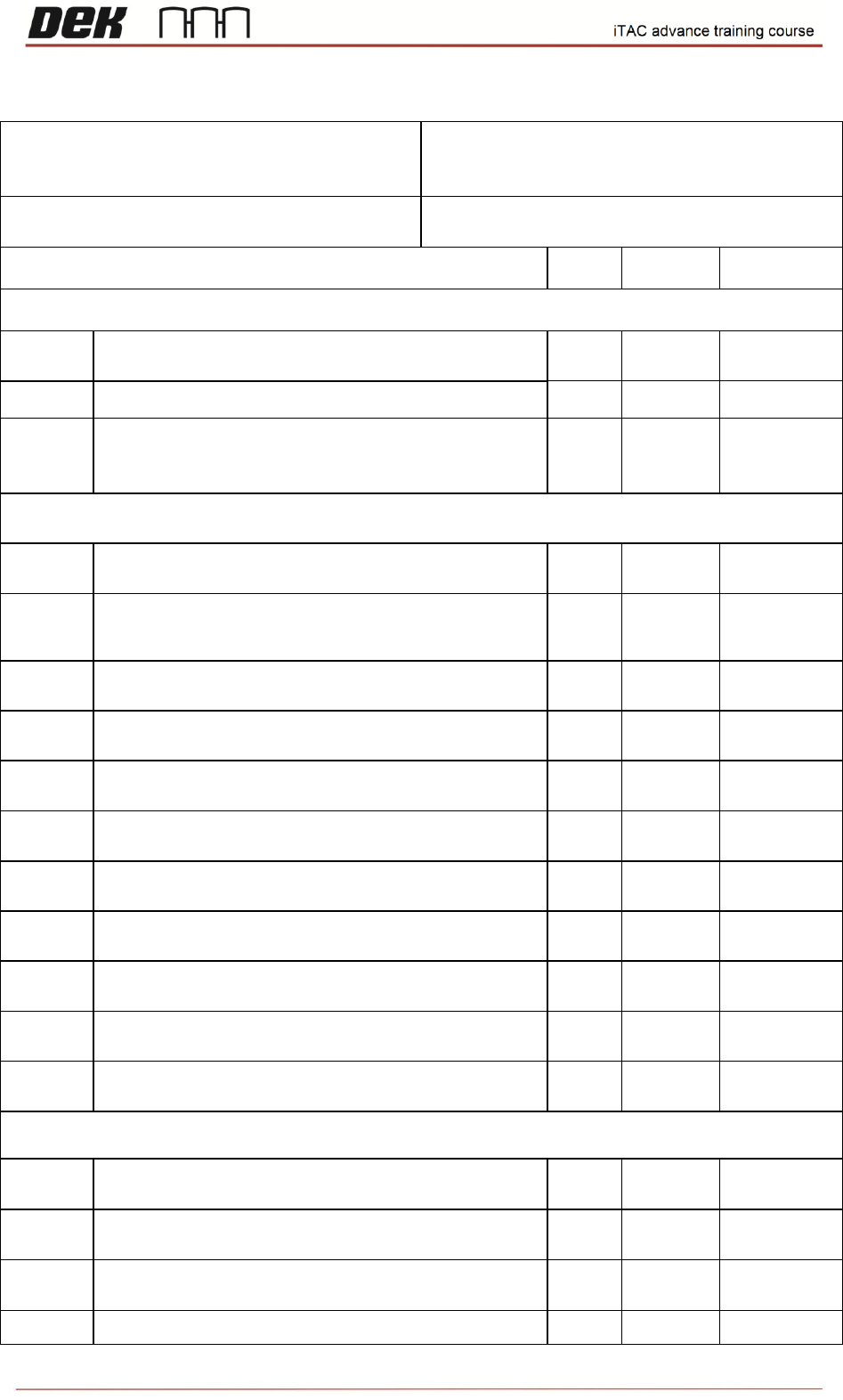
iTAC advance INDIVIDUAL PERFORMANCE OBJECTIVES
Name:
Department:
Job Title:
Objectives
Date
Trainee
Instructor
Introduction
HO 1
Locate the hazardous areas of the machine /
option.
SS 2
List items 1-6 of window elements.
SS 3
Log into ITAC Workplace and find in user
manual what the acronyms stand for in tree
view
iTAC MES Suite
HO 4
Create new version of BOM
HO 5
Create new version of WP and assign
equipment to printer
HO 6
Create new Work Order
HO 7
Create new Equipment
HO 8
Create new version of Recipe
HO 9
Activate selected WO on the line
HO 10
Create new version of BOM
HO 11
Create new equipment
HO 12
Create new version of WP and assign new
equipment
HO 13
Create new WO
HO 14
Create new version of recipe
API Module, Material, testing with printer
HO 15
Assign serial numbers to activated WO on the
line and upload state
HO 16
Use IMSApi-Description manual and find
what the error code 1 means
HO 17
Use “mlChangeMaterialBinData” API function
and modify expiration date and quantity
HO 18
Test API calls on all machines for all variants