00196956-02_IM_OIS_SIS 10.1_DE EN.pdf - 第6页
OIS 10.1 / Installation Manual Ausgabe 11/2012 Edition 2 Prerequisites NOTICE System requirements The Support Media DVD inclu ded in the installation package che cks the necessary system requirements of your system an d …
OIS 10.1 / Installation Manual Ausgabe 11/2012 Edition
1 Scope of delivery
SIPLACE
®
OIS Application V10.1, Item No. [00388831-02] is included in "SIPLACE Pro Media
Package V10.1", item no. [00116521-02] and contains:
Quantity Item
1 CD-ROM with V10.1 OIS and SIS software
1 Installation Manual, [00196956-02]
1 DVD Support Media
NOTICE
To Support Media DVD:
Please use the Navigation Guide button of the Support Media Launcher to navigate
through the documentation.
The navigation guide and all related documents are available on the Support Media DVD
that is shipped with the SIPLACE Pro / OIS package.
5

OIS 10.1 / Installation Manual Ausgabe 11/2012 Edition
2 Prerequisites
NOTICE
System requirements
The Support Media DVD included in the installation package checks the necessary
system requirements of your system and installs these. Amongst others e.g. Microsoft
.NET Framework, the License Manager and the Error Reporting tool.
The use of the Support Media V1.14 is obligatory.
The system requirements (supported operating systems and database variants) and an
overview of the interoperable products can be found in the SIPLACE Support Media
Installation Manual, item no. [00197214-xx].
2.1 OIS/SIS functionality
● The hard disk must have at least 200 MB of free memory.
2.2 OIS Client
● The hard disk must have at least 20 MB of free memory.
● When the system is used on a SIPLACE machine, the station computer must have at least
128 MB of main memory.
● Monitoring Service must be installed.
● You must know the TCP/IP address or the UNC name (e.g. \\server-name) of the Monitoring
Service.
● A compatible version of the station software must be installed (see chapter Fehler!
Verweisquelle konnte nicht gefunden werden., Fehler! Verweisquelle konnte nicht
gefunden werden.).
● A network connection to the Monitoring Service is available.
2.3 Monitoring functionality
● The hard disk must have at least 200 MB of free memory.
6
OIS 10.1 / Installation Manual Ausgabe 11/2012 Edition
3 Installation
► Prepare your computer with the Support Media DVD before starting the installation.
3.1 Starting the installation
► Start Windows.
► Log in with administrative permissions.
► Put the CD-ROM in the drive.
After a few seconds, the setup will be started automatically.
NOTICE
► If the setup does not start automatically, manually start the setup.exe program from
the root directory of the CD-ROM.
NOTICE
Installation duration
As of the OIS 10.0 version the UsedComponents OIS table has been split into three
tables. Due to this database conversion, installation may take a little bit longer as for
former versions.
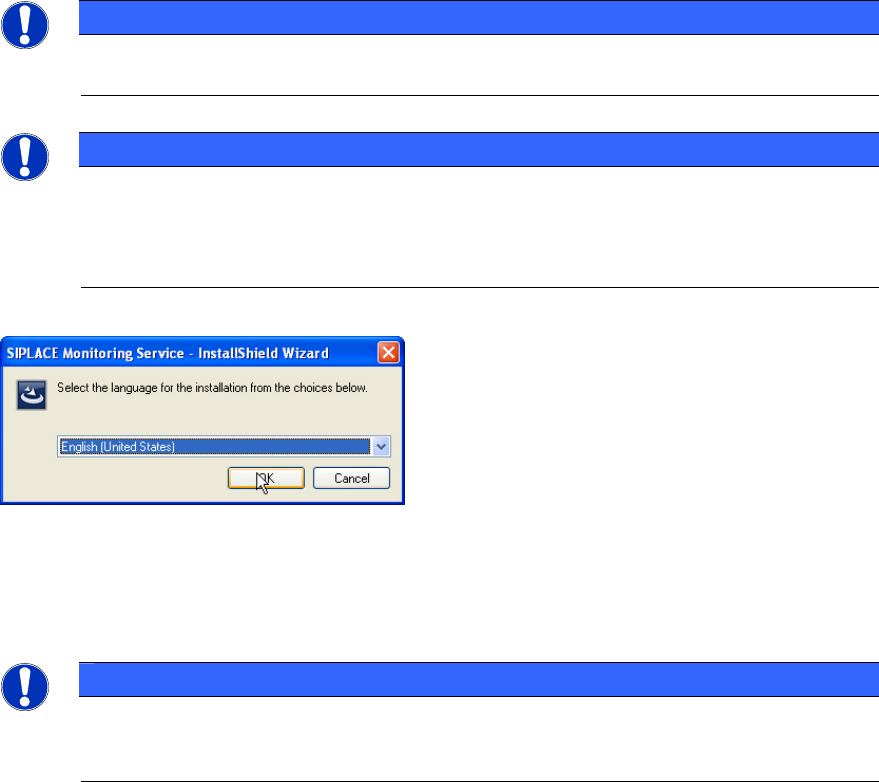
When the setup program is started, the following dialog box appears on the screen.
Figure 3-1: Selecting setup language
► Select the language you wish to use for the installation and click OK.
This setting will only affect the language used in the setup dialogs.
NOTICE
You can use the < Back and Next > buttons to move backward and forward within the
setup program. You can exit the program at any time using the Cancel button. This exits
the program without making any changes to the system.
7