Infinity EX Machine Overview.pdf - 第12页
INFINITY EX MAC HINE OV ERVI EW MACHINE INITIALIZATION 3.12 Technical Reference Manual Chapter Issue 3 Jan 04 MA CHINE INITIALIZA TION
INFINITY
EX
MACHINE OVERVIEW
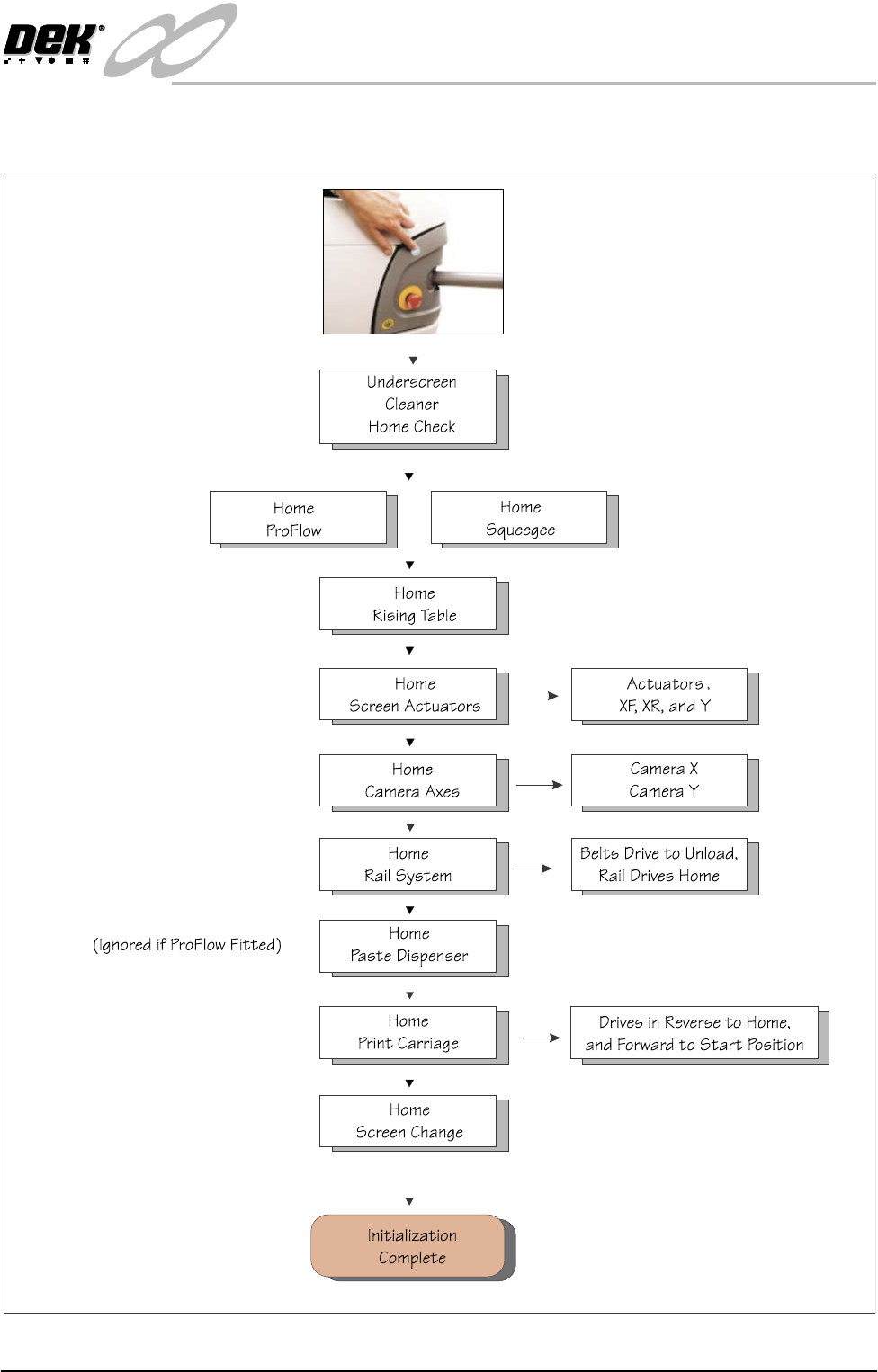
SOFTWARE INITIALIZATION
Chapter Issue 3 Jan 04 Technical Reference Manual 3.11
SOFTWARE INITIALIZATION
INFINITY
EX
MACHINE OVERVIEW
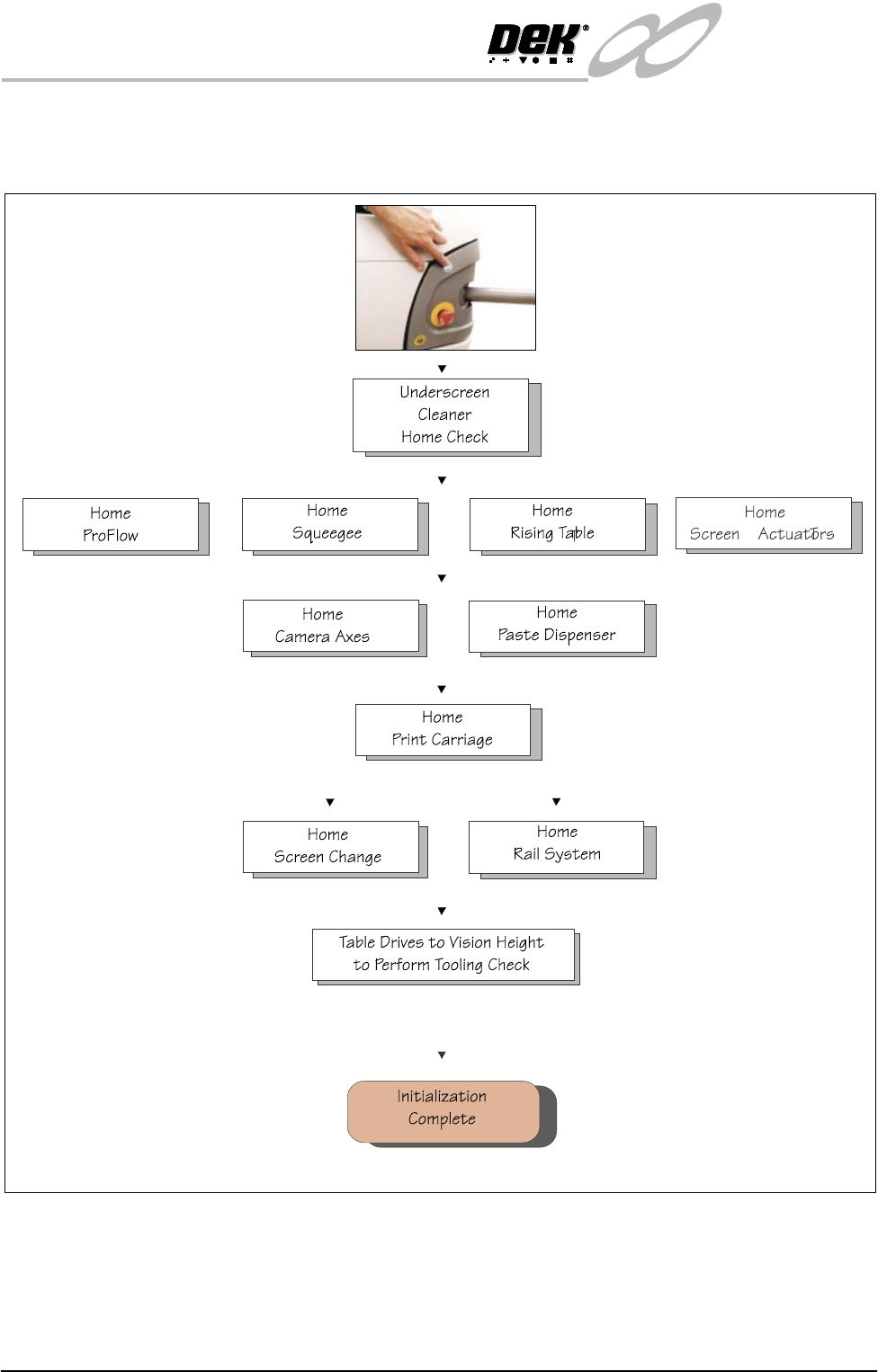
MACHINE INITIALIZATION
3.12 Technical Reference Manual Chapter Issue 3 Jan 04
MACHINE INITIALIZATION

INFINITY
EX
MACHINE OVERVIEW
MACHINE PRINT CYCLE
Chapter Issue 3 Jan 04 Technical Reference Manual 3.13
MACHINE PRINT CYCLE
The following is a typical machine print cycle with camera mounted board stop,
described for step mode:
1. Run is pressed on the MMI and the table carries out a rail lifted check.
2. The camera positions itself at the board stop co-ordinates.
3. The board stop lowers into position ready for the incoming board.
4. The print carriage moves to the start of the print stroke and both squeegees
drive to their dwell height (25mm above the stencil).
5. Auto Board is pressed and the board is transported into the machine
stopping at the board stop.
6. The belts stop running as soon as the board stop sensor detects the board.
NOTE
For machines fitted with the high throughput conveyor, the belts continue to
run until the time elapsed since the board was detected at the board stop,
equals the time set in the Board-At-Stop Run-On parameter.
7. The board clamp mechanism operates and the board stop retracts.
8. The camera carriage drives to the position determined by Fiducial 1 X & Y
co-ordinates.
9. The chase clamps come on.
10.The rising table carries out a rail lift check then it drives up to vision height.
11.The vision data window displays the board fiducial on the left and the stencil
fiducial on the right of the split display.
12.The fiducials are located and a small cross appearing in the centre of each
fiducial on the split display indicates successful location.
13.While the camera drives to Fiducial 2 X and Y coordinates, the location of
the fiducial 1 board and stencil fiducials are copied to the align data structure.
14.The Fiducial 2 board and stencil fiducials are located.
15.The camera carriage drives to its home position while copying location data
for Fiducial 2 to the align data structure.
NOTE
If Camera Idle Position is set to Behind Rail the camera is driven to a
position behind the rear rail in-line with Fiducial 2/Fiducial .
16.The rising table moves up to the print height minus 3mm and the squeegee
moves to 0.5mm - 1mm above the surface of the stencil.
17.If the stencil requires correction the chase clamps are turned off and re
alignment occurs. When aligned and checked the chase clamps come on
again.
18.The rising table drives up to the print height.
19.Either the front or rear squeegee drive down to the calculated pressure setting
as set in the board parameter menu. If the actual pressure differs from the
set pressure by more than +/- 1Kg a squeegee pressure error window is
displayed. The user is given the option to abort the print or continue the print.
20.If continue is selected, the print carriage drives at the set speed in the board