Galaxy EX Blue Under Screen Cleaner Module.pdf - 第2页
BLUE UNDE R SCREEN C LEANER M ODULE OVERVI EW 18. 2 Te chni cal Ref ere nce Ma nual Ch apte r Issue 5, May 15 The blu e un de r sc ree n cle an er ( U SC) wi pes li nt fr ee fabri c, d ry or we t a cros s the un de rsid …
BLUE UNDER SCREEN CLEANER MODULE
OVERVIEW
Chapter Issue 5, May 15 Technical Reference Manual 18.1
CHAPTER 18 BLUE UNDER SCREEN CLEANER MODULE
OVERVIEW
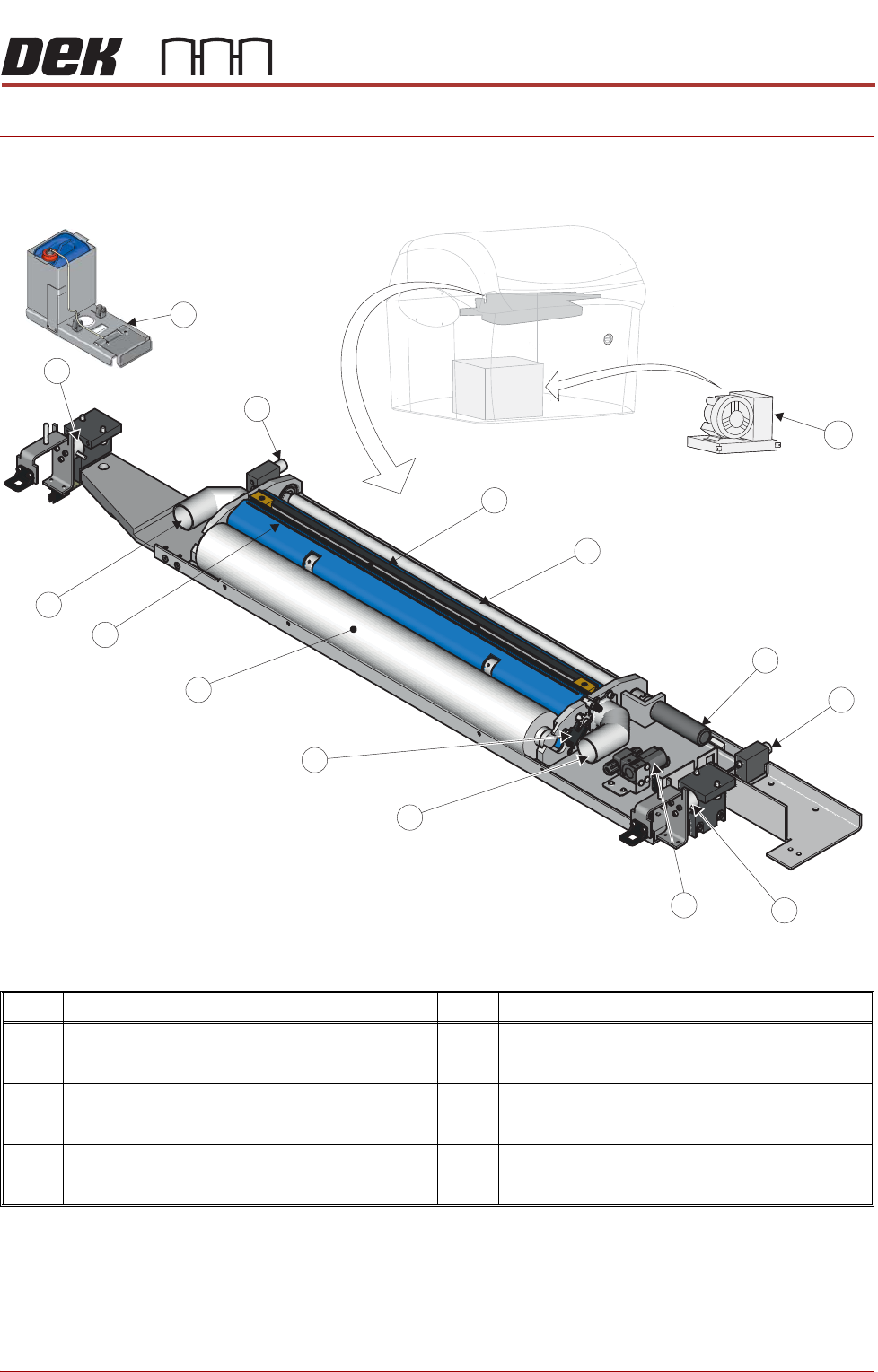
Figure 18-5 Blue Under Screen Cleaner
Item Description Item Description
1
Squeegee Assembly
7
Vacuum Connector (2 positions)
2
Take Up Roll
8
Paper Usage Sensor
3
Paper Feed Motor
9
Clean Paper Roll
4
Permanent Magnet (2 positions)
10
Solvent Spray Bar
5
Electromagnetic Clamp (2 positions)
11
External Solvent Tank
6
Solvent Pump
12
VF35i Vacuum Filtration Unit
1
2
3
4
4
5
5
6
7
7
8
9
10
12
11
BLUE UNDER SCREEN CLEANER MODULE
OVERVIEW
18.2 Technical Reference Manual Chapter Issue 5, May 15
The blue under screen cleaner (USC) wipes lint free fabric, dry or wet across
the underside of the screen to minimize paste build up. The paper is available
in 300, 400, and 520mm widths. The frequency and mode (wet/dry/vac) is
programmable in the product file.
When a screen cleaner operation is required, the camera carriage approaches
the cleaner and attaches to the cleaner using two permanent magnets. The
two electromagnetic clamps holding the screen cleaner unit in the home
position are de-energized allowing the camera carriage to control the cleaner.
The paper feed motor supplies a clean section of paper across the two rubber
wiper blades of the squeegee assembly. During a ‘Wet’ clean, a solvent pump
dispenses solvent through the solvent spray bar, wetting the width of the paper
just behind the squeegee assembly. The squeegee assembly is lifted
(engaging the cleaner with the underside of the screen) and the camera
carriage pulls the cleaner across the underside of the screen, removing any
surplus print medium.
The two wiper blades form the mouth of the vacuum cleaner.
A paper usage sensor enables the software to monitor the paper roll usage. If
‘Time To Go’ is enabled, software measures how much paper is remaining and
displays this as a percentage. If ‘Time To Go’ is disabled, software monitors
the pulses from the sensor and if no pulses are detected during paper
advance, it is assumed that the paper roll is empty and displays an error
message.
Solvent The solvent pump supplies solvent to the paper roll from the external solvent
tank, mounted on the rear or either side of the machine. The external solvent
tank container is capable of accommodating a 5 litre container of solvent. A
load cell in the base of the external solvent tank enables the software to
calculate the percentage level of solvent within the container.
Solvent Advice
CAUTION
RECOMMENDED SOLVENTS. ANY SOLVENTS USED MUST COMPLY WITH
LOCAL ENVIRONMENTAL GUIDELINES. ASM RECOMMEND USING SOLVENTS
THAT ARE ENVIRONMENTALLY FRIENDLY, IE CFC FREE AND WATER BASED.
SOLVENTS USED MUST HAVE FAST EVAPORATION RATES AND FLASHPOINT
SPECIFICATIONS GREATER THAN 39ºC.
CAUTION
SOLDER PASTE AND SOLVENTS. WHEN USING OR HANDLING ANY SOLDER
PASTE OR SOLVENT FORMULATION THE MANUFACTURERS’ SAFETY DATA
SHEETS MUST BE STRICTLY ADHERED TO.
The plastic tubing that transports the solvent from the solvent tank to the
underscreen cleaner head is designed to withstand most types of solvent.
However, mixing of two different solvents can cause a chemical reaction and
seriously damage the plastic tubing. When changing to a different type of
solvent, the tubing must be replaced completely to prevent solvent leaks. To
obtain new tubing and replacement instructions, order Machine Performance
Upgrade (MPU) 601187*2.
ASM only recommend the DEK-PRO and the DEK-PRO XF (Environmentally
Friendly) USC solutions to be used with the under screen cleaner. The
BLUE UNDER SCREEN CLEANER MODULE
OVERVIEW
Chapter Issue 5, May 15 Technical Reference Manual 18.3
following are available from ASM:
NOTE
The following solvents MUST NOT be used in the under screen cleaner unit,
however, this list is not complete and does not mean that any solvent not
mentioned is compatible, with ASM machines.
• Rosstech 106 FE
• Rosstech 162 ND
• Acetone
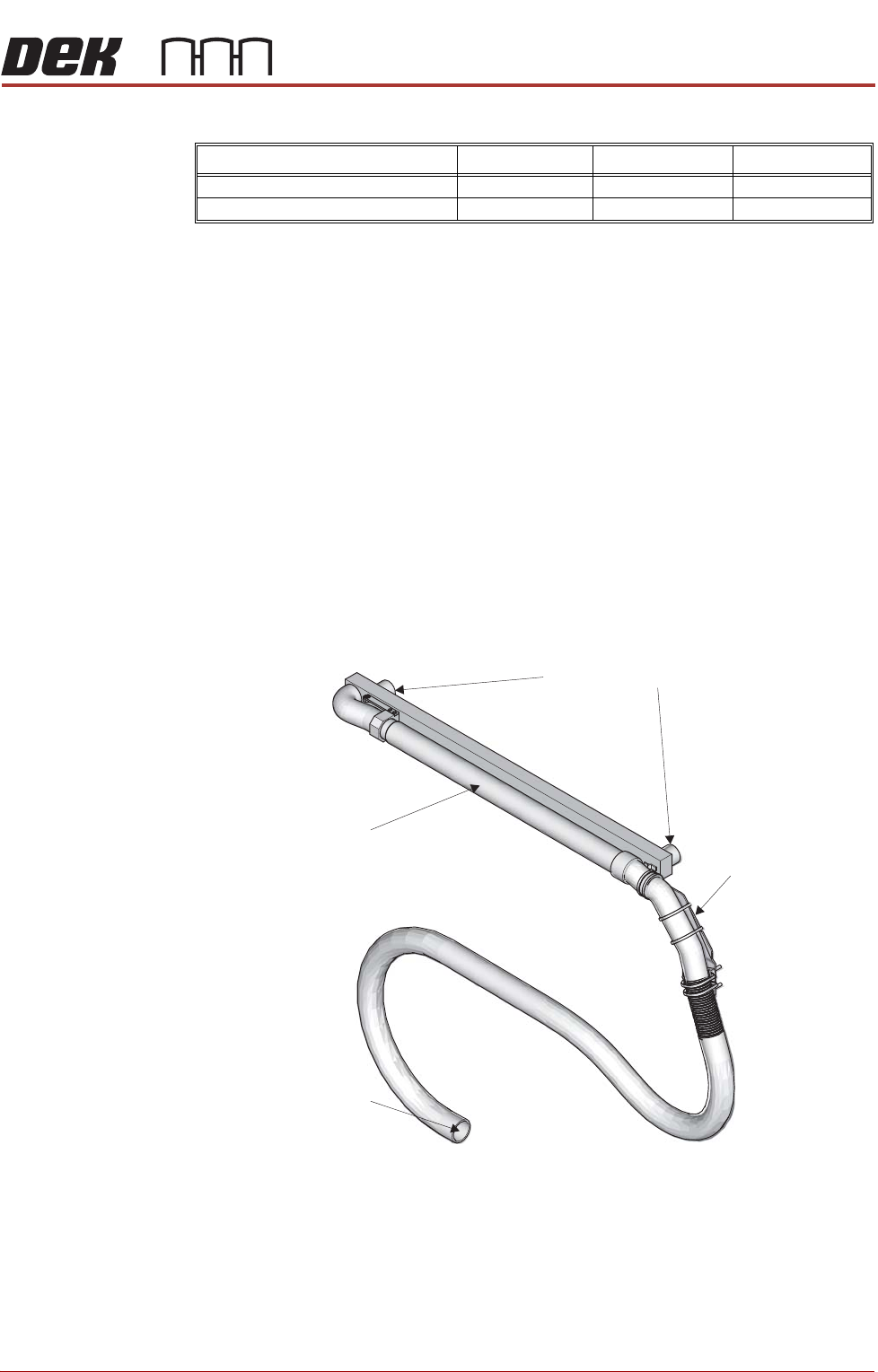
Vacuum Filtration The vacuum filtration unit extracts solvent fumes and draws excess print
material onto the paper.
Vacuum filtration is optional; the unit used is:
• VF35i Vacuum Filtration Unit
NOTE
For information on the removal and replacement of the filters, refer to the
Preventive Maintenance chapter of this manual.
Figure 18-6 Vacuum Option
Description 1 Litre 5 Litre 20 Litre
DEK-PRO 173483 173485 431093
DEK-PRO XF 431513 431514 -
Screen Cleaner Connection
Vacuum Connection
Telescopic Tube
Machine Mount