00197198-02_XML-Import-SetupCenter-5.1.pdf - 第4页
在线预览 00197198-02_XML-Import-SetupCenter-5.1.pdf PDF 文档。
Setup Center 5.1 - XML Import
3
Contents
Setup Center 5.0 1
XML-Import 1
1 Introduction 5
2 Handling 5
2.1 Configuration of the Import Function in SIPLACE Setup Center ........................ 5
2.2 Configuration of the Import Function in Siplace Setup Center GUI .................... 7
2.3 Import Functionality ........................................................................................... 8
3 XML Import files 11
3.1 Schema of XML import files ............................................................................. 11
3.2 Import Versions ............................................................................................... 12
3.2.1 Version 1.0.1.1 (from Setup Center 2.2) .......................................................... 12
3.2.2 Version 1.0.2.1 (from Setup Center 2.2 SP1) .................................................. 12
3.2.3 Version 1.0.3.1 (from Setup Center 3.0) .......................................................... 12
3.2.4 Version 3.0.1.1 (from Setup Center 3.2) .......................................................... 12
3.2.5 Constraints ...................................................................................................... 13
3.3 Examples ........................................................................................................ 16
4 Restrictions 18
4.1 Import .............................................................................................................. 18
5 Error result file 19
Setup Center 5.1 - XML Import
1 Introduction
This document describes how the “XML Batch Import of Packaging Units” works. The XML Import
provides the following features:
Import and create of non existing packaging units
Update of the field ‘Quantity’ of an existing packaging unit
Update of the field 'MsdOpenDate' of an existing packaging unit
2 Handling
This chapter describes how the XML Import can be configured and executed to create new
packaging units.
2.1 Configuration of the Import Function in SIPLACE Setup Center
You have to configure the SIPLACE Setup Center Server.
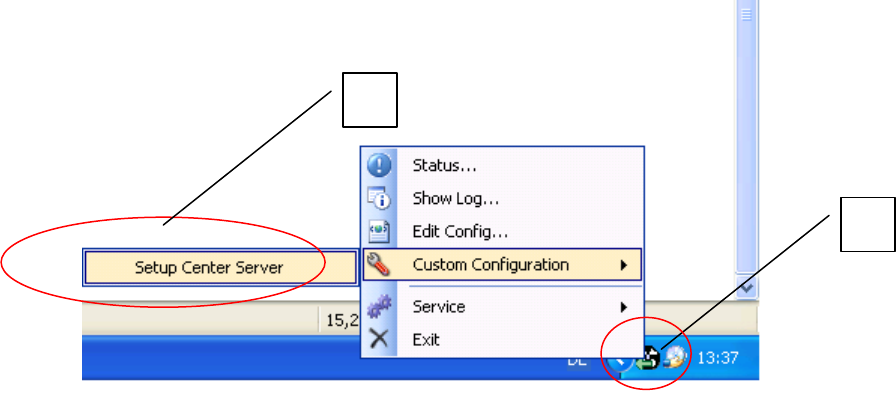
In the taskbar select icon (1) and in the context menu open Custom Configuration => Setup
Center Server (2).
The SIPLACE Setup Center Server Configuration dialog box is opened.
1
2