00197482-02_VD_SIPLACE-Client-API-3.3_EN.pdf - 第7页
Software Versi on Description SIPLAC E OI B Cl ient API 3. 3 04/2014 Edition 7 4 Installin g the Soft w are Caution: Please ins tall the r equired s oftware with the Requir em ents Anal yzer from the Support Me dia. 4.1 …
Software Version Description
SIPLACE OIB Client API 3.3 04/2014 Edition
6
3 Requirements
The Support Media DVD included in the installation package checks the necessary system requirements of your
system and installs the needed components like Microsoft .NET Framework, the License Manager and the Error
Reporting tool.
The use of the Support Media V1.16 is mandatory.
The system requirements (supported operating systems and database variants) and an overview of the
interoperable products can be found in the SIPLACE Support Media Installation Manual, item no. [00197214-
xx].
Software Version Description
SIPLACE OIB Client API 3.3 04/2014 Edition
7
4 Installing the Software
Caution:
Please install the required software with the Requirements Analyzer from the Support Media.
4.1 Starting the SIPLACE OIB Client API Installation Manager
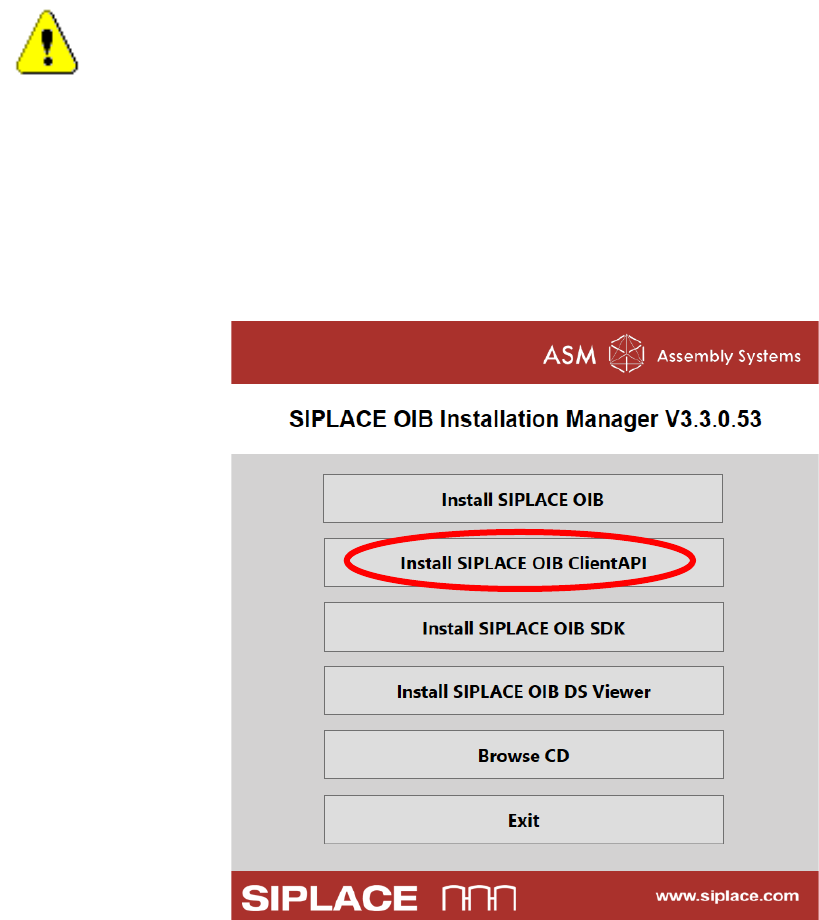
Select the installer package setup.cmd on the root folder of the SIPLACE OIB CD
Select the “Install SIPLACE OIB Client API” option
Software Version Description
SIPLACE OIB Client API 3.3 04/2014 Edition
8
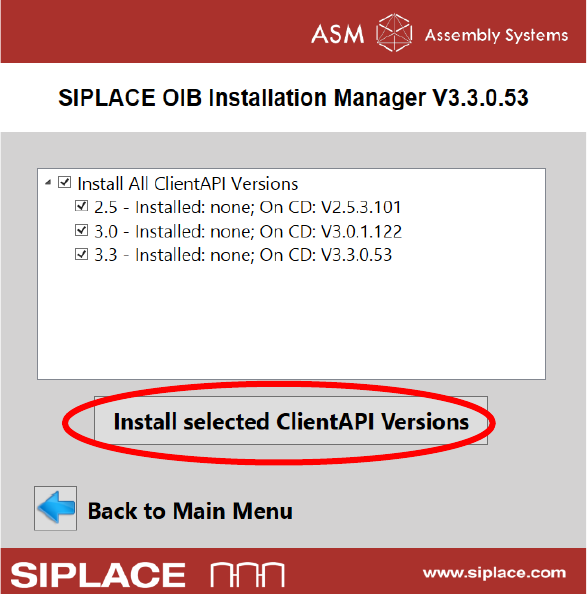
You see the options for the Client API versions which have been installed and which can be deployed
from the CD.
There are some rules when to install which version. See chapter “SIPLACE OIB Proxy” in the
“00197480-02_IM_SIPLACE-OIB-3.3_EN.pdf” document for details.
If you are not sure which version to install, the basic recommendation is to upgrade always to the newest
Client API Version and install all offered versions.
Select the Install selected ClientAPI Versions button. Then all installer which have to be finished
manually will be started.