ts9800-user-guide-7511-0360_A.pdf - 第23页
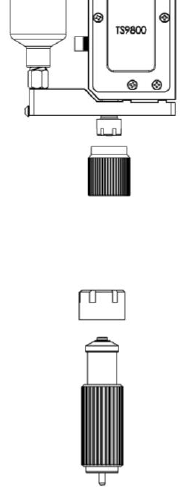
23 5. P lace new nozzle insert on the nozzle bushing wi th the smalle r end facing outward and screw the a ss embly back into the nozzle adjustment nut using provided tools. C au tion : Keep the assembly in vertical posi…
22
7. VALVE SETUP AND CLEANING
7.1 Valve removal.
1. Turn Off or disconnect the fluid pressure the syringe/fluid supply
line from the material reservoir.
2. Switch-Off the control unit.
3. Disconnect all valve cables.
4. Remove the valve from the XYZ table.
5. The valve can be now taken apart for cleaning, refer to section 7.3
for cleaning instructions.
6. After replacing the new valve or new control unit, repeat section 4.2
for setup and section 4.3 for nozzle calibration.
7.2 Installation of new nozzle insert.
1. Turn Off or Disconnect pressure to material syringe.
2. Unscrew the Nut and bushing assembly from the fluid manifold using
the nozzle adjustment tool.
3. Unscrew the nozzle bushing/insert assembly from the nozzle adjustment
nut using the nozzle installation tool.
4. Remove the nozzle insert from the nozzle bushing.

23
5. Place new nozzle insert on the nozzle bushing with the smaller end
facing outward and screw the assembly back into the nozzle adjustment
nut using provided tools. Caution: Keep the assembly in vertical
position while tightening to keep the nozzle seating in the proper
position. Use both tools to help torque the bushing onto the nut.
6. Screw the nozzle assembly unit back onto the fluid manifold and repeat
section 4.3 for nozzle calibration.
7. Re-connect or turn On the fluid supply and pressure. Run the several
purge cycles to remove air bubble from the nozzle replacement. Wipe
and Clean the nozzle tip and the system is now ready for dispensing.
Attention: Inspect the nozzle’s cleanliness under microscope if available.
7.3 Cleaning
WARNING:
• Proper gloves and eye protection must be worn before
disassembling the valve for cleaning.
• Never use wire brushes or machines that cause surface abrasion.
Unsuitable cleaning fluids may damage the valve. Before using
extremely aggressive cleaning liquids or solvents, make sure to
check that all fluid contacting parts are compatible.
The following cleaning tool kit (9800-CLEANKIT-XX) which consists
of the following:
1. Pin Vise
2. Cleaning wires (XX will designate the wire diameter)
3. Cleaning brush
24
For pre-cleaning purposes, disconnect pressure remove the
dispensing fluid, then connect an empty but clean syringe to the
valve. Use the pressurised air hook up to the syringe to push out any
residue fluid left in the valve out.
The cleaning of the TS9800 Jet Valve can be carried out via:
• Purge fluid path with appropriate cleaning solutions
To remove the remaining dispensed fluid, purge the system with
an appropriate cleaning solution (refer to the material safety
data sheet of the dispensed media and suitable cleaning
solution). For this method, connect a syringe filled with an
appropriate cleaning solution to the valve, then connect the
syringe to the supply pressure. Touch and hold the ‘Purge’ icon
on the controller to purge the system. Run the purge until
the system is clean. Ideally the only material left during the
purging should be the cleaning solution, that would be a good
indicator that the fluid path is clean.
• Thorough Cleaning
1. Perform the above step to purge the system with an appropriate
cleaning solution. Turn the system Off and disconnect all the
connections to the valve.
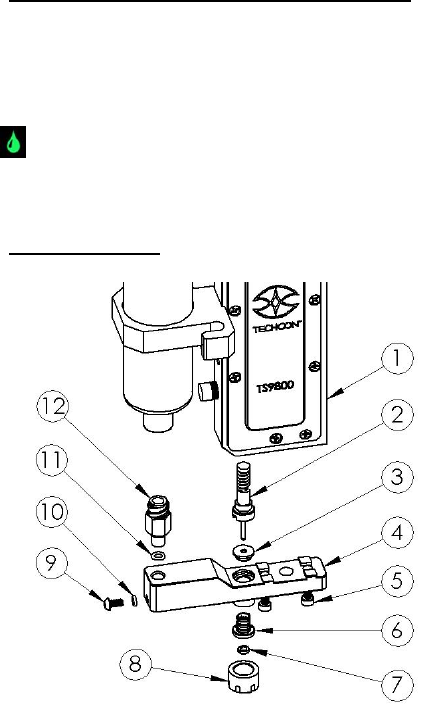
2. Remove the nozzle adjustment nut (8) by using the nozzle
adjustment tool to rotate it counter-clockwise.
3. Remove the nozzle bushing (6) with the nozzle insert (7) from
the nozzle adjustment nut by using the nozzle installation tool to
rotate it counter-clockwise.