00196654-01_IM_OIS_SIS 7.1_DE EN.pdf - 第26页
Installation Manual OIS 7.1 Installationsanleitung OIS 7.1 1 Lieferumfang SIPLACE ® OIS Applikation V7.1 (in " Basic Soft w are Package SIPLACE Pro V 7.1 ", Artikelnummer 116782-02 und in " Upgrade Soft wa…
OIS 7.1 Installation Manual
OIS 7.1 Installationsanleitung
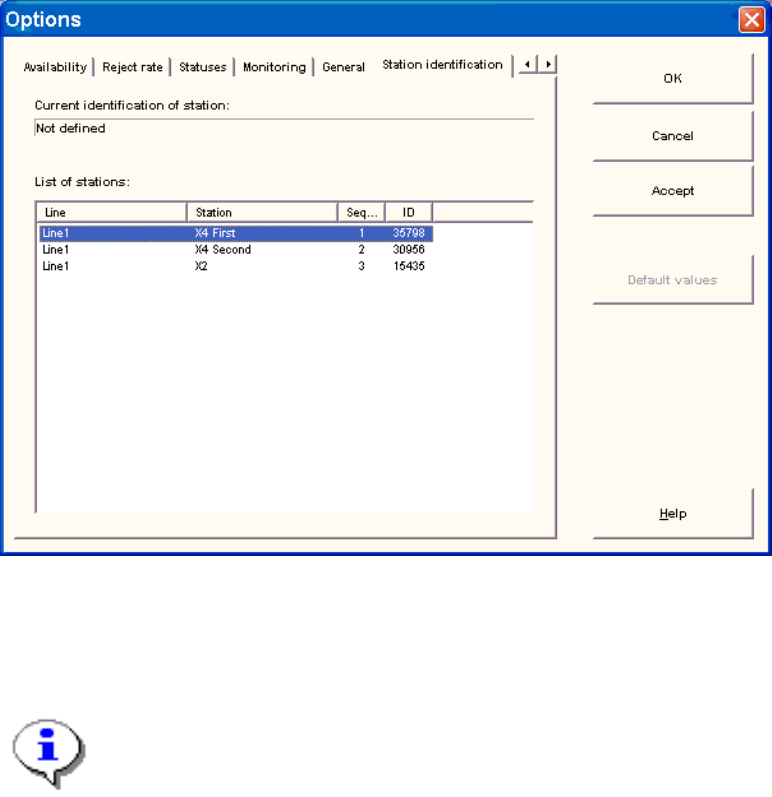
3.7 Identify Station (only OIS client)
For a station to be monitored, it must be identified.
For a station with station software version 70x, the station identification is not necessary.
¾ Select the Station identification item from the Options menu.
¾ Select the appropriate station in the OIS client from the list.
¾ Double-click the station to identify it.
¾ Close the dialog by clicking OK.
Note:
To select the station, the line configuration must be created first on the OIS server using
OIS Line Config, see the Administration Guide (item number 00196652-01).
25 von 48

Installation Manual OIS 7.1
Installationsanleitung OIS 7.1
1 Lieferumfang
SIPLACE
®
OIS Applikation V7.1 (in "Basic Software Package SIPLACE Pro V7.1", Artikelnummer
116782-02 und in "Upgrade Software Package SIPLACE Pro V7.1", Artikelnummer 116783-02 enthalten)
enthält:
Anzahl Artikel
1 CD-ROM mit OIS- und SIS-Software V7.1
Lizenzen für SIPLACE Pro-Versionen < 7.1
(siehe Abschnitt 2.3.1)
1 Installationsanleitung (00196654-01)
2 DVD1/DVD2 Support Media
Hinweis zur Support Media DVD:
Bitte verwenden Sie das Dokument "Navigation Guide for the Installation Procedure of
SIPLACE Software Systems" (Art. Nr. 00195050-xx) zum Navigieren durch die
Dokumentation.
Der Navigation Guide sowie alle Dokumente, auf die verwiesen wird, sind auf den Support
Media DVDs verfügbar, die mit dem SIPLACE Pro / OIS Package ausgeliefert werden.
26 von 48
OIS 7.1 Installation Manual
OIS 7.1 Installationsanleitung
27 von 48
2 Voraussetzungen
2.1 OIS/SIS-Funktionalitäten
• Eines der folgenden empfohlenen Betriebssysteme:
• Windows Server 2008 SP2
• Windows Server 2003 SP2 oder R2
• Auf der Festplatte ist mindestens 200 MB freier Speicherplatz vorhanden.
• Einer der folgenden Microsoft SQL-Server Versionen:
• Microsoft SQL Server 2008/Express Edition
• Microsoft SQL-Server 2005 SP3/Express Edition SP3
• Microsoft SQL-Server 2000 SP4/MSDE SP4
• DVD-ROM Laufwerk
• SIPLACE Pro V4.1 oder höher
• TimeSync ist installiert.
2.2 OIS-Client
• Das empfohlene Betriebssystem:
• Windows Vista SP2
• Windows XP Professional SP3
• Internet Explorer 4.01 SP2 oder höher ist installiert.
• Auf der Festplatte ist mindestens 20 MB freier Speicherplatz vorhanden.
• Bei Betrieb auf einer SIPLACE Maschine ist der Hauptspeicher des Stationsrechners mindestens
128 MB groß.
• Der Monitoring Service ist bereits installiert.
• Die TCP/IP-Adresse bzw. der UNC-Name (z.B. \\Server-Name) des Monitoring Service ist
bekannt.
• Es ist eine entsprechende Stationssoftware-Version installiert (siehe Kap. Fehler! Verweisquelle
konnte nicht gefunden werden. Fehler! Verweisquelle konnte nicht gefunden werden.).
• Es besteht eine Netzwerkverbindung zum Monitoring Service.
• TimeSync ist installiert.