OM-1452-002w_NP01102.pdf - 第62页
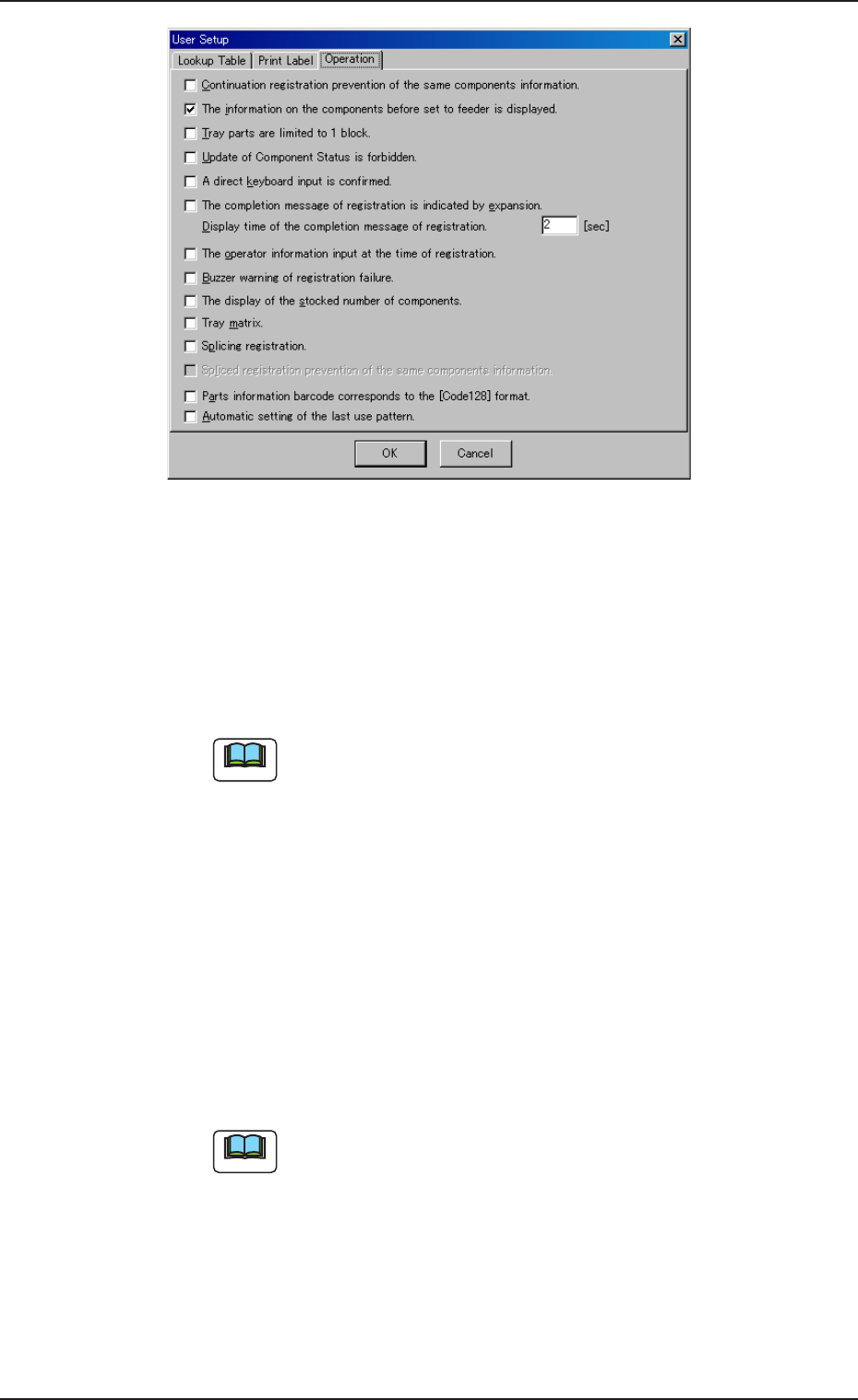
0708-001 6 0 Fig.47 Fig.47 Fig.47 Fig.47 Fig.47 [Operation( [Operation( [Operation( [Operation( [Operation( 登录操作 登录操作 登录操作 登录操作 登录操作 ) ) ) ) ) 的设定 的设定 的设定 的设定 的设定 ] ] ] ] ] • Continuation registration prevention of the C…
0708-001 59
(a) 打印条形码的特征如下:
Customize(自定义):打印对 1 段的条形码只分
配一个数据项目的标签。
JEITA(C-3) : 打印 JEITA(C-3)规格的标签。
AIAG : 打印 AIAG 规格的标签。
(b) 设定内容作为 “ 标签打印: ” 显示在主界面的上端。
关于 JEITA(C-3)规格、AIAG 规格请参照 “14. 条形码标签规
格 ” 章节。
•
Start Char(Start Char(
Start Char(Start Char(
Start Char(
开头文字开头文字
开头文字开头文字
开头文字
))
))
)
((
((
(
只在标签书写方式为只在标签书写方式为
只在标签书写方式为只在标签书写方式为
只在标签书写方式为 “
CustomizeCustomize
CustomizeCustomize
Customize”
时有效时有效
时有效时有效
时有效
))
))
)
打印数据的开头可附带任意的字符串。
• 设定范围
各数据 : 4 个字符以内的英文字母( 大写) 和数字
在对象数据中,只能设定有效的数据项目。
•
Object Data(Object Data(
Object Data(Object Data(
Object Data(
对象数据对象数据
对象数据对象数据
对象数据
))
))
)
((
((
(
只在标签书写方式为只在标签书写方式为
只在标签书写方式为只在标签书写方式为
只在标签书写方式为 “
CustomizeCustomize
CustomizeCustomize
Customize”
或或
或或
或 “
AIAGAIAG
AIAGAIAG
AIAG”
时有效时有效
时有效时有效
时有效
))
))
)
设定打印的数据项目。
通常 “Maker Comp ID(制造商元件 ID)” 为打印对象。
•
Pattern(Pattern(
Pattern(Pattern(
Pattern(
只在标签书写方式为只在标签书写方式为
只在标签书写方式为只在标签书写方式为
只在标签书写方式为 “
JEITA(C-3)JEITA(C-3)
JEITA(C-3)JEITA(C-3)
JEITA(C-3)”
时有效时有效
时有效时有效
时有效
))
))
)
对打印标签的 JEITA(C-3)规格设定条形码式样。
• 设定范围
“d”/“e”/“f”/“g”
• 初始设定
“d”
关于 JEITA(C-3)规格请参照 “14.1 JEITA(型号 C-3)规
格 ” 章节。
•
Print Mgt Comp S/N(Print Mgt Comp S/N(
Print Mgt Comp S/N(Print Mgt Comp S/N(
Print Mgt Comp S/N(
打印管理序列号打印管理序列号
打印管理序列号打印管理序列号
打印管理序列号
))
))
)
[Setting Feeder/Comp([Setting Feeder/Comp(
[Setting Feeder/Comp([Setting Feeder/Comp(
[Setting Feeder/Comp(
送料器送料器
送料器送料器
送料器
//
//
/
元件设置元件设置
元件设置元件设置
元件设置
)])]
)])]
)]
在 “Setting Feeder/Comp” 模式中的服务器登录处理中,前
次贴装了从未发行过的管理序列号标签的元件时,将自动
发行该管理序列号标签的处理变为有效时进行检测。
所谓 “Management S/N(管理序列号)” 是指在 ACV 系统中
因管理元件信息而编的序列号。
11.6 11.6
11.6 11.6
11.6
各种功能的设定各种功能的设定
各种功能的设定各种功能的设定
各种功能的设定
Note
Reference
Note
Note
Note
Reference
0708-001 60
Fig.47Fig.47
Fig.47Fig.47
Fig.47
[Operation([Operation(
[Operation([Operation(
[Operation(
登录操作登录操作
登录操作登录操作
登录操作
))
))
)
的设定的设定
的设定的设定
的设定
]]
]]
]
•
Continuation registration prevention of theContinuation registration prevention of the
Continuation registration prevention of theContinuation registration prevention of the
Continuation registration prevention of the
same components information.(same components information.(
same components information.(same components information.(
same components information.(
防止同一元件信息防止同一元件信息
防止同一元件信息防止同一元件信息
防止同一元件信息
的连续登录的连续登录
的连续登录的连续登录
的连续登录
))
))
)
在服务器登录操作中可以防止连续读取同一条形码的错误。
只在输入了制造商元件 ID 和制造商序列号时有效。
•
The information on the components before setThe information on the components before set
The information on the components before setThe information on the components before set
The information on the components before set
to feeder is displayed.(to feeder is displayed.(
to feeder is displayed.(to feeder is displayed.(
to feeder is displayed.(
显示前次送料器安装元件显示前次送料器安装元件
显示前次送料器安装元件显示前次送料器安装元件
显示前次送料器安装元件
的信息的信息
的信息的信息
的信息
))
))
)
在 “Setting Feeder/Comp(送料器 / 元件设置)” 模式界面
中,输入送料器信息时,显示前次登录的元件信息。
•
Tray parts are limited to 1 block.Tray parts are limited to 1 block.
Tray parts are limited to 1 block.Tray parts are limited to 1 block.
Tray parts are limited to 1 block.
((
((
(
料盘元件的料盘元件的
料盘元件的料盘元件的
料盘元件的
11
11
1
模块限定使用模块限定使用
模块限定使用模块限定使用
模块限定使用
))
))
)
在 “Setting Feeder/Comp” 模式界面中,输入盘式送料器的
序列号时,模块号 1 自动切换到元件信息输入界面。
通常盘式送料器时,最多可登录 4 个模块的元件信息,在
送料器信息输入处理中,务必进行模块号的输入。
11.6 11.6
11.6 11.6
11.6
各种功能的设定各种功能的设定
各种功能的设定各种功能的设定
各种功能的设定
Note
Note
0708-001 61
•
Update of Component Status is forbidden.Update of Component Status is forbidden.
Update of Component Status is forbidden.Update of Component Status is forbidden.
Update of Component Status is forbidden.
((
((
(
禁止元件状态的更新禁止元件状态的更新
禁止元件状态的更新禁止元件状态的更新
禁止元件状态的更新
))
))
)
不进行元件状态的更新处理,强行切换到新增元件登录处
理中。
(a) 新增元件登录,因此数据库中登录新的元件信息。
(b) 装置发生吸取异常时,即使存在元件,因数据库管理
的元件状态信息为 “Inaccessible(禁止使用)”,也不
能继续进行生产。此时,在 ACV 系统用终端进行将元
件状态信息更新为 “Accessible(使用可能)” 的操作。
•
A direct keyboard input is confirmed.A direct keyboard input is confirmed.
A direct keyboard input is confirmed.A direct keyboard input is confirmed.
A direct keyboard input is confirmed.
((
((
(
直接键盘输入直接键盘输入
直接键盘输入直接键盘输入
直接键盘输入
))
))
)
可在系统界面上用键盘输入元件信息。
通常,在专用[INPUT(输入)]对话框中进行。
•
The completion message of registration isThe completion message of registration is
The completion message of registration isThe completion message of registration is
The completion message of registration is
indicated by expansion.(indicated by expansion.(
indicated by expansion.(indicated by expansion.(
indicated by expansion.(
登录完成消息的放大显示登录完成消息的放大显示
登录完成消息的放大显示登录完成消息的放大显示
登录完成消息的放大显示
))
))
)
放大显示消息框。
只限放大显示时,正常处理消息框为绿色、异常处理为红
色。
•
Display time of the completion message ofDisplay time of the completion message of
Display time of the completion message ofDisplay time of the completion message of
Display time of the completion message of
registration.(registration.(
registration.(registration.(
registration.(
登录完成消息的显示时间登录完成消息的显示时间
登录完成消息的显示时间登录完成消息的显示时间
登录完成消息的显示时间
))
))
)
设定正常处理消息框的显示时间。设定时间一过自动被取
消。
按[OK]按钮,关闭异常处理消息框。
只在 “The completion message of registration is
indicted by expansion” 选项为有效时才可以设定。
•
The operator information input at the time ofThe operator information input at the time of
The operator information input at the time ofThe operator information input at the time of
The operator information input at the time of
registration.(registration.(
registration.(registration.(
registration.(
登录时的操作员信息输入登录时的操作员信息输入
登录时的操作员信息输入登录时的操作员信息输入
登录时的操作员信息输入
))
))
)
在 “Register Comp(元件登录)” 模式界面及 “Setting Feeder
/Comp(送料器 / 元件设置)” 模式界面中,进行服务器登录操
作时,最初需要输入操作员信息。对一次的登录操作,需要
每次输入操作员信息。
•
Buzzer warning of registration failure.Buzzer warning of registration failure.
Buzzer warning of registration failure.Buzzer warning of registration failure.
Buzzer warning of registration failure.
((
((
(
登录失败蜂鸣警告登录失败蜂鸣警告
登录失败蜂鸣警告登录失败蜂鸣警告
登录失败蜂鸣警告
))
))
)
显示异常消息框时,响起警告音。
警告音为计算机音量和 “Audio Device(音频控制器)” 中
设定的 “ 一般警告音 ” 。
11.6 11.6
11.6 11.6
11.6
各种功能的设定各种功能的设定
各种功能的设定各种功能的设定
各种功能的设定
Note
Note
Note
Note
Note