00198055-02_IM_Taceability5.1_EN.pdf - 第25页
Uninstalling Installation Manual SIPLACE Traceability 5.1 25 5 5 U n in s t a llin g Uninstalling Trace Monitor or Trace Service from Control Panel NOTICE Requirement You need administrato r privilege for your ope ration…
Installation of Trace Service and Monitor
Trace Monitor 4.3.1 Installation of Trace Monitor
24 Installation Manual SIPLACE Traceability 5.1
► In case of collation conflicts we recommend you to recreate the SQL Server.
Uninstalling
Installation Manual SIPLACE Traceability 5.1 25
5
5 Uninstalling
Uninstalling
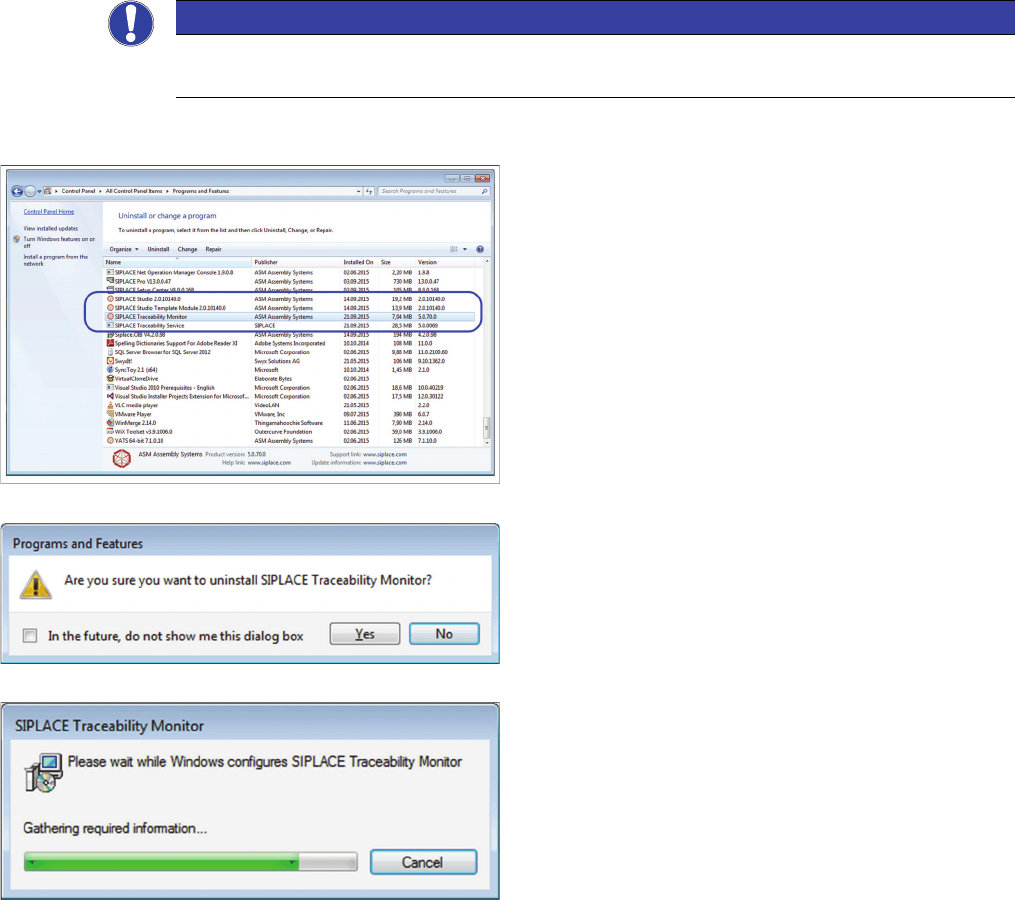
Trace Monitor or Trace Service from Control Panel
NOTICE
Requirement
You need administrator privilege for your operation system in order to perform this steps.
► In the Control Panel -> All Control Panel Items -> Pro-
grams and Features dialog select the application
SIPLACE Traceability Monitor or SIPLACE Tracea-
bility Service , right-click and select Remove in the
context menu.
You are prompted to confirm uninstalling Trace Monitor.
► Confirm with Yes.
► The Install Shield Wizard will start and uninstalling
Trace Monitor or Trace Service will be prepared. un-
installing Trace Monitor or Trace Service will be unin-
stalled.
► Monitor or Trace Service is no longer available.
Uninstalling
26 Installation Manual SIPLACE Traceability 5.1