Printer 710-810 v9 Transportation_PowerUp.pdf - 第25页
TRANSPORTATION - POWER UP FOREIGN MACHINE INTERFACE Chapter Issue 1, Jan 16 Technical Reference Manual 43.25 Protocol Selection Figure 43-7 Interface Selector Switches Part Numbers & Settings Procedure Ensure the MIU…
TRANSPORTATION - POWER UP
FOREIGN MACHINE INTERFACE
43.24 Technical Reference Manual Chapter Issue 1, Jan 16
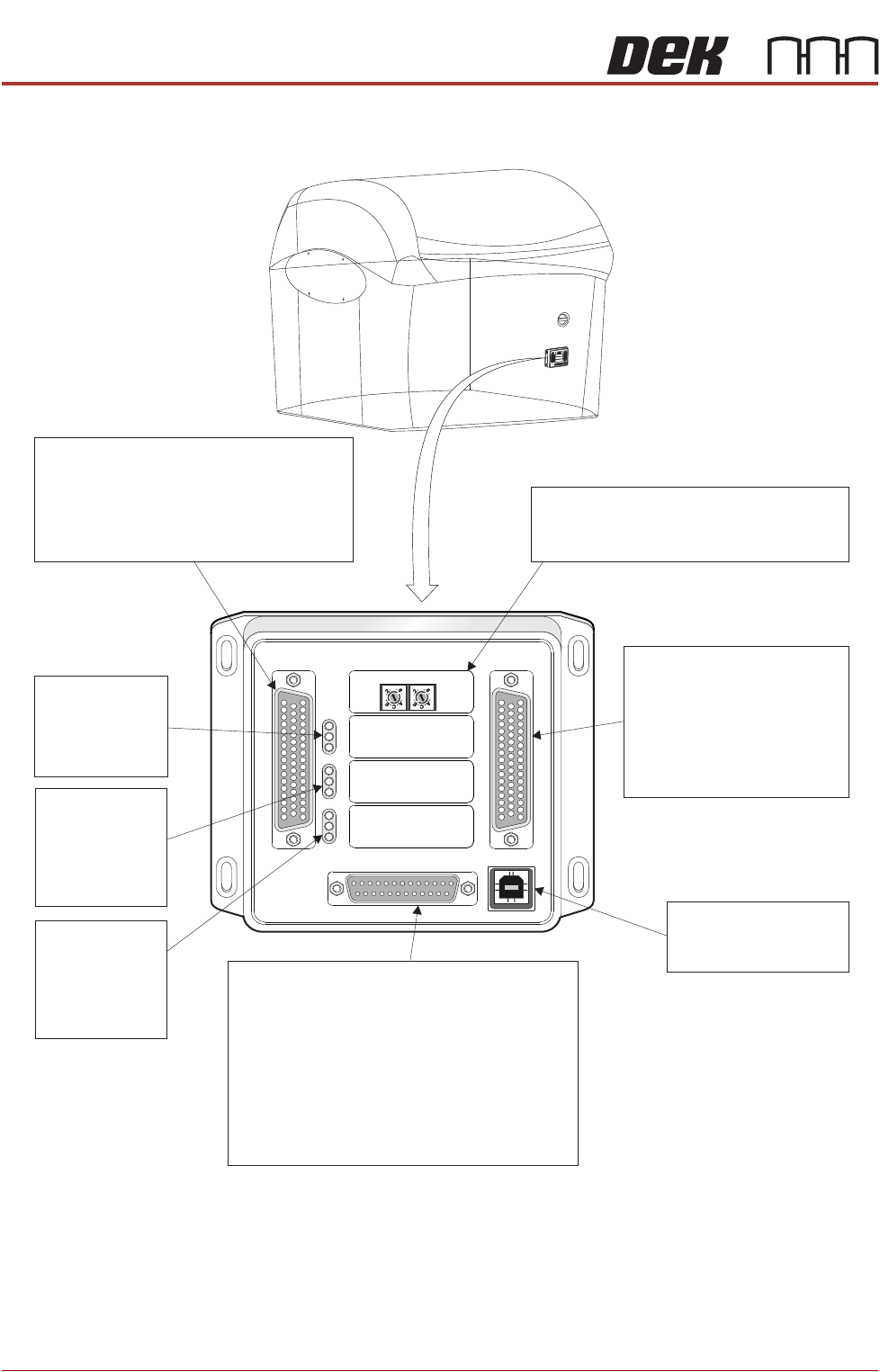
Figure 43-6 Multi-Interface Unit
M1SK1
UPLINE
M1SK2
DOWNLINE
M1PL3
DEK M/C
M1SK4
DEK USB
+12V
+24V
+24V SW
SEND UPLINE
SEND DOWNLINE
CONTROL IN
UPLINE READY
DOWNLINE READY
CONTROL OUT
POWER
I/P'S
O/P'S
PROTOCOL SELECTION
UP
LINE
DOWN
LINE
MIU 191114
Protocol Selection
Upline interface select switch.
Downline interface select switch.
M1SK1
Signal lines to and from the DEK machine
from the upline machine.
4 Inputs: Opto-isolated.
4 Outputs: Lowside driver.
4 Outputs: Solid State Relay switched.
LED Bank LD1
Shows the
integrity of
the derived
supplies
LED Bank LD2
Indicates the
sequence of
events during
board transfers
(Inputs)
LED Bank LD3
Indicates the
sequence of
events during
board transfers
(Outputs)
M1SK2
Signal lines to and from
the DEK machine from
the downline machine.
4 Inputs: Opto-isolated.
4 Outputs: Lowside driver.
4 Outputs: Solid State
Relay switched.
DEK USB connection
not used.
M1SK4
M
1
S
K
1
M1
SK1
U
P
L
I
N
E
U
P
LI
N
E
M
1
S
K
2
M1
SK
2
D
O
W
N
L
I
N
E
DOWNLI
NE
M
1
P
L
3
M
1
P
L3
D
E
K
M
/
C
DEK
M/
C
M
1
S
K
4
M1
S
K
4
D
E
K
U
S
B
DE
K
USB
+
1
2
V
+1
2
V
+
2
4
V
+
2
4V
+
2
4
V
S
W
+
2
4V SW
S
E
N
D
U
P
L
I
N
E
SE
N
D U
PL
IN
E
S
E
N
D
D
O
W
N
L
I
N
E
SEND D
OW
NLIN
E
C
O
N
T
R
O
L
I
N
CONT
RO
L
I
N
U
P
L
I
N
E
R
E
A
D
Y
UPLIN
E
RE
ADY
D
O
W
N
L
I
N
E
R
E
A
D
Y
DOWN
L
I
N
E
REA
DY
C
O
N
T
R
O
L
O
U
T
C
ONTR
O
LO
UT
P
O
W
E
R
PO
WER
I
/
P
'
S
I
/
P'
S
O
/
P
'
S
O
/
P
'
S
P
R
OT
OC
OL
S
E
LECT
I
O
N
P
R
O
T
OCOL
S
E
L
E
C
T
I
ON
U
P
UP
L
I
N
E
LINE
D
O
W
N
DOW
N
L
I
N
E
L
I
NE
MI
U
19
1
1
1
4M
IU 1
91
1
14
4
8
0
4
8
0
M1PL3
Power supplies.
Comms connections to the DEK machine
Inputs to the DEK machine from interface -
1. Downline Ready
2. Upline Ready
3. Control In
Outputs from the DEK machine to interface -
1. Send Downline
2. Send Upline
3. Control Ou
t
4
80
4
80
TRANSPORTATION - POWER UP
FOREIGN MACHINE INTERFACE
Chapter Issue 1, Jan 16 Technical Reference Manual 43.25
Protocol Selection
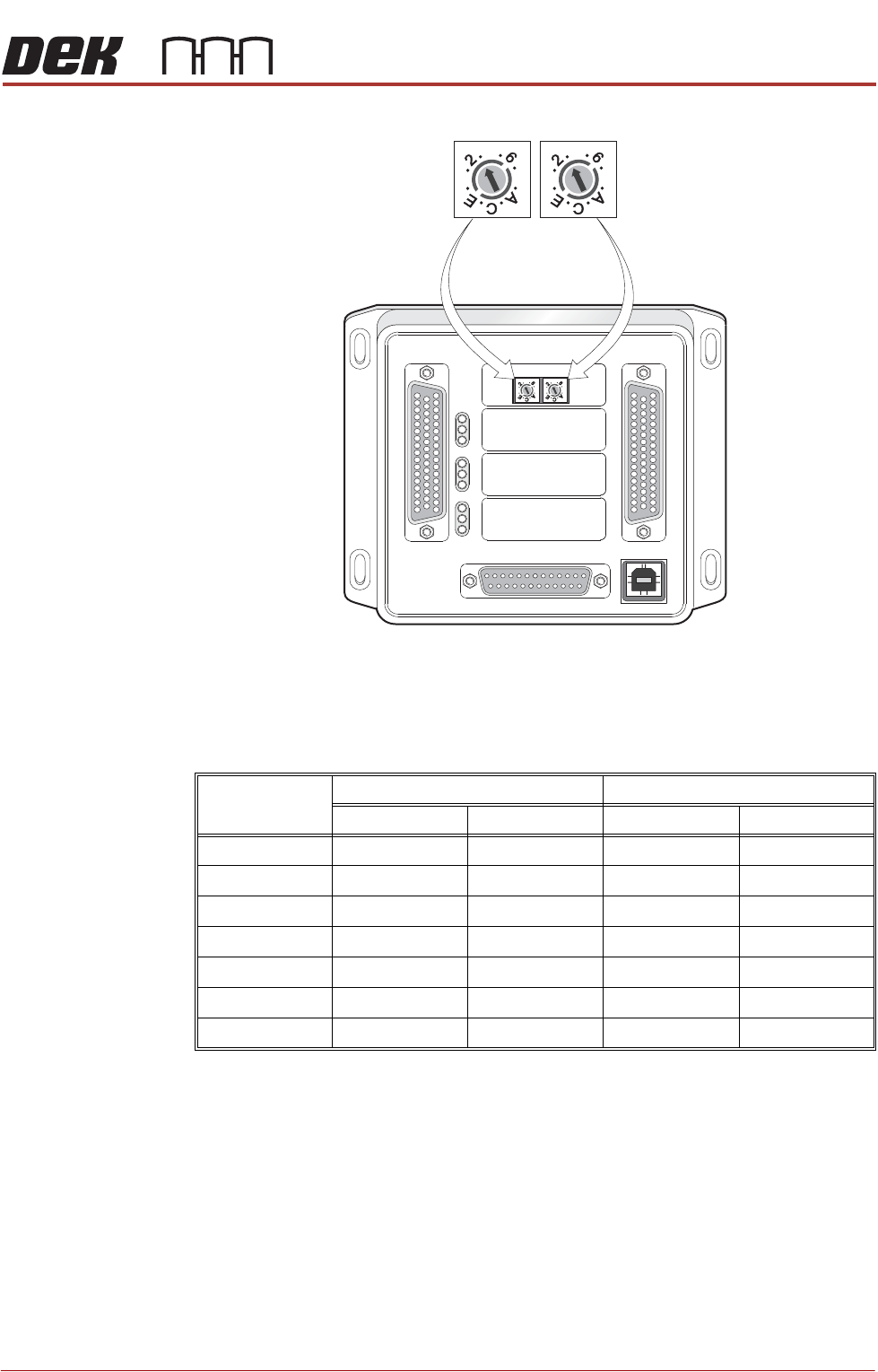
Figure 43-7 Interface Selector Switches
Part Numbers &
Settings
Procedure Ensure the MIU is configured with the correct protocols for upline and downline
machines as detailed earlier.
With the cables supplied, connect the upline and downline machines to the MIU
box or FMI Pod. Cables should be routed down behind the rear access panel.
1. Power up the machine using the mains isolator.
2. Press the System button.
3. Select Maintenance.
4. Select Machine Setup.
5. Select Basics.
M1SK1
UPLINE
M1SK2
DOWNLINE
M1PL3
DEK M/C
M1SK4
DEK USB
+12V
+24V
+24V SW
SEND UPLINE
SEND DOWNLINE
CONTROLIN
UPLINE READY
DOWNLINE READY
CONTROL OUT
POWER
I/P'S
O/P'S
PROTOCOLSELECTION
UP
LINE
DOWN
LINE
MIU 191114
4
80
4
80
4
80
4
80
Upline Interface
Selector Switch (SW2)
Downline Interface
Selector Switch (SW3)
Protocol MIU Setting Cable Part Number
Upline SW2 Downline SW3 Upline Downline
SMEMA 2 2 131343 131345
Siemens 3 3 131335 131337
SMPI 4 4 131331 131333
TDK 5 5 131323 131325
Fuji 7 7 126757 126758
Panasonic 7 7 131339 131341
Sanyo 8 8 146120 146119

TRANSPORTATION - POWER UP
FOREIGN MACHINE INTERFACE
43.26 Technical Reference Manual Chapter Issue 1, Jan 16
6. Select Upline Protocol.
7. Select MIU.
8. Select Accept.
9. Select Downline Protocol.
10. Select MIU.
11. Select Accept.
12. Select Printer Mode.
13. Select No Print.
NOTE
In No Print mode, the DEK machine acts as a conveyor, passing the board
through the machine without printing.
14. Select Accept.
15. Select Back.
16. Select Back.
17. Select Back.
18. Ensure that the Upline and Downline Machines are connected and are
powered up.
19. Select Print.
The printer requests a board from the upline machine and passes it through the
machine. The board stops at the sensor on the conveyor. On request from the
downline machine the board passes onto the external conveyor. When the
sensor is clear the stencil printer requests another board from the upline
machine and the sequence repeats.
This shows that the interface is working between the printer and the external
machines.
Dual Lane Machine The dual lane machine requires separate FMI communications for the print lane
and the pass through lane.
For the print lane, the normal DEK FMI rules apply. If the DEK machine is
connected to upline and downline machines/conveyors that use SMEMA, Fuji
or Panasonic communications protocol, an FMI pod is used. If either of the
communications protocol is not SMEMA, Fuji or Panasonic, a Multi-Interface
Unit (MIU) must be used.
For the pass through lane, if the DEK machine is connected to upline and
downline machines/conveyors that use SMEMA, Fuji or Panasonic communi-
cations protocol, connection is made to the M40 Dual Lane enclosure. If either
of the communications protocol is not SMEMA, Fuji or Panasonic, an MIU must
be used.