2DI.pdf - 第4页
Edit Global ..........3 9 Edit Limits ..........3 9 New Pre-images ..........3 9 Edit Site ...........3 9 Inspect Site ..........3 9 Reject ............3 9 IMAGE RECORDING ...........4 0 MENU PARAMETERS ...........4 1 26…
2D INSPECTION CONTENTS
MODULE OVERVIEW ...........1
Introduction ...........1
Purpose ............1
Operation ............2
Screen Inspection ...........3
Board Inspection ...........4
Shapes ............5
Shape Recognition ..........6
Paste Volume Prediction .........7
Auto Learn ............8
Inspection Cycles ...........9
Histogram ............10
Lighting ............10
Inspection Setup ...........11
Adjustment During Print Cycle ........13
2Di SETUP .............14
Preparation ............14
Set Preferences ...........14
Load Product File...........14
Edit Data ............15
Edit Global ............18
Edit Limits ............19
AddLimits..........20
Edit Limits ..........21
Edit Site ............23
Lighting Setup ..........25
Learn Site ...........27
Inspect ............29
Auto Learn ............34
SETUP TIPS ............37
OPTIONS AFTER AN INSPECTION ALARM .......38
Accept ............38
Inspect More ...........38
Recovery Action ...........38
Paste Load ..........38
Clean Mode 1 and 2 .........38
Re-print Board ..........38
Adjust ............38
Inspect All ............39
Adjust Inspect ...........39
Issue 8 Sept 00 265GS/GSX/Lt/Horizon/Infinity
2D INSPECTION
CONTENTS
2Di INSPECTION
MODULE OVERVIEW
Introduction The vision system of the screen printing machine is used to both align the screen
to each board before it is printed and, when enabled, inspect the screen and
board. This module describes how this is achieved.
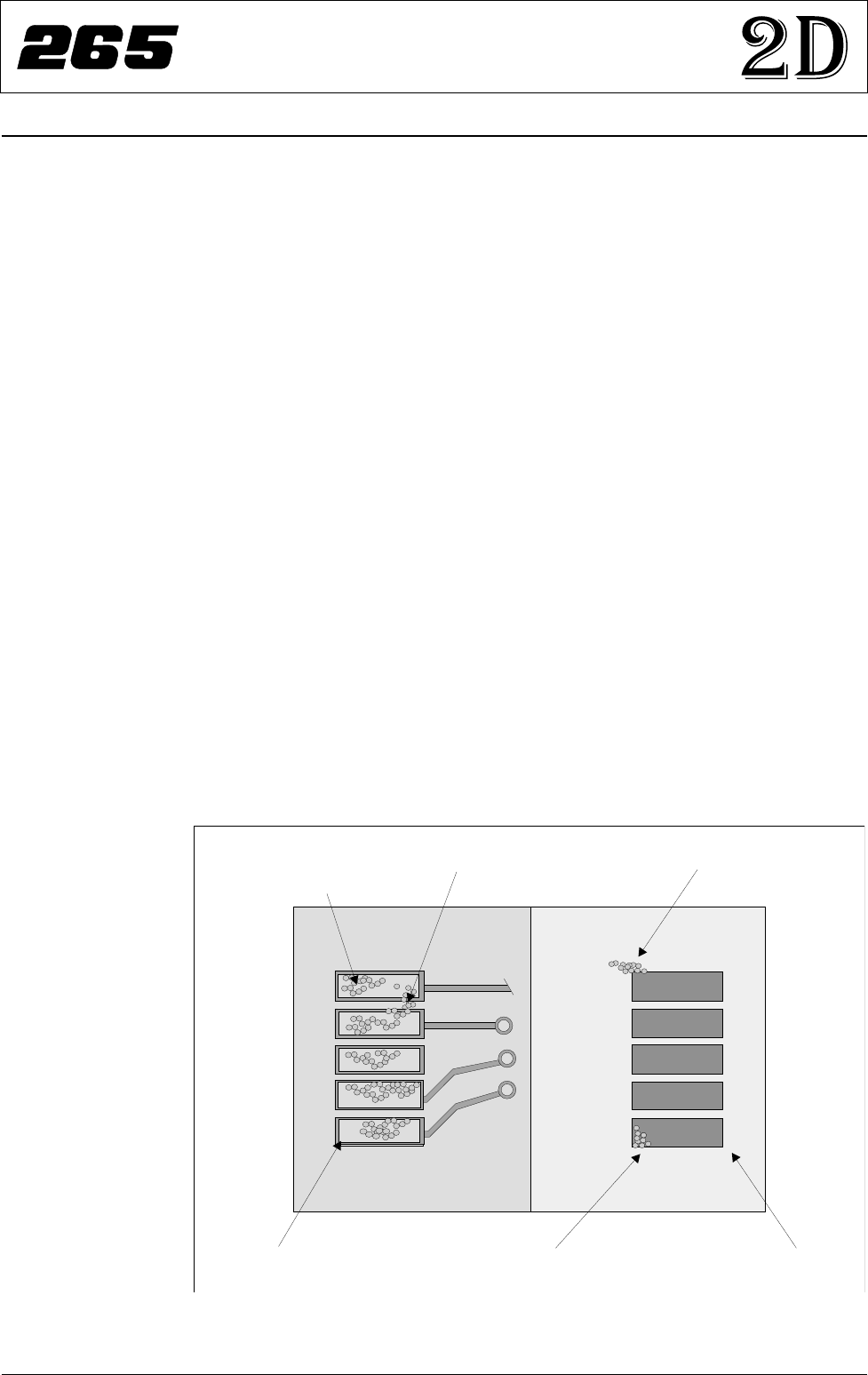
Purpose 2D inspection (2Di) ensures the quality of the print by monitoring the printing
process, to determine when a screen clean or paste dispense is required and if
licensed and selected, to warn for bridging, misalignment and reduced paste
volume. 2Di optimizes the cycle time by eliminating unnecessary screen
cleaning and paste dispensing operations. To achieve this the system inspects
various areas of the board and/or screen (sites) to detect the following:
•
Screen Blockage - solder paste remaining inside screen apertures.
•
Screen Smear - solder paste on the screen.
•
Board: Paste on Pad - amount of the pad covered by solder paste, as a %
of the aperture size (board inspection set to basic).
• Board: Paste Present - amount of paste in the region of interest, as a % of
the aperture size (board inspection set to advanced).
• Board: Alignment - accuracy of paste positioning compared to the learnt
site image.
• Board: Bridging - distance between adjacent deposits of paste.
Using the screen aperture, blockage and paste present information the system
can calculate the following:
• Board: Paste Volume - volume of paste on the pad.
Issue 8 Sept 00 265GS/GSX/Lt/Horizon/Infinity 1
2D INSPECTION
MODULE OVERVIEW
Paste on screen
(smear)
Pa s t e o n b o a r d
(bridging)
Paste Present
and
Paste Volume
Screen apertureBoard pad
Underside of screenTop of board
Paste in aperture
(blockage)
Figure 1 Paste on Board and Screen