User-manual-FP2636-stencil-printer.pdf
A c c e s s o r i e s L i s t I n s t a l l X , Y , θ h a n d l e s t o t h e i r p o s i t i o n s a c c o r d i n g l y . FP 26 36 ( Fr am el es s Ve rs io n) Unpa ck in g I ns tr uc ti on s F P 2 6 3 6 P a r t s l i s…
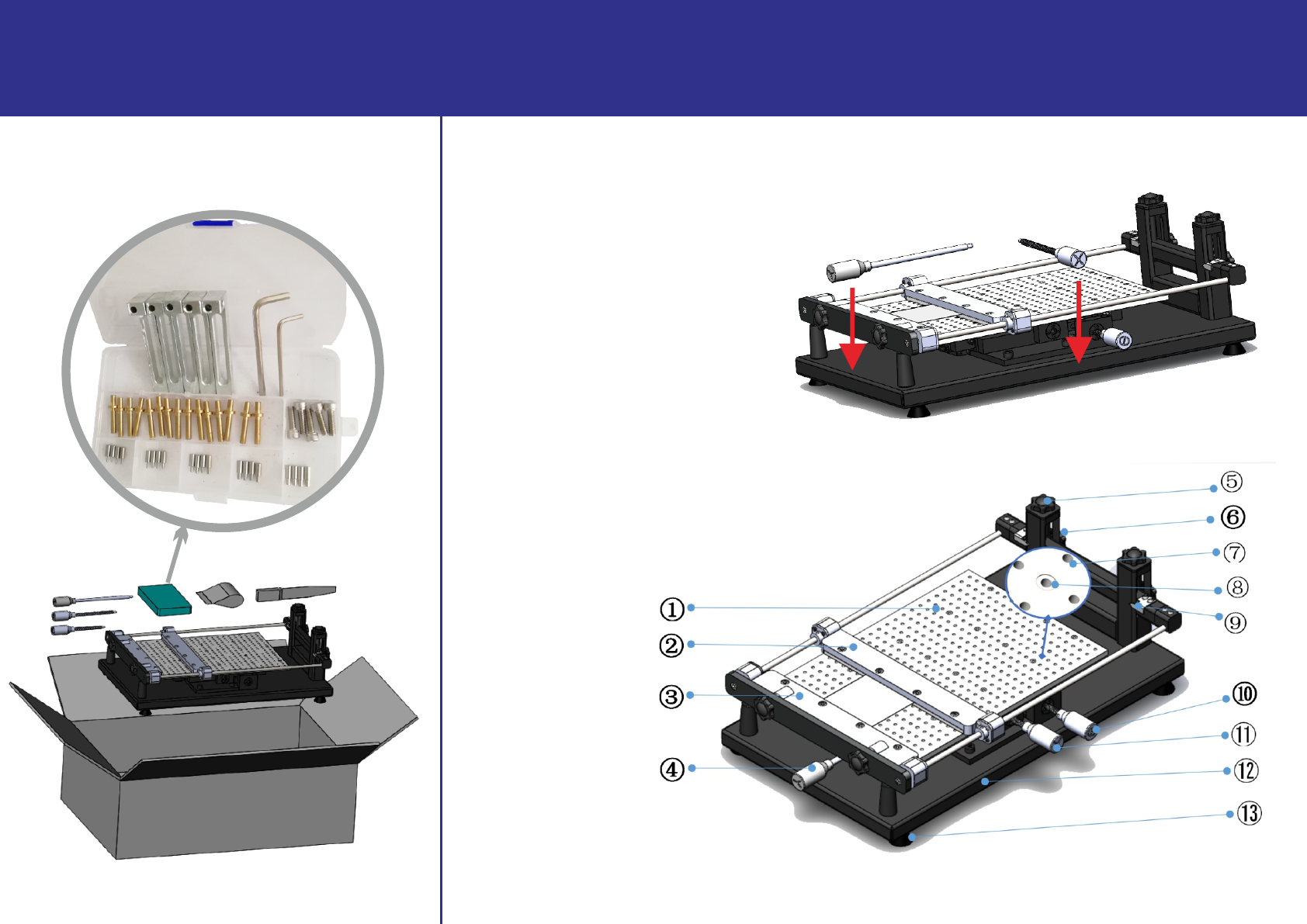
Accessories List
Install X,Y,θ handles to their positions accordingly.
FP2636 (Frameless Version) Unpacking Instructions
FP2636 Parts list
①: Porous positioning plate
②: Rear steel mesh fixed pressure plate
③: Front steel mesh fixed pressure plate
④: Y direction adjustment handle
⑤: Steel mesh height adjustment knob
⑥: Steel mesh height beam fixing knob
⑦: PCB top post placement hole
⑧: L-shaped fixing base screw hole
⑨: Height pointer
⑩: Angle adjustment handle
⑪: X direction adjustment handle
⑫: Printing table base
⑬: Printing table mats
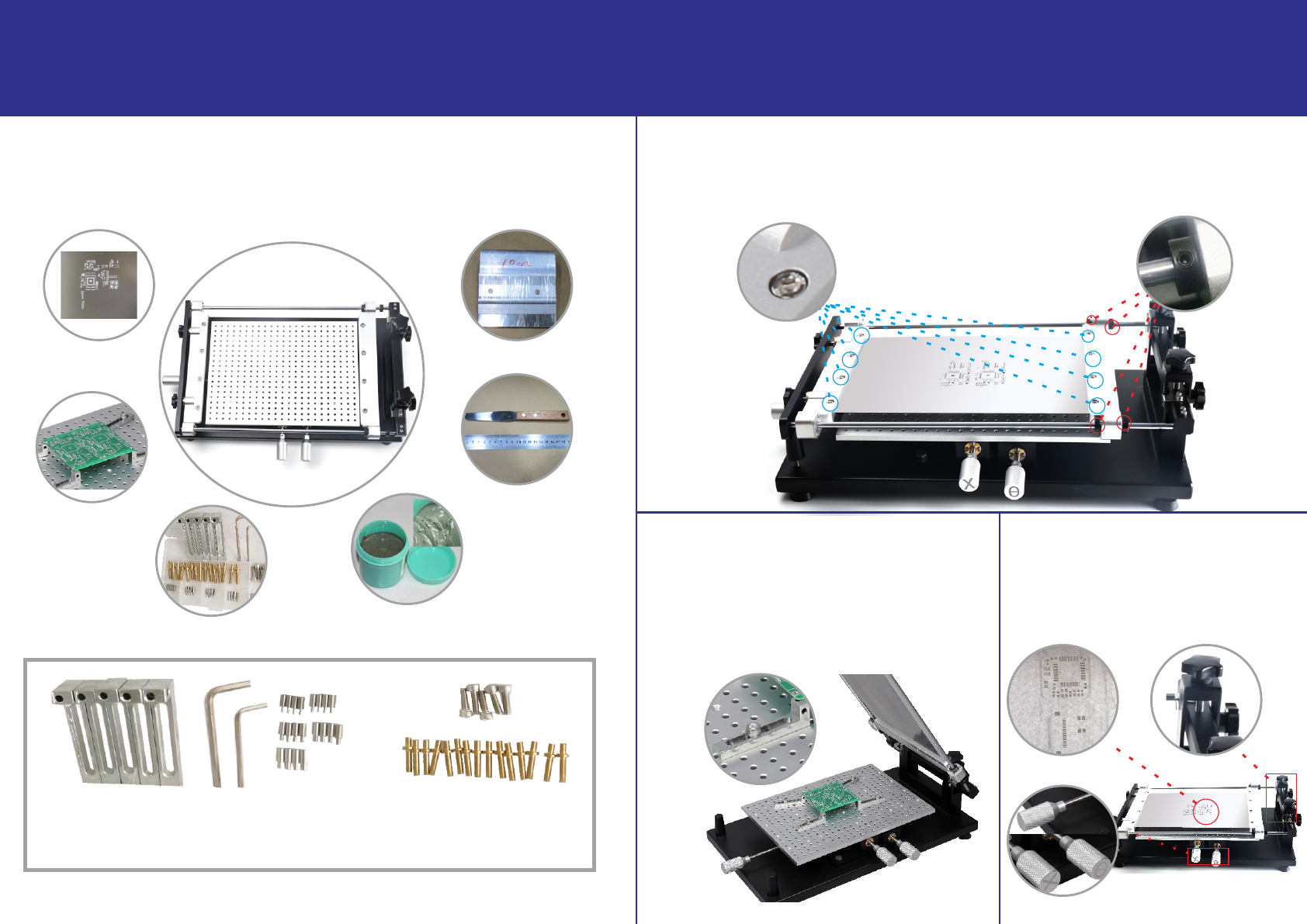
FP2636 (Frameless Version) User Instructions
Top ring
Height adjustment
handle
Ⅱ.Install the frameless stencil:
Loosen the four "Set screw", adjust the "rear stencil fixing platen" to a suitable position,
Ⅲ.Place the PCB:
Install four "L-shaped seats" and "positioning pins"
Ⅳ. Adjust the stencil:
Adjust the "height adjustment handle" to
Ⅰ.Preparation:
FP2636 stencil printer, frameless stencil, PCB, accessory box, solder paste, stirring knife,
scraper blade
loosen the 8 screws on the front and rear stencil fixing platen, and put in the "frameless
stencil", tighten the screws.
according to the actual positioning holes on the PCB
(PS: Due to the limited XY adjustment range, the position
of the "PCB" should be as close as possible to the hole
location of the frameless stencil),if the PCB is easy to
deform, you can install the PCB top post to the size of
L-shaped seats 5Pcs |L-shaped wrenches 2Pcs | positioning pins: 1mm 4Pcs, 1.5mm 4Pcs,
2mm 4Pcs, 2.5mm 4Pcs, 3mm 4Pcs | PCB top post 15Pcs | Fixing screws 5Pcs
the PCB.
adjust the height of the stencil, adjust the
x, y and angle adjustment handle to adjust
the X/Y position .
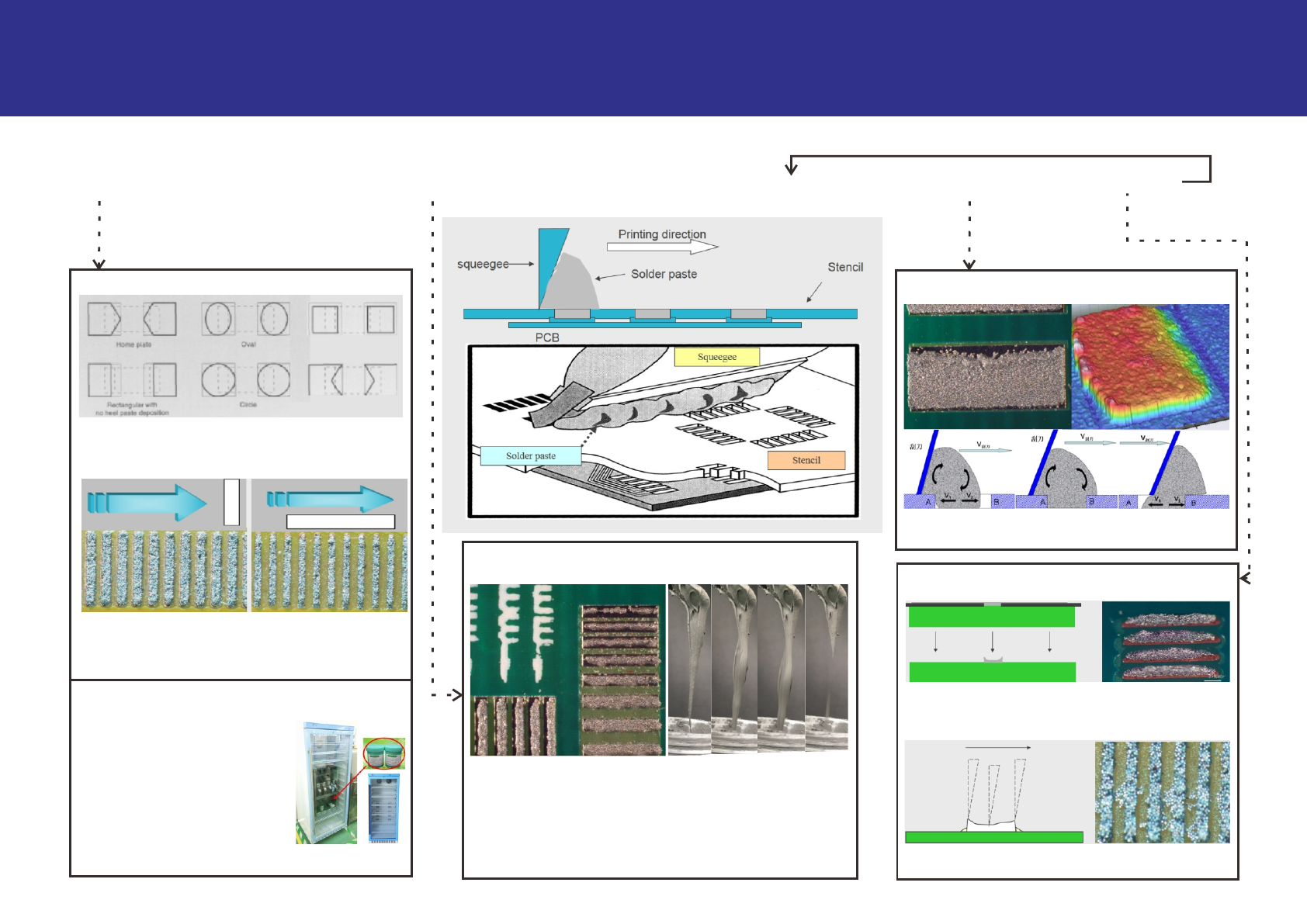
Process Processes:
Prepare materials→Adjust the stencil printer→Stir solder paste→Place solder paste→Place the PCB and close the Stencil→Printing solder paste→Clean the Stencil
Stencil for material preparation
FP2636 (Frameless Version)Printing Process Instructions
There is a big difference in the amount of solder paste
in the parallel and vertical directions. When opening
holes on the Stencil, the opening width in the parallel
direction should be reduced accordingly.
Solder paste for material preparation
Unopened, reheated solder paste
should be stored in the refrigerator
when it is not used within 24 hours,
Solder paste for SMT printing process
Before each addition the solder paste, the solder paste must
be stirred uniformly before use,manual stirring speed is 2-3
seconds per revolution, in the same direction for 2 minutes to
5 minutes to make it into a fluid.The picture on the left is a
typical printing abnormality caused by insufficient solder
paste stirring.The picture on the right is a simple method for
testing liquidity(Picking up solder paste with a stirring knife
can naturally fall)
Printing for SMT printing process
Solder paste does not roll, stencil holes filling is
insufficient, solder paste is omission or defect.
Cleaning for SMT printing process
The surface of the stencil is not thoroughly brushed
Contaminated, Causes defects such as tin beads; poor
solder paste molding,increased cleaning frequency.
More and more micro components are used, how to
take into account the amount of solder paste on large
and small pads:Controlling the shape and size of the
template opening is the most direct method
the refrigeration temperature should
be between 3℃and 8℃, do not reheat
the solder paste of the same bottle
more than twice.Before use, it must
be taken out of the refrigerator and
placed at room temperature for more
than 4 hours before it can be opened
for use.
clean, the solder paste is poorly formed, less solder
paste, and lack of printing