00190802-02.pdf - 第316页
11 Production Tools / Optimization User’s Manual Line Computer UNIX 11.4 Optimization Dial og Software Version 402.xx Edition 06/96 11 - 20 11.4.2 Main Window of Optimi zation Dialog Set-Up O ptimiza tion is o perated fr…

User’s Manual Line Computer UNIX 11 Production Tools / Optimization
Software Version 402.xx Edition 06/96 11.4 Optimization Dialog
11 - 19
11.4 Optimization Dialog
The Optimization Dialog is the user interface of the Set-Up Optimization. Via the Optimization Dialog it is possible
to create lot files, start the optimization process and display the results of the optimization runs. Moreover, all
relevant editors can be invoked from the Optimization Dialog.
11.4.1 Starting the Optimization Dialog
The Optimization Dialog is called up from the desktop:
In the programming mode:
●
Click on icon „Optimization“.
The Optimization Dialog is opened.
In the control mode:
●
On the „PRODUCTION TOOLS“ desktop menu click on the „Optimization“ menu option.
The Optimization Dialog is opened.
11 Production Tools / Optimization User’s Manual Line Computer UNIX
11.4 Optimization Dialog Software Version 402.xx Edition 06/96
11 - 20
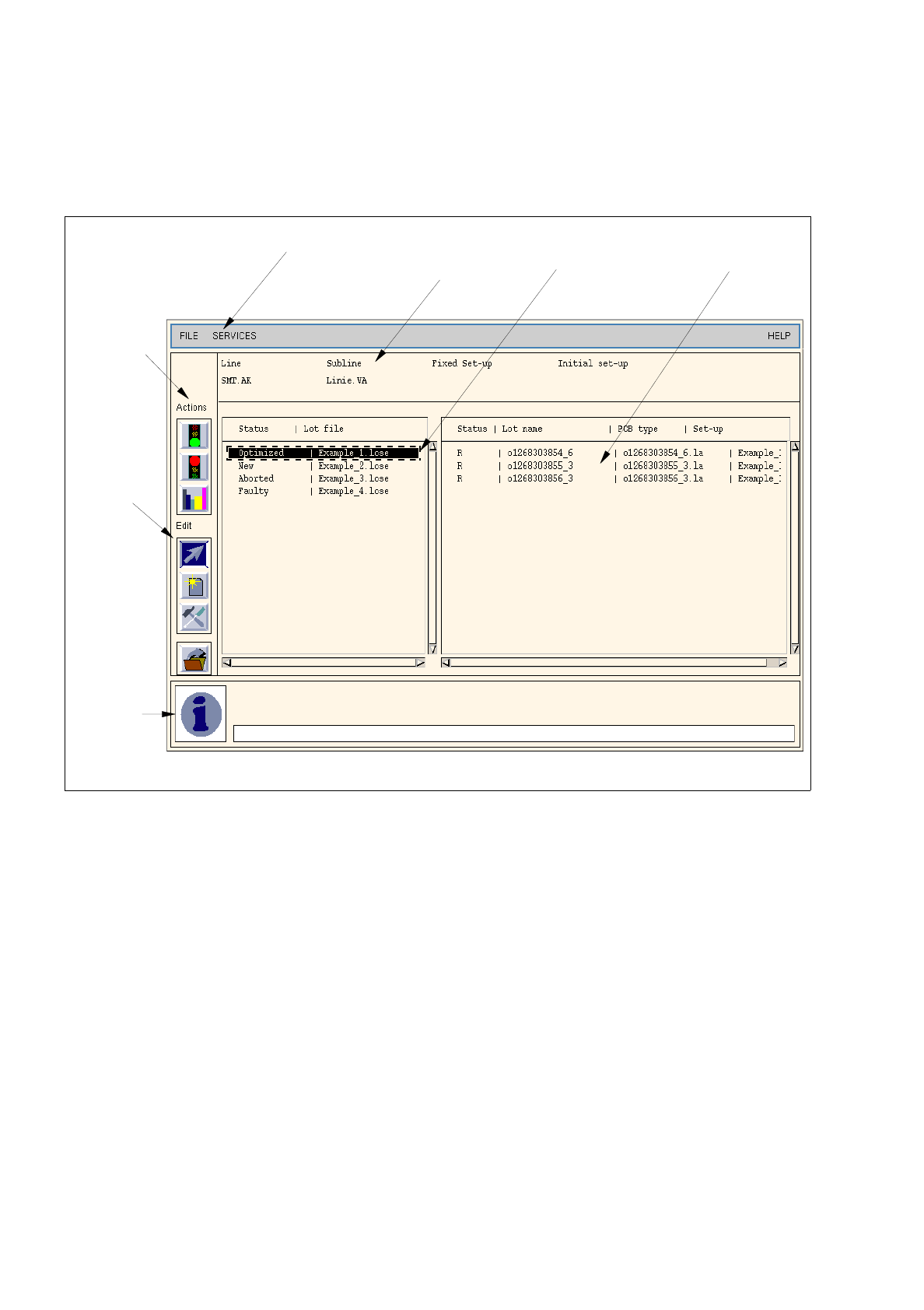
11.4.2 Main Window of Optimization Dialog
Set-Up Optimization is operated from the main window of the Optimization Dialog.
Fig. 11.4.1 Main Window of Optimization Dialog
The main window of the Optimization Dialog is subdivided into the following areas.
-
Menu bar
-
Field „Basic optimization data“
-
Selection field „Lot file“
-
Selection field „Jobs“
-
Command area „Actions“
-
Command area „Editing“
-
Info box
menu bar field
„Basic optimization
selection field
„Jobs“
info box
command
area
„Editing“
command
area
„Actions“
selection field
„Lot file“
data“

User’s Manual Line Computer UNIX 11 Production Tools / Optimization
Software Version 402.xx Edition 06/96 11.4 Optimization Dialog
11 - 21
Menu Bar
The menu bar contains the menus „FILE“, „SERVICES“ and „HELP“.
The „SERVICES“ menu is described in section 11.4.3.
☞
NOTE
The functions and operation of the menus „FILE“ and „HELP“ are similar to those in other application
programs of the line computer and are described in detail in chapter 2 „General Information on Using
the Program“.
Field „Basic Optimization Data“
In this field, the basic optimization data are displayed, i.e. information on which line, subline and fixed set-up
or initial set-up were defined for the given lot file in Job Control (see chapter 14).
Selection field „Lot file“
The "Lot file" selection field contains a listing of all lot files and their current status.
The following statuses exist:
-
Optimized:
optimization of lot file is complete, can be returned to the job list.
-
New:
newly created lot file.
-
In progr.:
the lot file is in the process of being optimized.
-
Being checked:
A producibility check is being performed for all jobs of a lot file.
-
Waiting:
the scheduled lot file is in the waiting queue.
-
Faulty:
the optimization process for the given lot file has been aborted by the program
on account of encountered errors.
-
Aborted:
the optimization run of the lot file has been aborted manually.
Selection field „Jobs“
The „Jobs“ selection field contains a listing of the jobs of a selected lot file. They are displayed with their lot
names (= job name), the associated PCB type and the setup determined by optimization. Their current status
is displayed as well.
Various states exist:
-
tP:
a producibility check is being performed for this job.
-
E:
a fault was identified for this job during the producibility check.
-
R:
the producibility check has been successfully completed.