ASM_SIPLACE_RandomSetup_DB_EN_V3.pdf
SIPLACE Random Setup SET UP YOUR LINE MORE QUICKLY A ND EA SILY In today's electronics production, small lot sizes and frequent product changeovers have long become standard operating procedure. That's why effi…
SIPLACE Random Setup
SET UP YOUR LINE MORE QUICKLY AND EASILY
In today's electronics production,
small lot sizes and frequent
product changeovers have long
become standard operating
procedure. That's why efficient
setup processes are so important.
Innovative setup concepts in
combination with SIPLACE
Random Setup offer electronics
producers maximum flexibility by
significantly simplifying and
accelerating the setup processes.
In SMT production, many factors affect the quality
and productivity of the placement process, with
error-free setups being one of them. Particularly in
factories with frequent product changeovers and
small lot sizes, having a flexible setup concept is
critically important for running an efficient
production line.
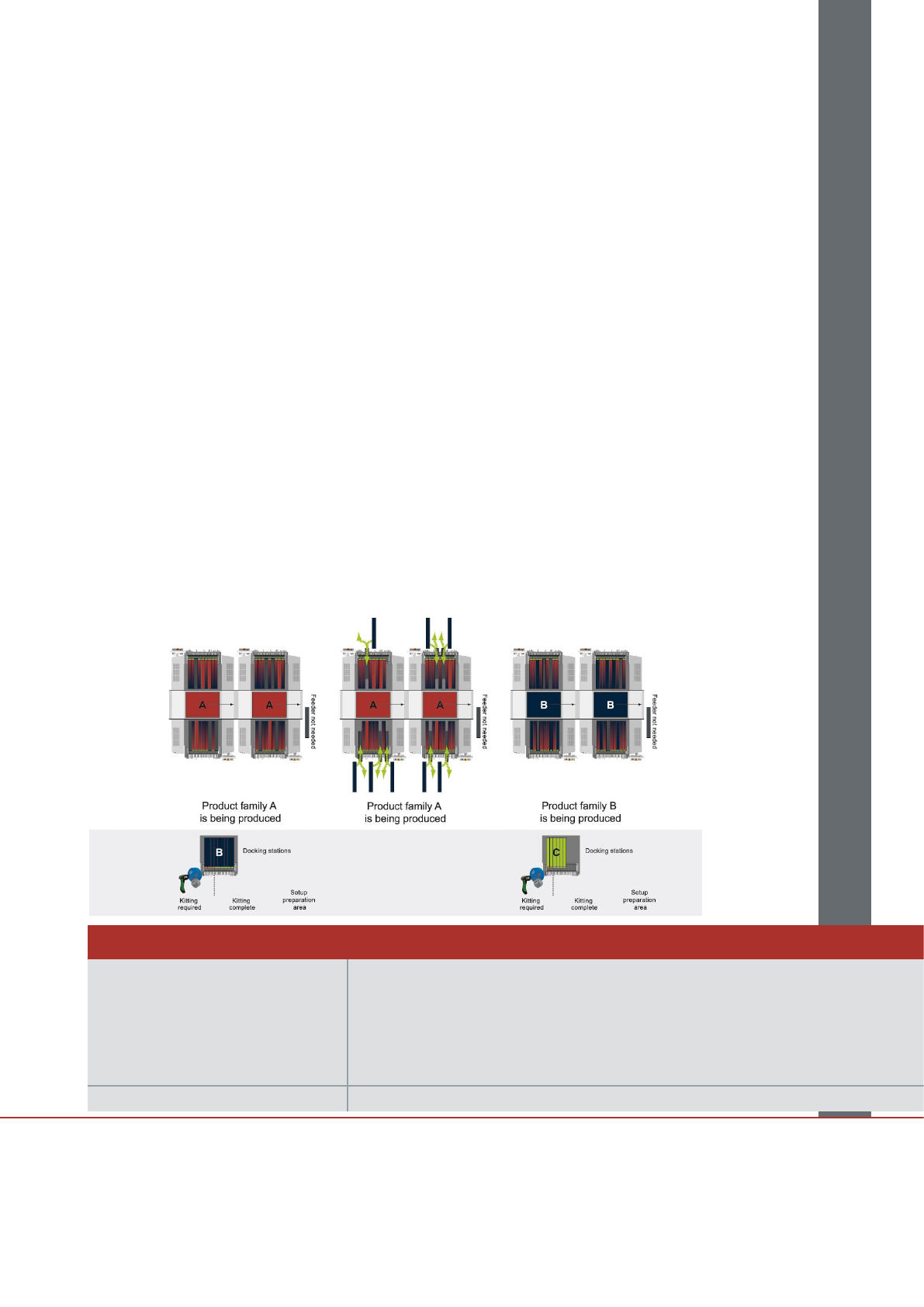
With its Random Setup, SIPLACE is making setup
changeovers a lot easier: operators can now place
component feeders anywhere on the feeder table
and are no longer restricted to specific slots.
In addition, the same component can be set up
twice for much easier refills: when the first track
runs empty, the SIPLACE machine automatically
switches to the second track.
With SIPLACE Random Setup, the operator can
place the intelligent SIPLACE X-feeders in any
open slot on the line or on the feeder cart – without
having to stop the line.
SIPLACE Software
The information in this specification consists only of general descriptions and / or performance features, which is not contractually binding.
Any specific performance features / capabilities will only be binding if contractually agreed. Subject to changes without notice.
A10011-ASM-G106-EN Edition 3-04/2011
ASM Assembly Systems GmbH & Co. KG
Rupert-Mayer-Str. 44
81379 Munich, Germany
Phone: +49 89 20800-27819
Fax: +49 89 20800-36692
smt-solutions.de@asmpt.com
www.asm-smt.com
SIPLACE Random Setup
The SIPLACE machine recognizes the new feeders
automatically based on their unique IDs. If the
components and feeders were previously “kitted” by
scanning their respective barcodes, the placement
machine also receives all the necessary
component-related information and adjusts its
placement process accordingly. That way, floating
setup changeovers become possible, and
components can be set up on a second track
(SIPLACE Alternative Track). The SIPLACE X-
feeders even signal via their LEDs whether they will
still be needed in one of the next setups.
In addition, SIPLACE Setup Center makes it
possible to monitor the feeders' fill levels. If a feeder
is about to run empty, the station software and the
SIPLACE X-feeder LEDs signal this and prevent
expensive line stops because of missing
components.
The setup preparation department benefits from
SIPLACE Random Setup as well: At the click of a
button, operators can generate a so-called delta
setup, which highlights only those components for
the next job which are not already installed on the
line.
If the setup changeovers are executed with feeder
carts, Random Setup speeds up this procedure,
too, because the components can be set up
anywhere on the table before it gets docked on the
machine. This eliminates the need to sort the
material.
Your benefits:
Random Setup enables electronics
manufacturers who have to deal with small lots,
frequent product changeovers or lots of
prototypes to increase the total productivity of
their SMT lines by minimizing their setup times
and their total throughput times.
SIPLACE Random Setup also reduces the
feeder and feeder cart inventory in most cases,
thus reducing your asset base and improving
your capital position.
SIPLACE Random setup lets you set up
components on alternative tracks to avoid
components from running out.
Technical Data
SIPLACE Setup Center comprises
the following components and
subsystems:
• Setup Center GUI (client)
• Setup Center database (server)
• Datalogic 1D/2D wireless barcode scanner or
Symbol PDA MC70 with WLAN and scanner
• Multiple Setup Center GUIs (for example, one per line) can be linked to a single central
Setup Center database. Depending on your needs, you can connect multiple wireless
scanners to the system.
Supported barcode types: EAN 8/EAN 13/UPC A/UPC E, Interleaved 2/5, Code 39, Code 128, Code 93, 2D codes