00192296-02.pdf - 第55页
$6rJ oPH Qs (PHQs PLQGHQP HQsIXQNFLoYDOU HQGHONH]LNDKKR]KRJ\D ]gOORPgVYH]kUOÊ V] gP mWoJkSKH]D VrJoUHQGV]HUWLOOHW Y HDV]RIWYHUKH]P LQGHQgOWDOgQRVLQIRUP gFLoMgWIHOKmYKDVVD 7DUWDORP9W…
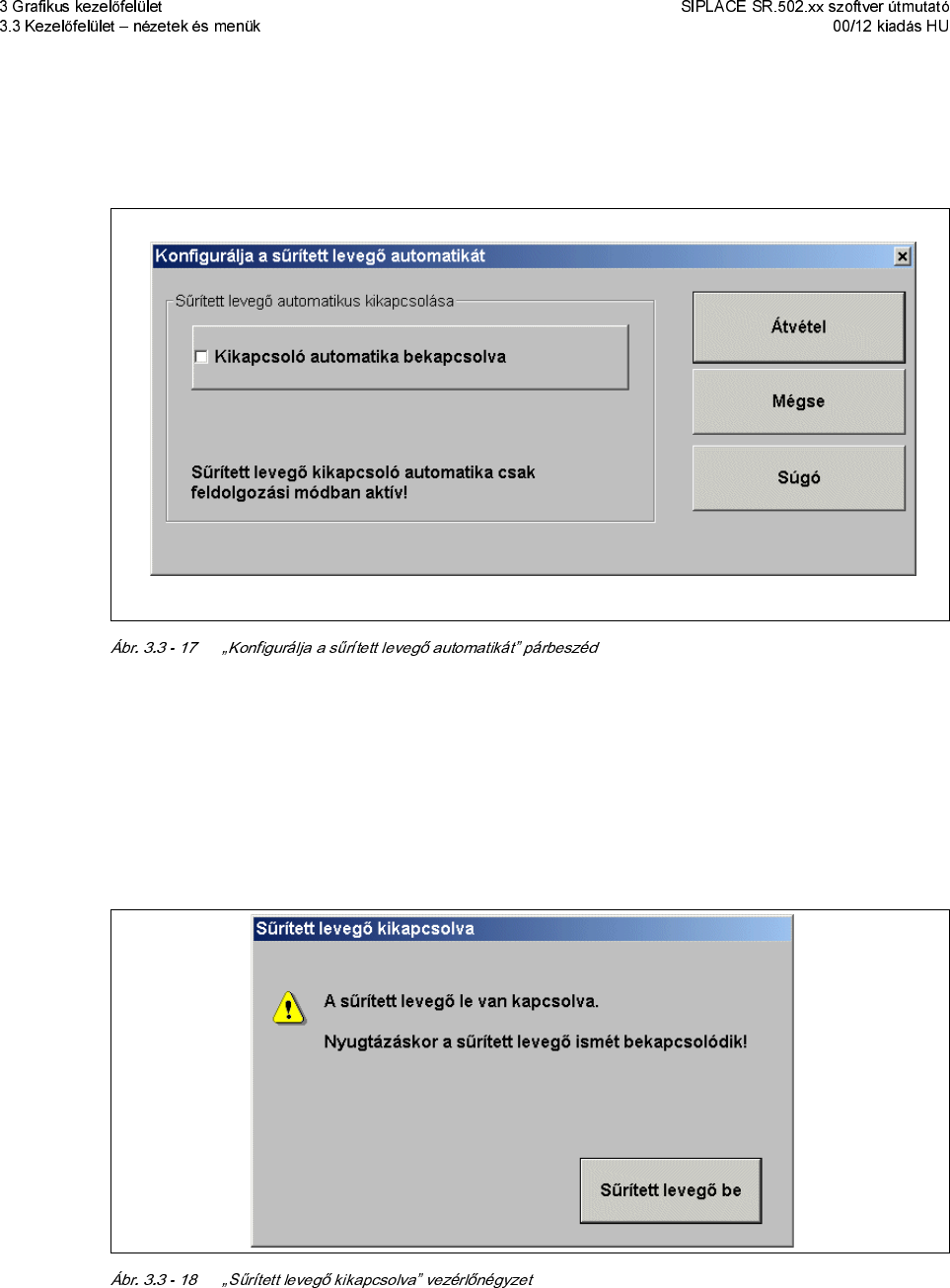
Å .DWWLQWVRQUgD.RQILJXUgOMDDVØUmWHWWOHYHJÊNLNDSFVROgVWPHQsEHMHJ\]kVUH
$NqYHWNH]ÊDEODNQ\mOLNPHJ
Å $NWLYgOMDGHDNWLYgOMDDNLNDSFVROoDXWRPDWLNDEHNDSFVROgVgQDNYH]kUOÊQkJ\]HWkW
Å .DWWLQWVRQUgD]WYkWHOUHDEHgOOmWgVRNWgUROgVDFkOMgEoO
Å .DWWLQWVRQUgD.DSFVROMDNLDVØUmWHWWOHYHJÊWPHQsEHMHJ\]kVUH(IXQNFLoFVDNDNNRU
OHKHWVkJHVKDDJkSD*\gUWgVOHgOOmWYDgOODSRWEDQYDQ
$NqYHWNH]ÊDEODNQ\mOLNPHJ
Å 1\RPMDPHJD6ØUmWHWWOHYHJÊEHJRPERW
Å $VØUmWHWWOHYHJÊLVPkWEHNDSFVROoGLN
$6rJoPHQs
(PHQsPLQGHQPHQsIXQNFLoYDOUHQGHONH]LNDKKR]KRJ\D]gOORPgVYH]kUOÊV]gPmWoJkSKH]D
VrJoUHQGV]HUWLOOHWYHDV]RIWYHUKH]PLQGHQgOWDOgQRVLQIRUPgFLoMgWIHOKmYKDVVD
7DUWDORP9WUOI
)HOKmYMDD]LQWHUDNWmYRQOLQHVrJoW
6rJo$OW)
$VrJoWgMkNR]WDWgVDPLQGLJD]DNWXgOLVQk]HWUHYRQDWNR]LN
6rJoKDV]QgODWD
0XWDWMDDVrJoUHQGV]HUNH]HOkVLPoGMgW
,QIR
,QIRUPgFLoNDWPXWDWDV]RIWYHUDNWXgOLVDQWHOHSmWHWWYHU]LoMgKR]65YHU]LoDV]HUYL]SDFNKR]D
Q\HOYL&'KH]kVIHOWsQWHWLDVRUYH]kUOÊV]gPmWoJkSgOWDOgQRVDGDWDLW
7-d.2=7$76
$]LQWHUDNWmY2QOLQH6rJoDNH]HOÊIHOsOHWPLQGHQQk]HWkEÊOD NDSFVROoV]LPEoOXPPDO
MREEUDDOXOIHOKmYKDWo
(]IHOKmYMDDVrJoWD]DNWXgOLVQk]HWKH]
$VrJoPHQsNPØNqGkVkWUkV]OHWHVHQDIHMH]HWLVPHUWHWL
Å .DWWLQWVRQUgD6rJoPHQsEHQDNmYgQWPHQsIXQNFLoUDYDJ\Q\RPMDPHJDPHJIHOHOÊ
ELOOHQW\ØNRQELQgFLoW
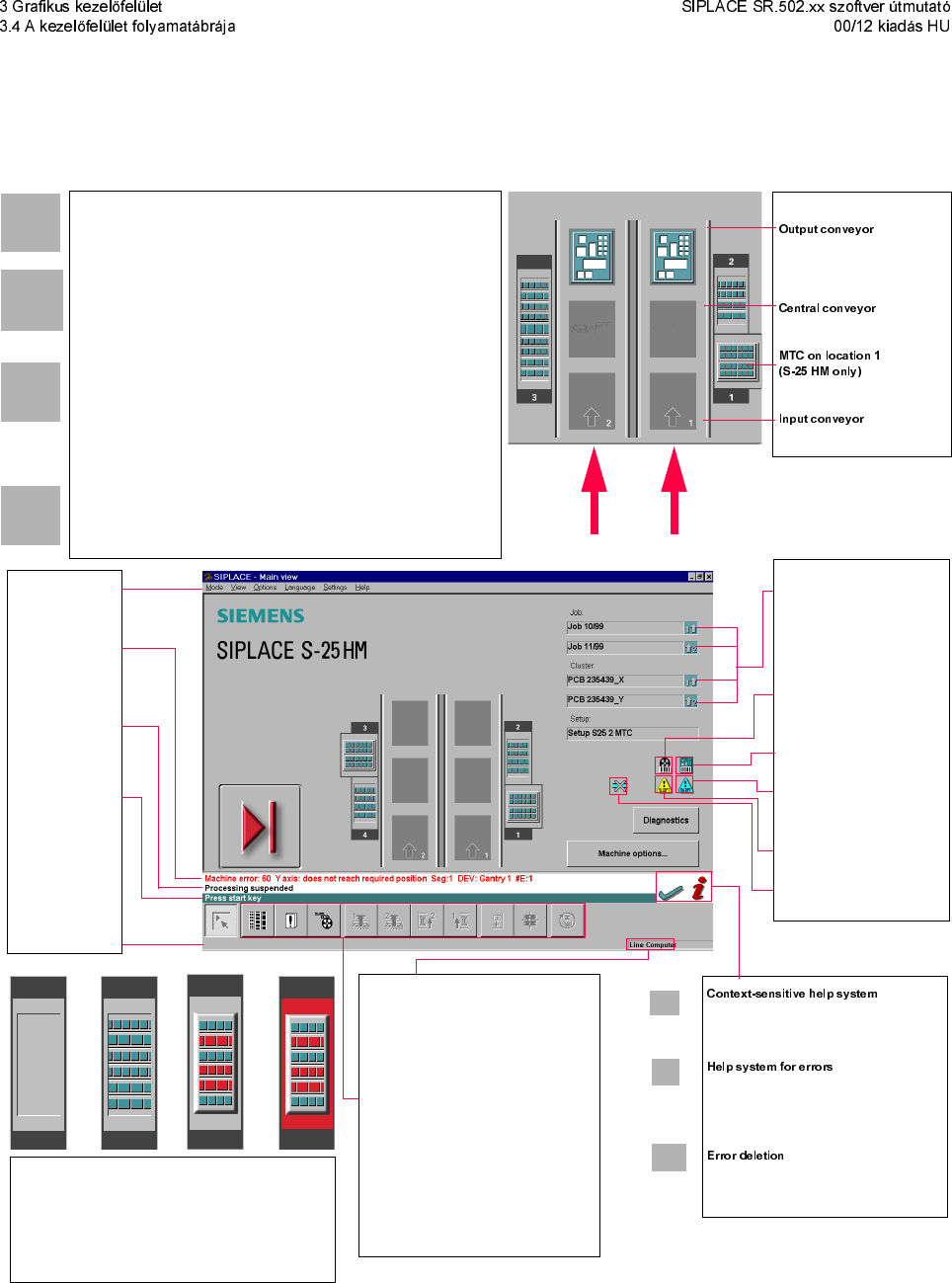
$NH]HOÊIHOsOHWIRO\DPDWgEUgMD
5qYLGrWPXWDWoIRO\DPDWgEUgYDODV]RIWYHU65[[PLQGHQIXQNFLoMgKR]UHQGHONH]kVUHgOO
*HUPDQFLNV]gPDkV(QJOLVKFLNNV]gPDQ\HOYHNHQ
Pull-down menus
Error information
bar
Status indication
and process status
Notification about a
specific action to
carry out
Information bar
Control modes:
Stand alone
GEM Host (not yet available)
Line Computer
SIPLACE Pro
Submenu icons with info box:
Setup
Error
Feeders
Gantry 1, 2
PCB conveyor 2, 1
Teach fiducial
Test component
SITEST
GEM
The PCB is supplied.
The central conveyor is empty.
The input conveyor is empty.
This also provides a short description of all
displayed operating elements.
Starts a help system displaying possible
causes of the current error along with correc-
tive actions.
After the error has been successfully cor-
rected, the currently active error is deleted.
Conveyor 2
Conveyor 1
Identifies the job or cluster of the
right conveyor lane, or of the
single conveyor, and of the left
conveyor lane (dual conveyors
only).
Barcode-supported component
refilling
PCB barcode is activated.
Machine options have been
changed
Software options configured
Compressed air switch-off
mechanism configured
1234
1 No setup available on the corresponding location
2 Setup available
3 Setup available - at least one empty track error
4 Machine standstill due to track error
This display appears during the start-up process of the machine. Only when the
referenSR.502.xx szoftver útmutatóce run has been completed successfully will
the display appear in the form of a button.
Status
The machine is running, or is in its 'ready' state.
Pressing the button:
The machine stops.
Status
The machine is placing components; 'stop' is activated. The assembly of the PCBs
located in processing conveyors 1 and 2 or in the central conveyor will be
terminated and the PCBs will be transported to the intermediate or output
conveyor. Subsequently, the machine will stop.
Pressing the button:
The machine continues to run without interruption.
Status
Machine is in the stopped state.
Pressing the button:
The machine resumes the placement operation.