Printer 710_810 Screen Change Module.pdf - 第6页
SCREE N CHANGE MO DULE ADJUS TMENTS AN D SETTIN GS 13.6 Technical Reference Manual Chapter Issue 5 May 05 Screen Change Mechanism Screen Position Sensor 1. Position a scr een in the machine so the rear screen frame is be…
SCREEN CHANGE MODULE
ADJUSTMENTS AND SETTINGS
13.4 Technical Reference Manual Chapter Issue 5 May 05
ADJUSTMENTS AND SETTINGS
Screen Depth
Adjuster
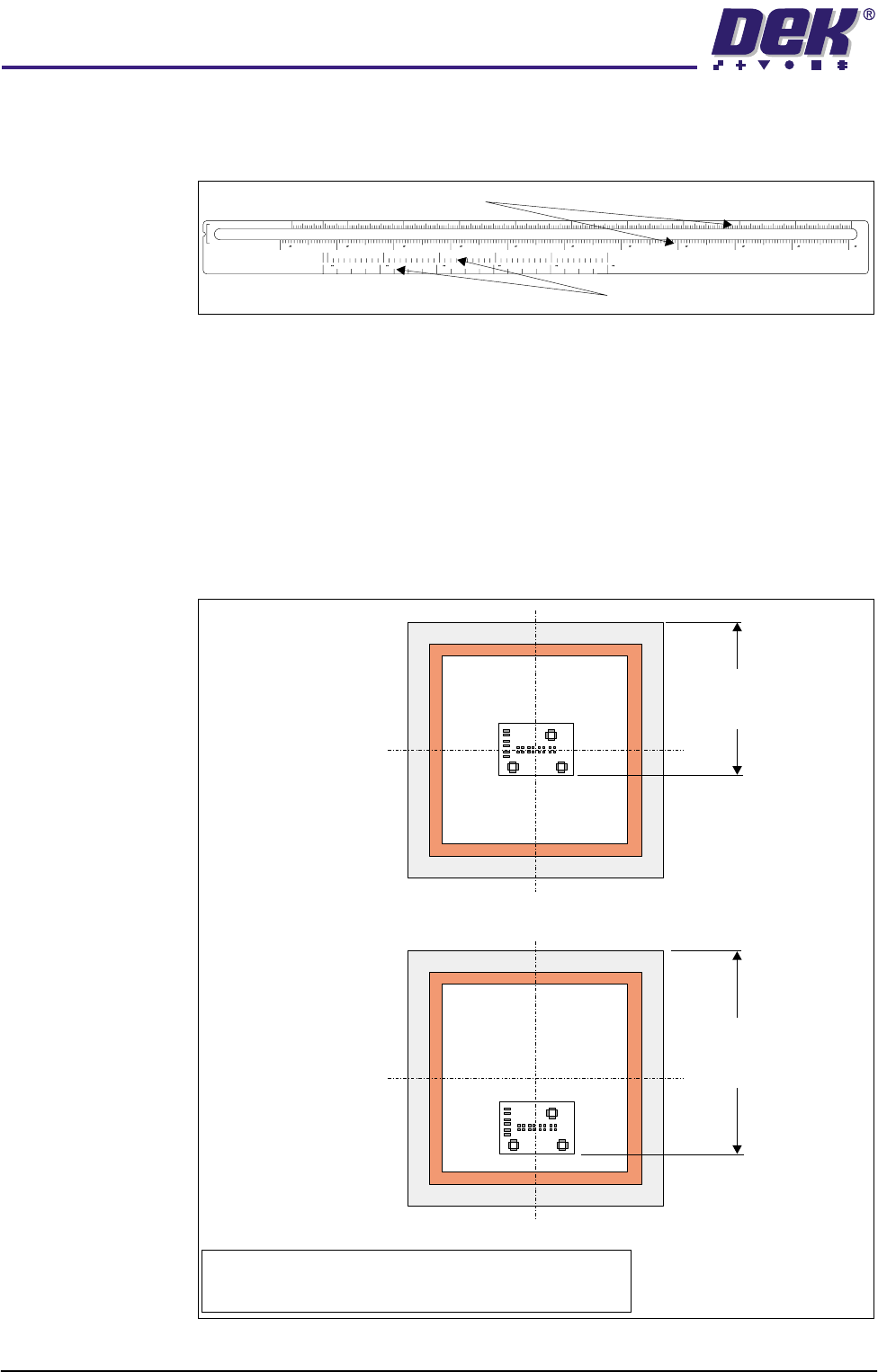
The screen depth adjuster has two scales as follows:
The rear of stencil to front of image scale, marked on the top of the screen depth
adjuster, can be used for either centre justified or front justified stencils. The
scale has both imperial and metric units as follows:
• Metric - 150mm to 650mm
• Imperial - 6” to 26”
When using this scale the screen depth adjuster is set to the rear of stencil to
front of image value. The figure below shows this measurement for both centre
and front justified stencils
Figure 13-1 Rear of Stencil to Front of Image Measurement
REAR OF STENCIL
TO FRONT OF IMAGE
CENTRE JUSTIFIED IMAGE SIZE
650
622 600 550 500 450 400 350 300 250 200 150
68101214161820222426
508 500 400 300 200
100 0
048121620
Rear of Stencil to Front of Image Scale
Centre Justified Image Size Scale
Front Justified
Rear of Stencil
to
Front of Image
Centre Justified
NOTE
Rear of stencil to front of image is measured from the rear
face of the screen frame to the front edge of the image.
Rear of Stencil
to
Front of Image
SCREEN CHANGE MODULE
ADJUSTMENTS AND SETTINGS
Chapter Issue 5 May 05 Technical Reference Manual 13.5
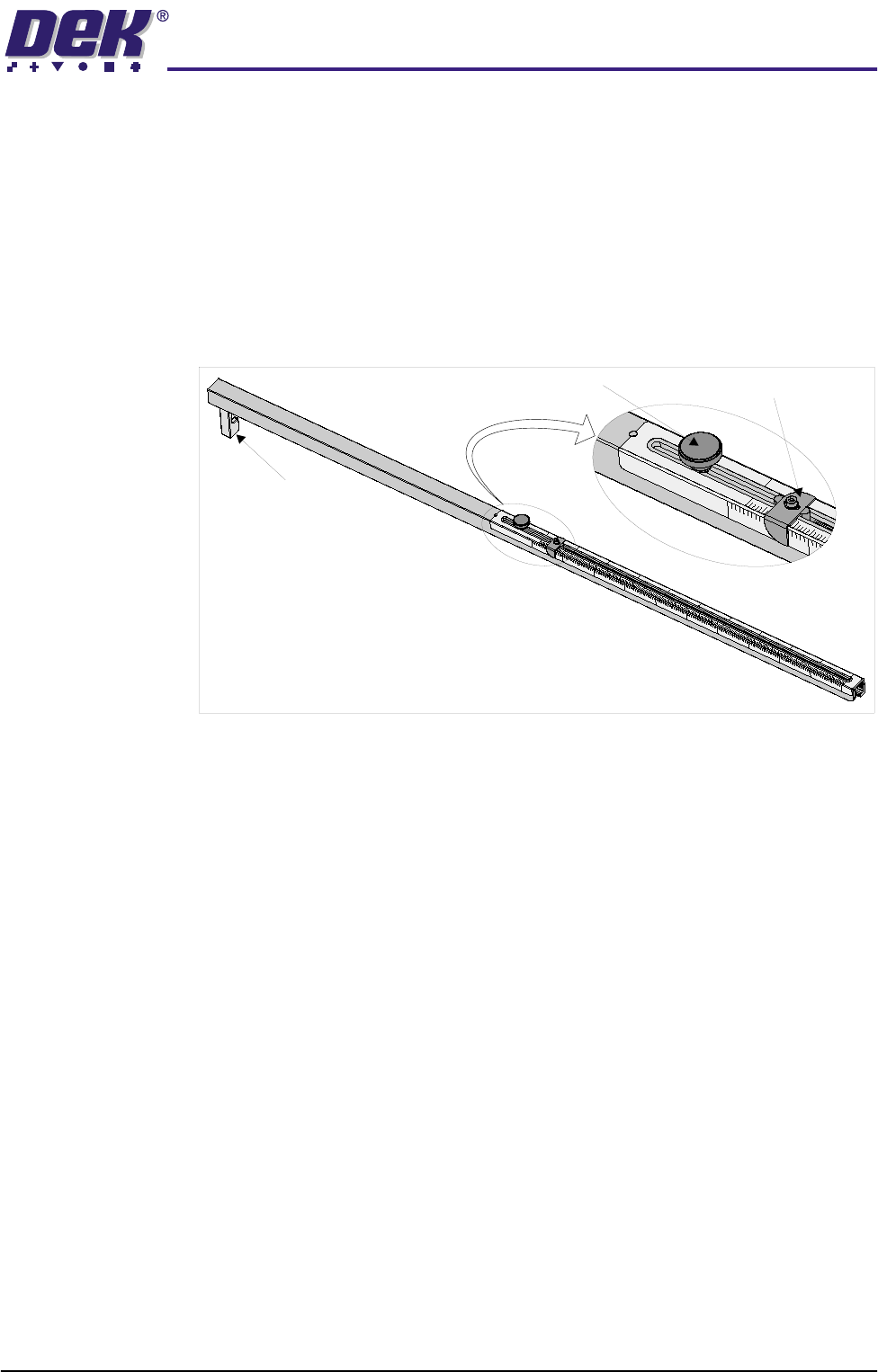
The centre justified image scale, marked on the side of the screen depth
adjuster, can only be used for centre justified stencils. When using this scale
the screen depth adjuster is set to the board width value. The scale has both
imperial and metric units as follows:
• Metric - 0mm to 508mm
• Imperial - 0” to 20”
To set the screen depth adjuster, use the following procedure:
1. Release the locking adjustment knob by turning it anti-clockwise.
2. Set the measurement guide to either:
a. The rear of stencil to front of image value, on the top scale, for either
centre or front justified stencils.
or
b. The board width value, on the centre justified image size scale, for centre
justified stencils only.
3. Turn the locking adjustment knob clockwise to secure the measurement
guide.
2
6
”
2
4
”
2
2
”
2
0
”
1
8
”
1
6
”
1
4
”
1
2
”
1
0
”
8
”
6
”
150
200
250
300
350
400
450
500
550
600
650
Left Hand View on Screen Depth Adjuster
Locking Adjustment Knob
Measurement Guide
End Stop
2
0
”
2
4
”
650
TO
F
RONT
O
F
I
MAGE
REAR OF STENCIL
C
E
N
T
R
E
J
U
S
T
I
F
I
E
D
I
M
A
G
E
S
I
Z
E
SCREEN CHANGE MODULE
ADJUSTMENTS AND SETTINGS
13.6 Technical Reference Manual Chapter Issue 5 May 05
Screen Change
Mechanism
Screen Position
Sensor
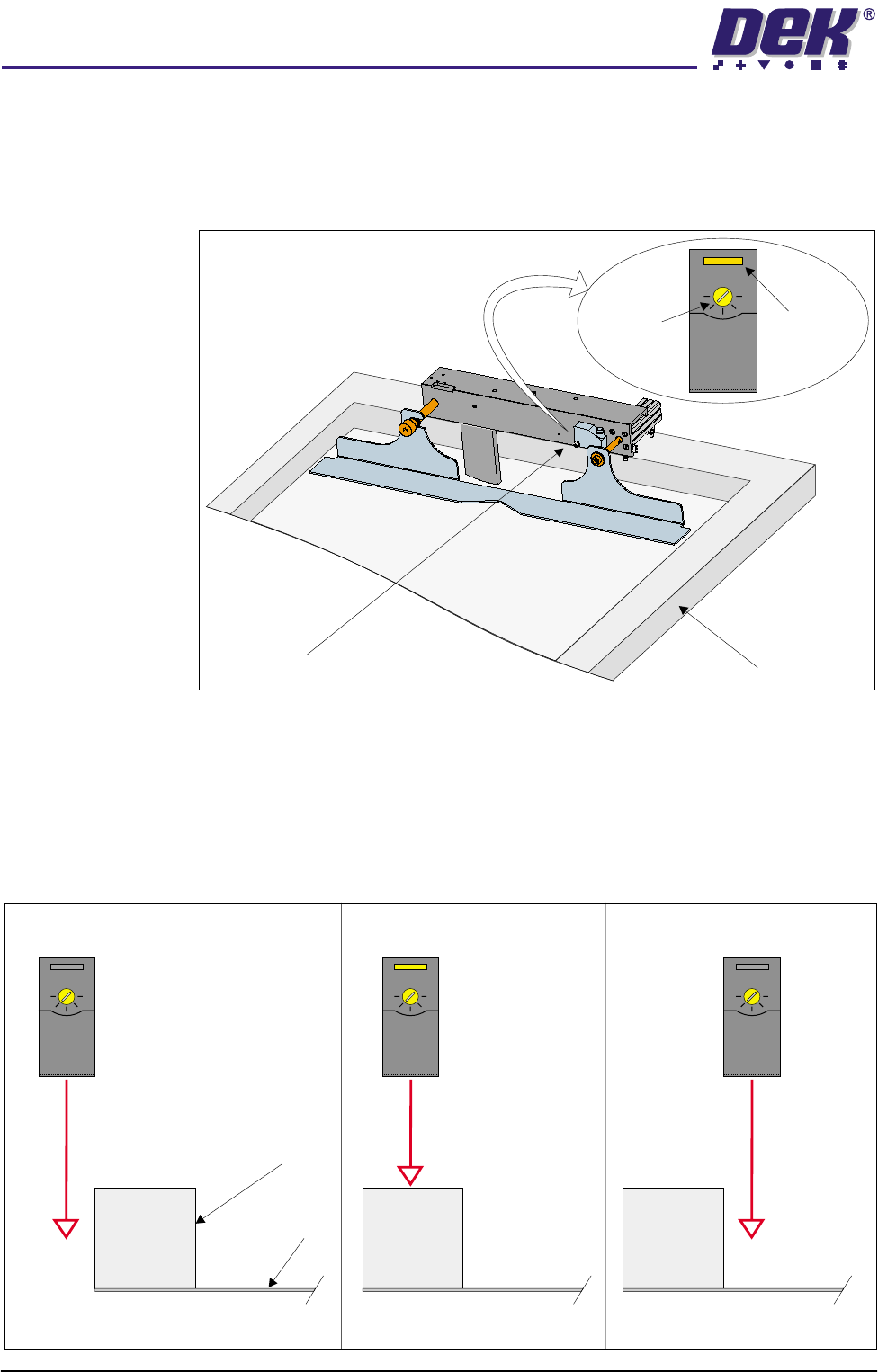
1. Position a screen in the machine so the rear screen frame is beneath the
screen position sensor.
2. Using a potentiometer trimming tool adjust the sensor sensitivity anti-
clockwise until the sensor test LED extinguishes.
3. Turn the sensor sensitivity clockwise until the sensor test LED illuminates.
4. Turn the sensor sensitivity clockwise a further half turn.
5. Move the rear screen frame backwards and forwards under the sensor to
ensure that the test LED is only activated by the screen frame.
Screen Frame
Screen Position Sensor
Adjuster
Test LED
+
-
+
-
+
-
+
-
Sensor Behind Screen Sensor Over Screen Frame Sensor Over Screen
Test LED Off Test LED On Test LED Off
Screen
Screen Frame