TP2024.Lane Expansion of the Parameter in BoardData.pdf - 第3页
SMT Software Eng ineering Group IM Operatio ns Y AMAHA MOTOR CO.,L TD. MD OC-SOFT50096 3/4 8 Pre Fix Ti mer sec [Board]-[B oard] tab 9 Trans Height (mm) [Board]-[B oard] tab 10 Board Fiduc ial “Execute / No …
SMT Software Engineering Group
IM Operations YAMAHA MOTOR CO.,LTD.
MDOC-SOFT50096
2/4
1. Target Model
The target model and the version are as follows.
Table 1.1. Target model and version
Item Object Remarks
Target model YS24DL, YS24XDL
Target version V3.24STD R1.000 or later (Mounter)
V1.24STD R1.000 or later (Y.FacT)
2. Summary
From this version, several parameters in board data ( described below ) can be set by each lane.
In addition, the function to display error message when the parameters that should be common
to all lane are different is added.
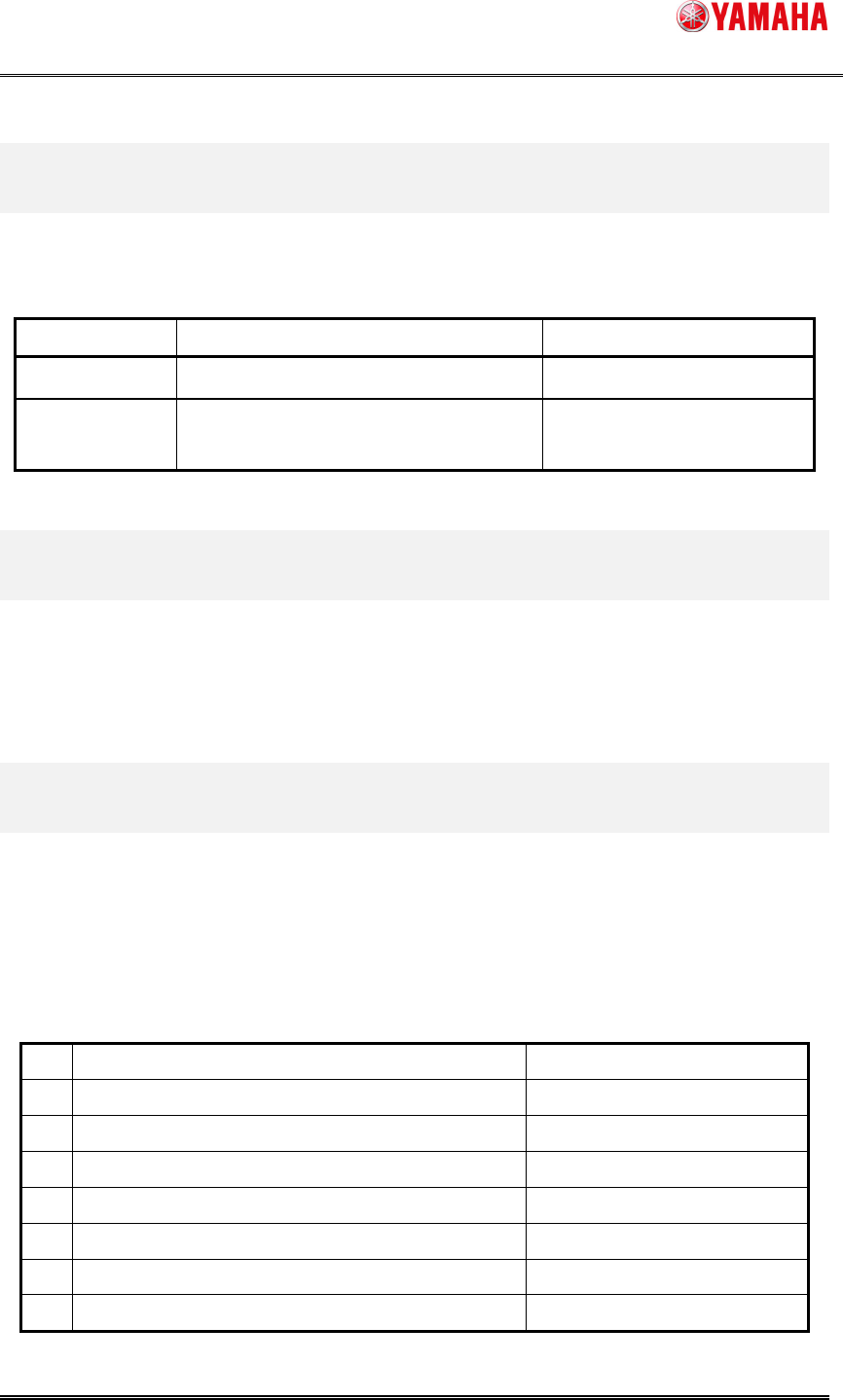
3. Production setting parameters
3.1 Individual parameters for each lane
In the previous version, parameters of table 2.1 are common data for all lane.
From this version, they can be set individually by each lane.
Table 3.1. Individual parameters for each lane
No.
Item name Location
1 Mount “Execute / Skip” [Board]-[Board] tab
2 Conveyor Motor Speed (%) [Board]-[Board] tab
3 Parts Height Carry In (mm) [Board]-[Board] tab
4 3A Correction [Board]-[Board] tab
5 Board Fix Device [Board]-[Board] tab
6 Conveyor Timer sec [Board]-[Board] tab
7 Precede Pick [Board]-[Board] tab

SMT Software Engineering Group
IM Operations YAMAHA MOTOR CO.,LTD.
MDOC-SOFT50096
3/4
8 Pre Fix Timer sec [Board]-[Board] tab
9 Trans Height (mm) [Board]-[Board] tab
10
Board Fiducial
“Execute / No Execute”
[Board]-[Fiducial] tab
11
Block Fiducial
“Execute / No Execute”
[Board]-[Fiducial] tab
12
Local Fiducial
“Execute / No Execute”
[Board]-[Fiducial] tab
13
Board Badmark
“Execute / No Execute”
[Board]-[Badmark] tab
14
Block Badmark
“Execute / No Execute”
[Board]-[Badmark] tab
15
Local Badmark
“Execute / No Execute”
[Board]-[Badmark] tab
16
Sort Type For Badmark
Sort Type “No Sort / Near Mark”
[Board]-[Badmark] tab
17
Sort Type For Badmark
Starting Point “Front left / Rear left / Front right /
Rear right”
[Board]-[Badmark] tab
18
Sort Type For Badmark
Prior Direction “X Direction / Y Direction”
[Board]-[Badmark] tab
3.2 Common parameters for all lane
Parameters of table 3.1 should be set commonly for all lane. So if they are different for each
lane, data check error happens and the machine can not be start running. If error message is
displayed after loading the board data, change the parameter commonly and start auto-running.
Table 3.2. Common parameters for all lane
No.
Item name Location Error Message Number
1 3D Co-Planarity [Board]-[Board] tab Ea24515
2 Vacuum Check [Board]-[Board] tab Ea24516
3 Alignment [Board]-[Board] tab Ea24517
4 Tray Priority [Board]-[Board] tab Ea24518
5 Skip Retry [Board]-[Board] tab Ea24520
SMT Software Engineering Group
IM Operations YAMAHA MOTOR CO.,LTD.
MDOC-SOFT50096
4/4
6 Mount Interfere Check [Board]-[Board] tab Ea24522
7 Retry Sequence [Board]-[Board] tab Ea24523
4. Limitations
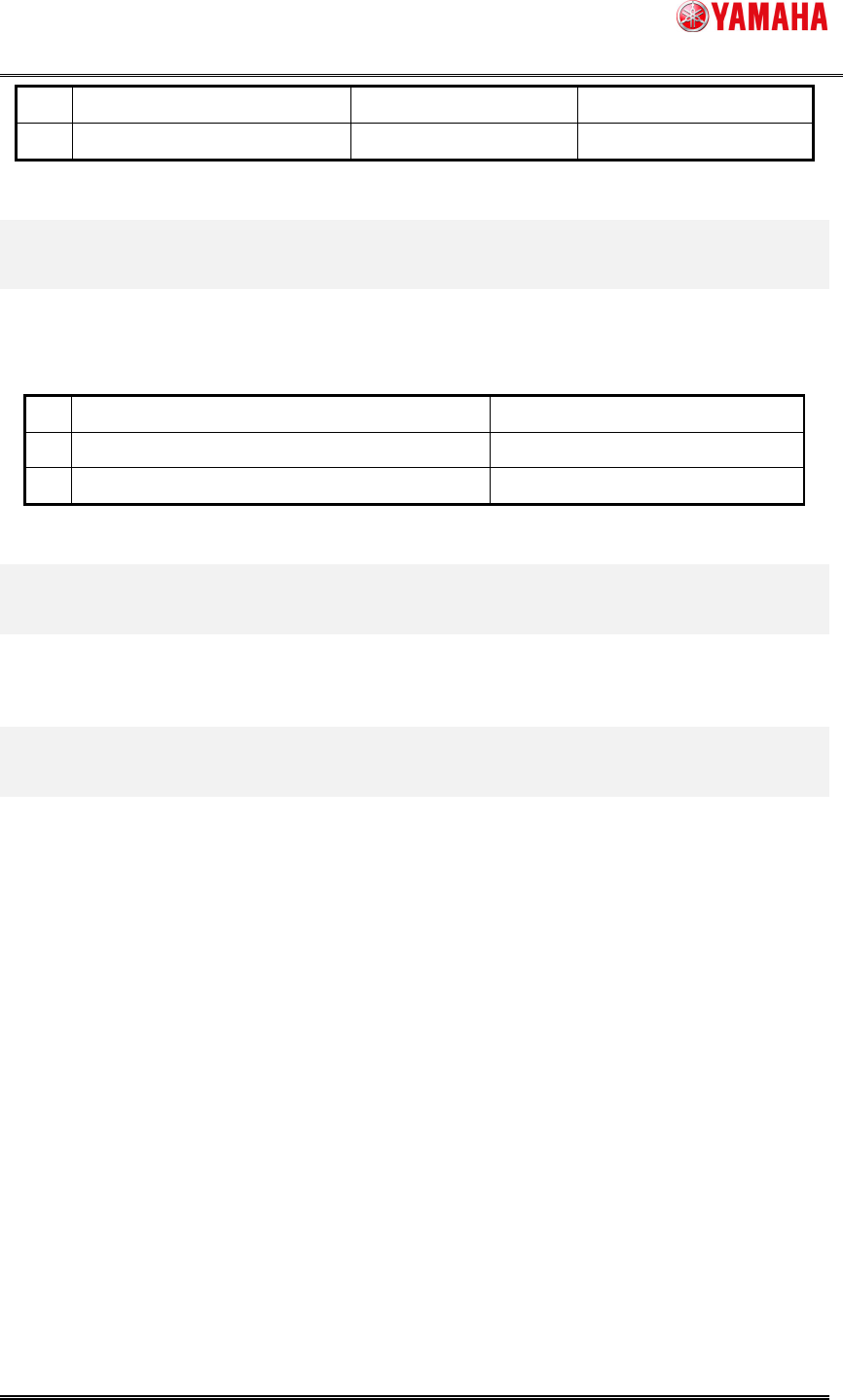
The parameter Table 4.1 of coordinate system can be set by each lane.
表 4.1 Individual parameters for each lane
No
Item name Location
1 Local Fiducial Data [Board]-[Fiducial] tab
2 Local Badmark [Board]-[Badmark] tab
5. Limitations
There are no limitations.
6. Notice
When the board data which is made by the version that this function is active is used in the
machine that it is not active, there is a case that it works as the setting which does not intend.
Similarly, when the software is downgraded, there is same case.
When the board data is saved in the application that this function is not active, there is a
case that the setting value set individually is lost.