00197478-02_VB_BoardGateKeeper1.2-SP1_DE_EN.pdf - 第28页
Requirements Time Sync 28 SIPLACE BoardGateKeeper 1.2 SP1
Requirements
Software Requirements
SIPLACE BoardGateKeeper 1.2 SP1 27
3
3 Requirements
Requirements
3.1
3.1 Software Requirements
Software Requirements
To run the BoardGateKeeper 1.2 SP1 system, you need to install the following software:
▪ SIPLACE Pro 12.1 (recommended), 12.0 (compatible)
▪ OIB 4.1 Core
▪ Optional: OIB LineControl adapter (for integration of multiple, line-specific MES systems)
3.2
3.2 Time Sync
Time Sync
To ensure that you can trace board production data properly at a later date, it is important that all systems
involved have synchronized time keeping. The individual times in the various systems can be automat-
ically synchronized with the SIPLACE Time Sync tool.
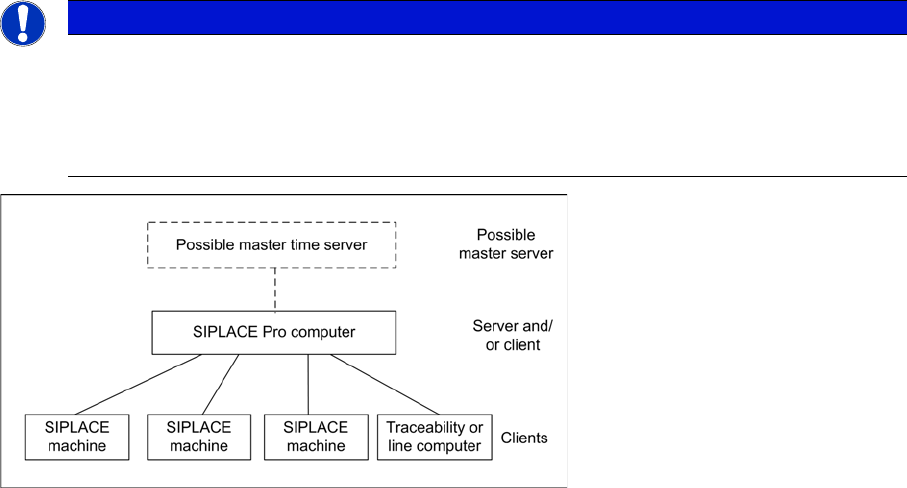
SIPLACE Time Sync is a client server application, which helps to synchronize the time at all SIPLACE
machines and all traceability or line computers (client) via the SIPLACE Pro computer or a central time
server (server). Time Sync is installed and configured on one particular computer as a time server and
on one or more other computers as a client.
The SIPLACE Pro computer has proven to be an ideal time server.
NOTICE
Time Sync
After installing the Time Sync server and Time Sync client, check the settings for "Time Sync"
and correct the times where necessary, at the Time Sync client.
The current Time Sync software and software instructions can be found on one of the Support
Media DVDs (item no: 00388693-xx or 00388694-xx), supplied with each software product.
Requirements
Time Sync
28 SIPLACE BoardGateKeeper 1.2 SP1

System Requirements and Software Components
System Requirements for SIPLACE BoardGateKeeper
SIPLACE BoardGateKeeper 1.2 SP1 29
4
4 System Requirements and Software Components
System Requirements and Software Components
4.1
4.1 System Requirements for SIPLACE BoardGateKeeper
System Requirements for SIPLACE BoardGateKeeper
4.2
4.2 Configuration
Configuration
To establish the connection to the line equipment, you need to install SIPLACE BoardGateKeeper in the
SIPLACE LAN. The installation options vary according to your network configuration and are as follows:
1. SIPLACE BoardGateKeeper on one computer
This option requires that all SIPLACE Pro computers are available in the same LAN segment.
2. SIPLACE BoardGateKeeper on each line server
This option needs to be selected if the SIPLACE Pro computers are in different line-specific LAN seg-
ments.
NOTICE
System requirements
The system requirements (supported operating system and database variants) and an over-
view of mutually compatible products can be found in the Assembly Instructions SIPLACE Sup-
port Media, item no [00197214-xx].