00195403-0102_AI_ AxisUnitA364_DE+EN.pdf - 第11页
Replacing Axis Unit with Adapter Cable (X and D series) Montageanleitung Axis Unit A364 SIPLACE X and D series 2-1 2 Replacing Axis Unit with Adapter Cable (X and D series) Item numbers Axis Unit A364 [03050365S02] It …
Achseinschub mit Adapterkabel tauschen (X-, D-Serie)
1-6 Montageanleitung Axis Unit A364 SIPLACE X and D series

Replacing Axis Unit with Adapter Cable (X and D series)
Montageanleitung Axis Unit A364 SIPLACE X and D series
2-1
2 Replacing Axis Unit with Adapter Cable
(X and D series)
Item numbers
Axis Unit A364 [03050365S02]
It contains the following parts:
– Axis Unit A364 [03050365-02]
– Adapter cable harness Axis Unit [03050590-01]
– 2 screws DIN912-M3 x 6-A2-70 [00201463-xx]
Dismounting of the old axis unit
NOTE: Cable harness with adapter
The cable harness with adapter is only necessary if an old axis unit is replaced by the newer
version.
ATTENTION: Marking the connectors
Before you unplug the connectors mark the positions to make the reconnection easy later on.
ATTENTION:
Make sure that you do not damage any cables.
Replacing Axis Unit with Adapter Cable (X and D series)
2-2 Montageanleitung Axis Unit A364 SIPLACE X and D series
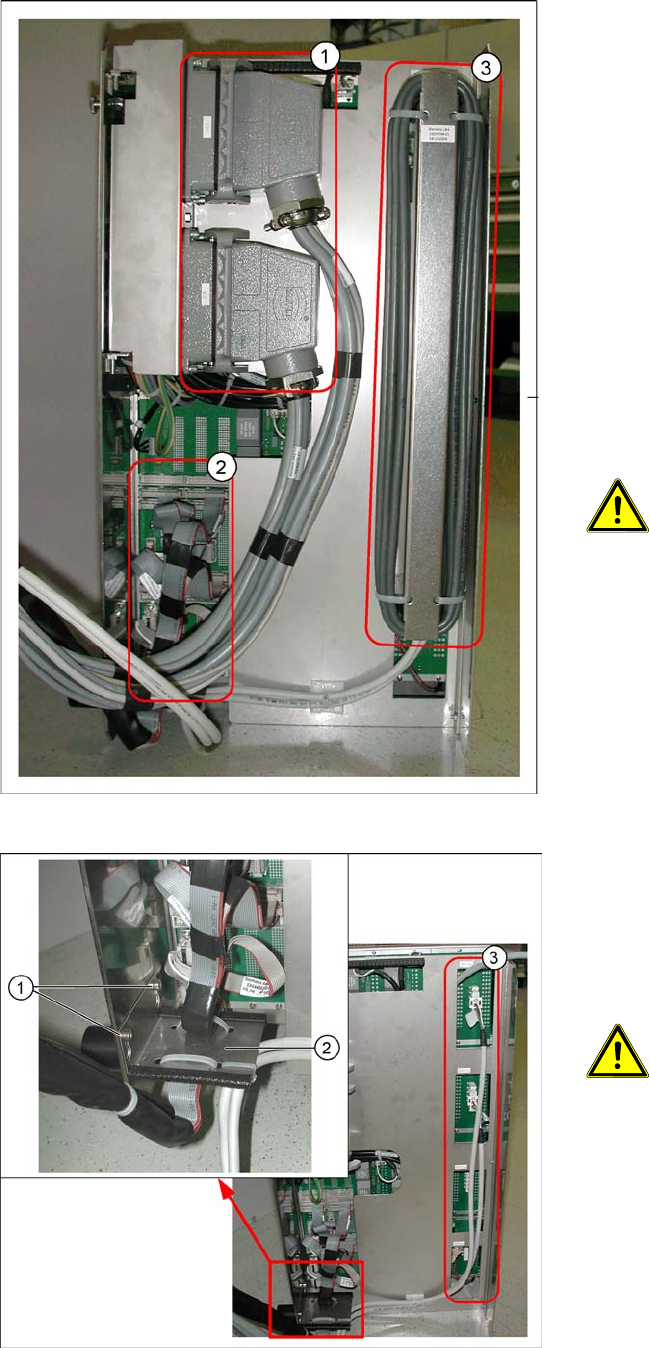
Legend
1. Harting connector
2. Flat ribbon cable
3. Ballast resistor
In order to dismount the old axis unit proceed as
follows:
X Switch off the machine.
X Remove the safety cover above the axis unit to
have a free access to the axis unit.
X Pull the axis unit out from the machine.
X Lift up the axis unit of the guidance and place
it on the floor.
X Unplug the harting connector (1).
X Unplug all flat ribbon cables (2).
ATTENTION: Marking the connectors
Mark the flat ribbon cables to
make the reconnection easy later on.
X Lift up the ballast resistor (3) and disconnect
the plugs going to the axis units.
X Dismount the flat ribbon cable holder (2) by
loosening both screws (1).
X Remove the two or four connectors (3). Their
number varies depending on the machine ty-
pe. If the cables are fixed to the axis unit with
cable holders also loose these cable holders.
ATTENTION: Marking the connectors
Before you unplug mark
the connectors to make the
reconnection easy later on.