00195403-0102_AI_ AxisUnitA364_DE+EN.pdf - 第12页
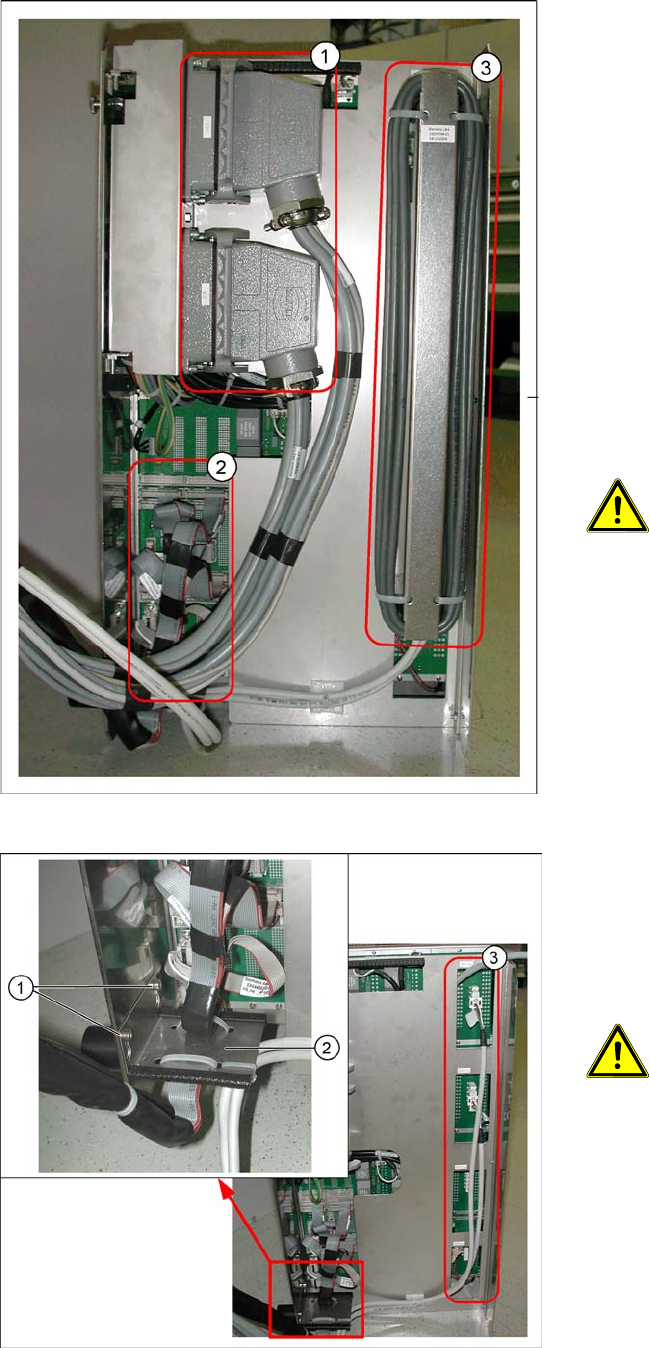
Replacing Axis Unit with Adapter Ca ble (X and D series) 2-2 Montageanleitung Axis Unit A364 SIPLACE X and D series Legend 1. Harting connector 2. Flat ribbon cable 3. Ballast resistor In order to dismount the o ld axis …

Replacing Axis Unit with Adapter Cable (X and D series)
Montageanleitung Axis Unit A364 SIPLACE X and D series
2-1
2 Replacing Axis Unit with Adapter Cable
(X and D series)
Item numbers
Axis Unit A364 [03050365S02]
It contains the following parts:
– Axis Unit A364 [03050365-02]
– Adapter cable harness Axis Unit [03050590-01]
– 2 screws DIN912-M3 x 6-A2-70 [00201463-xx]
Dismounting of the old axis unit
NOTE: Cable harness with adapter
The cable harness with adapter is only necessary if an old axis unit is replaced by the newer
version.
ATTENTION: Marking the connectors
Before you unplug the connectors mark the positions to make the reconnection easy later on.
ATTENTION:
Make sure that you do not damage any cables.
Replacing Axis Unit with Adapter Cable (X and D series)
2-2 Montageanleitung Axis Unit A364 SIPLACE X and D series
Legend
1. Harting connector
2. Flat ribbon cable
3. Ballast resistor
In order to dismount the old axis unit proceed as
follows:
X Switch off the machine.
X Remove the safety cover above the axis unit to
have a free access to the axis unit.
X Pull the axis unit out from the machine.
X Lift up the axis unit of the guidance and place
it on the floor.
X Unplug the harting connector (1).
X Unplug all flat ribbon cables (2).
ATTENTION: Marking the connectors
Mark the flat ribbon cables to
make the reconnection easy later on.
X Lift up the ballast resistor (3) and disconnect
the plugs going to the axis units.
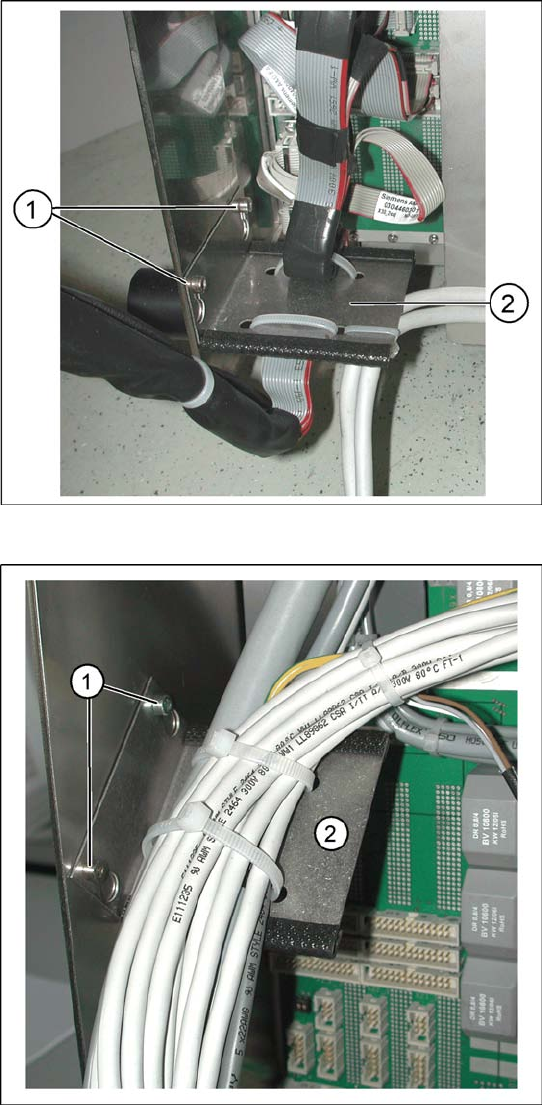
X Dismount the flat ribbon cable holder (2) by
loosening both screws (1).
X Remove the two or four connectors (3). Their
number varies depending on the machine ty-
pe. If the cables are fixed to the axis unit with
cable holders also loose these cable holders.
ATTENTION: Marking the connectors
Before you unplug mark
the connectors to make the
reconnection easy later on.
Replacing Axis Unit with Adapter Cable (X and D series)
Montageanleitung Axis Unit A364 SIPLACE X and D series
2-3
Installation
X Connect all flat ribbon cables coming from the
machine with the corresponding connectors at
the axis unit. Connect the cables in the same
way as they were connected in the older axis
unit.
X Mount the flat ribbon cable holder(2) with two
screws(1) to the new axis unit.
X Mount the holder of the cable harness (2) with
two provided screws(1) on the left inner side of
the axis unit.