00196658-01 - IM SIPLACE Pro 7.1_en.pdf - 第6页
Installation Manual 1 Introduction SIPLACE Pro 7.1 Edition 11/2009 US 4 1.2 Scope of Delivery The Basic Software Package SIPL ACE Pro 7.1 (Item No . 001 16782-02) cons ists of the following: 1 CDs: 1 "1 CD-ROM "…
1 Introduction Installation Manual
Edition 11/2009 US SIPLACE Pro 7.1
3
1 Introduction
Please read chapters 1 through 3 before you install SIPLACE Pro. 1
Chapter 4 describes the installation sequence for SIPLACE Pro, as well as the related server
types, and important information regarding the installation. 1
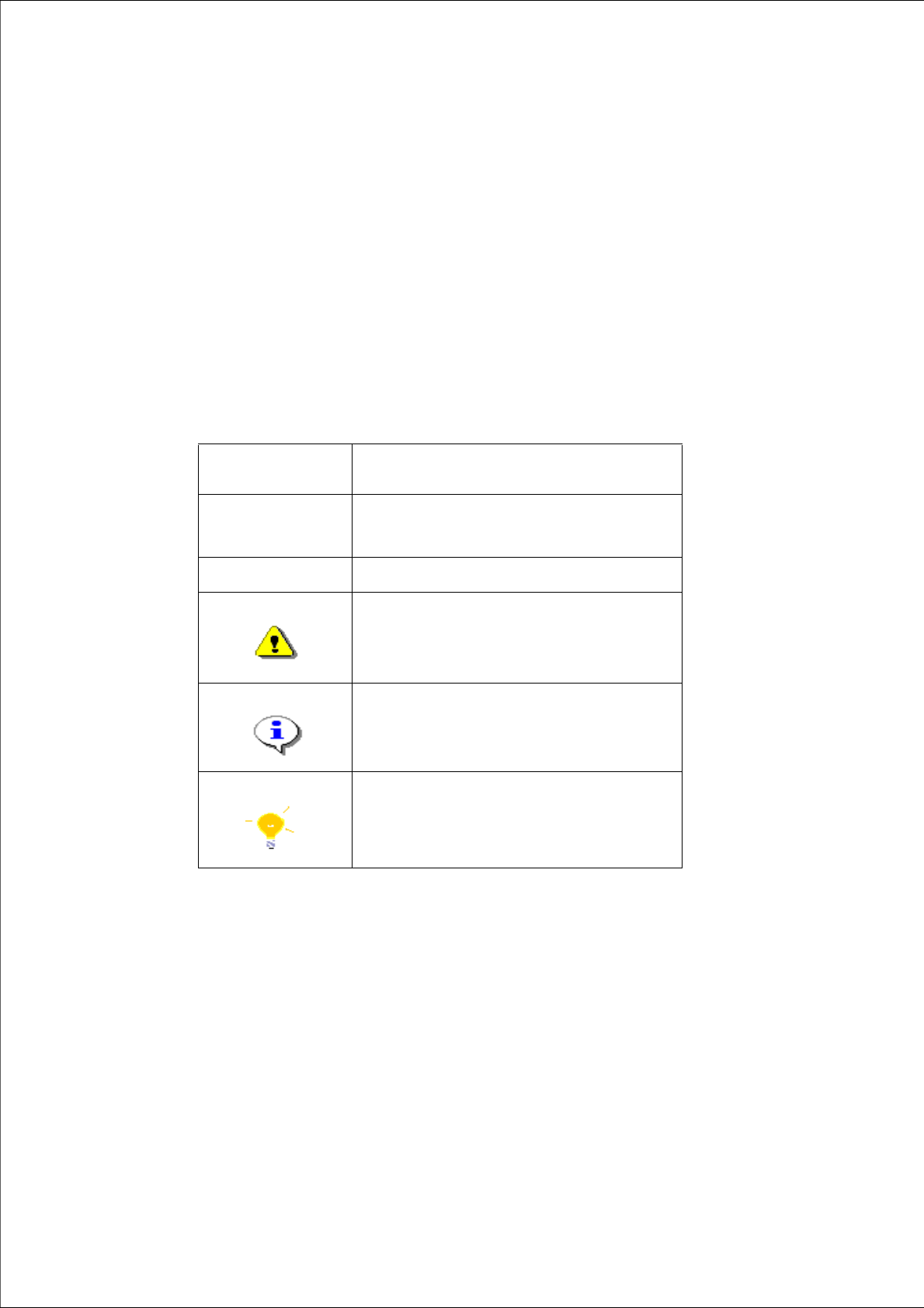
1.1 Explanation of symbols
Various symbols and notes are used for making this document easier to read. 1
1
1
Words in bold/
italics
These are dialog boxes and menu commands.
Step ...
An installation step includes all the actions relating
to a specific dialog box. An installation step may be
composed of several actions.
Æ
Requires an action (e.g. mouse click, open file)
Corresponds to a warning. The information is critical
to the success of the installation process. The
installation will be cancelled if you do not comply
with the warning.
Explanatory information about the installation
sequence.
Hint to facilitate your working with SIPLACE Pro
installation.
Tab. 1 - 1 Explanation of symbols

Installation Manual 1 Introduction
SIPLACE Pro 7.1 Edition 11/2009 US
4
1.2 Scope of Delivery
The Basic Software Package SIPLACE Pro 7.1 (Item No. 00116782-02) consists of the following:1
CDs: 1
"1 CD-ROM "SIPLACE Pro", which contains 1
SIPLACE Pro 7.1 1
SiCluster Professional (a license is required). 1
"1 SIPLACE Pro Factory License (without the connection to SIPLACE stations) 1
"1 CD-ROM with OIS 7.1 Server and Client application 1
"Support Media version 1.7 (Item No. 00388451-01), which contains 1x DVD 1 and 1x DVD 21
1
Documentation: 1
Basic documents: 1
– Software Version Description SIPLACE Pro 7.1
(German / English 00196657-01)
– Getting Started with SIPLACE Pro 7.1
(English: Item No 00196655-01, German: Item 00196656-01)
– Installation Manual SIPLACE Pro 7.1 (Item No 00196658-01)
Detailed installation manuals: 1
– Configurations for SIPLACE Pro (English only: Item No 00193760-xx)
– Guideline for XML Import / Export (English only: Item no. 00193789-xx)
– Standard Component Shape Library Handling (English only: Item no. 00194625-xx)
– Recipe Analyzer API Manual (English only: Item no. 00196138-xx)
– Software Version Description SIPLACE CAD V4.1 SP2
(English only: Item no. 00194678-xx)
Note:
Please use the document "Navigation Guide for the Installation Procedure of SIPLACE Soft-
ware Systems" (Item No. 00195050-xx) to navigate through the documentation. The navigation
guide and all related documents are available on the Support Media DVD (Art. No. 00388451-01)
that is added to any software product. 1
1 Introduction Installation Manual
Edition 11/2009 US SIPLACE Pro 7.1
5
1.3 System requirements
The following hardware is required for a successful SIPLACE Pro installation. 1
1.3.1 SIPLACE Pro Server
The following Hardware is recommended for the SIPLACE Pro Server: 1
– Pentium 4 with 3.0GHz or higher
– 2 x 160 GB hard disk
– 2048 MB memory (1024 MB min.)
– Backup drive (e.g. DAT, DVD-writer)
– 21” screen (19’’ min.)
– optional SR-UPS
1
The following Software is required: 1
– The following Software is required:
– Windows 2003 Server Standard Edition with SP2 and SQL 2000 with SP4 /
SQL 2005 (Server/Express) with SP2/SP3 / SQL 2008 (Server/Express) with SP1, or
– Windows XP Professional with SP2/SP3 and MSDE with SP4 /
SQL 2005 (Server/Express) SP2/SP3 / SQL 2008 (Server/Express) SP1, or
– Windows Vista SP2 with SQL 2005 (Server/Express) SP2/SP3 /
SQL 2008 (Server/Express) SP1, or
– Windows Server 2008 with SQL 2005 (Server/Express) SP2/SP3 /
SQL 2008 (Server/Express) SP1
Note:
A hard disk with 500 MB or more free space should be used for installation. 1
Note:
- Windows Server 2000/W2K is not longer supported. This means that SIPLACE Pro 5.x and
higher versions are not compatible to Windows 2000/W2K. Therefore please make sure that you
upgrade your Windows Server 2000/W2K system to Windows 2003, Windows XP or Windows
Vista.
- SIPLACE Pro 5.2 or higher is compatible with Windows Vista SP2. 1
1