00198015-01_IM_SQL_Server_2014_Express_EN.pdf - 第42页
SQL Server 2014 Ex press / Installation Manual 11/2015 Edition 42 NOTICE Name of administrators group dep ends on language Please keep in mind t hat the above listed query is bui lt for English language systems. If your …
SQL Server 2014 Express / Installation Manual 11/2015 Edition
41
► Ensure that the correct SQL instance is entered as Server name:.
The correct naming is <ComputerName>\<InstanceName> for user defined instances. If you
installed a default SQL instance (internal name MSSQLSERVER), you only have to enter the
computer name instead.
► Ensure that SQL Server Authentication is selected (since the administrators group does not
have proper permissions).
► Enter the Login and Password for the sa user (SysAdmin).
► Click the Connect button to connect to the SQL instance.
SQL Server 2014 Management Studio connects to the SQL instance.
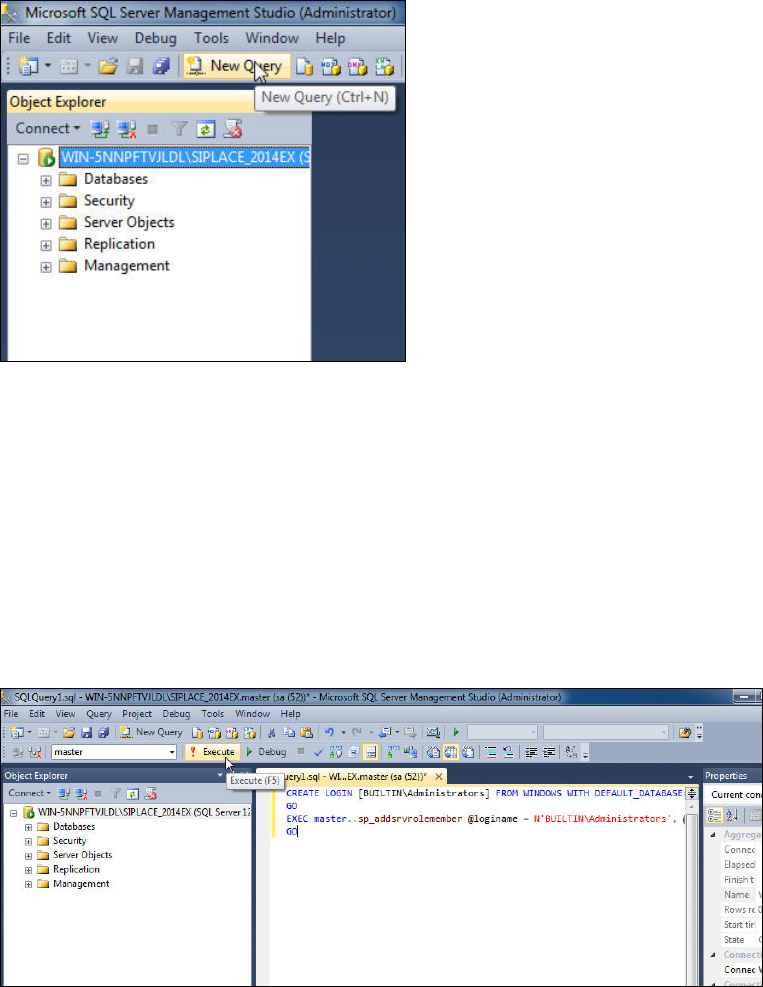
Figure 5-23: Starting New Query
► Click the New Query button.
► Paste the following text in the new query window:
CREATE LOGIN [BUILTIN\Administrators] FROM WINDOWS WITH
DEFAULT_DATABASE=[master]
GO
EXEC master..sp_addsrvrolemember @loginame = N'BUILTIN\Administrators',
@rolename = N'sysadmin'
GO
Figure 5-24: Executing the query
► Click the ! Execute button.
You have now assigned the administrators group to the SQL SysAdmins role.

SQL Server 2014 Express / Installation Manual 11/2015 Edition
42
NOTICE
Name of administrators group depends on language
Please keep in mind that the above listed query is built for English language systems. If
your operating system has another language, you may have to modify the query to use
the appropriate group name, including the prefix.
SQL Server 2014 Express / Installation Manual 11/2015 Edition
43