00198055-01_IM_Taceability5.0_EN.pdf - 第18页
Installation of Trace Service and Monitor System Requirements and Software Components for Tra ceability Mo dules 4.1.3 Software Components and Config uration 18 Installation Manual SIPLACE Traceability 5.0 1. SIPLACE Tra…
Installation of Trace Service and Monitor
4.1.3 Software Components and Configuration System Requirements and Software Components for Traceability Modules
Installation Manual SIPLACE Traceability 5.0 17
4.1.3
4.1.3 Software Components and Configuration
Software Components and Configuration
4.1.3.1
4.1.3.1 Software Components
Software Components
The SIPLACE Traceability installation CD contains the following software components:
▪ Trace Service 5.0
▪ Trace Monitor 5.0
4.1.3.2
4.1.3.2 Configuration
Configuration
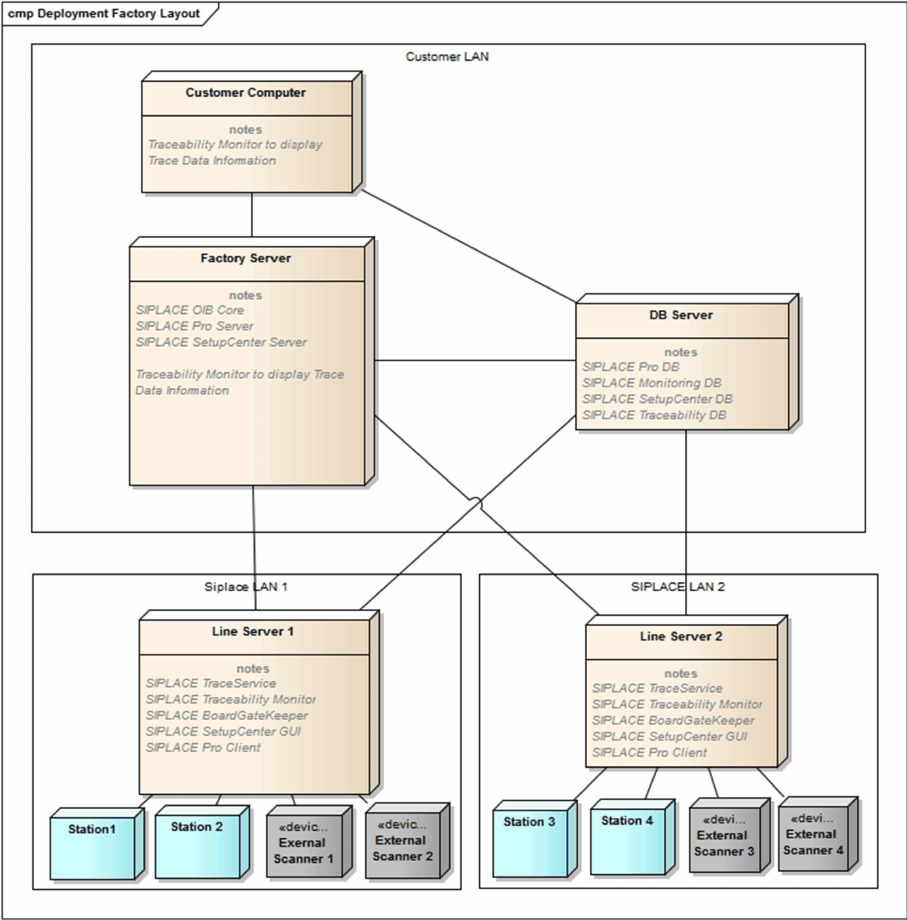
Trace Service can either be installed in SIPLACE LAN or distributed via SIPLACE and client LANs. The
following configuration options exist for SIPLACE Traceability:

Installation of Trace Service and Monitor
System Requirements and Software Components for Traceability Modules 4.1.3 Software Components and Configuration
18 Installation Manual SIPLACE Traceability 5.0
1. SIPLACE Traceability on one Computer
This option involves installing all SIPLACE Traceability software components on one computer.
However, the database server can be on a separate computer.
2. SIPLACE Traceability distributed across several computers:
This option involves installing the SIPLACE Traceability software components on multiple comput-
ers, according to your system requirements:
▪ Traceability or Line Computer
The following components need to be installed on this computer:
– SIPLACE Traceability with the components:
Trace Service
– Microsoft.NET 4.0 Framework
– Microsoft Internet Explorer
– SIPLACE Pro Client installation (for SPI XML Adapter)
– SIPLACE Setup Center GUI (if Line based Traceability mode is used with “Remove unused
charges” option)
▪ SIPLACE Studio (for Trace Monitor)
▪ Database server
– SQL Supported Versions:
SQL 2008 Express SP3
SQL 2008 Express SP3 x64
SQL 2005 Express SP4
SQL 2005 Express SP4 x64
SQL 2008R2 SP 2 Express
SQL 2008R2 SP 2 Express x64
SQL 2012 SP 1 CU2 Express
SQL 2012 SP 1 CU2 Express x64
SQL Server 2005 SP 4
SQL Server 2005 SP 4 x64
SQL Server 2008 SP 3
SQL Server 2008 SP 3 x64
SQL Server 2008R2 SP 2
SQL Server 2008R2 SP 2 x64
SQL Server 2012 SP 1 CU2
SQL Server 2012 SP 1 CU2 x64
–
NOTICE
SQL Server Installation Manual
For a detailed description of the SQL Server installation, refer to the SQL Server Installation
Manual (Item No.: 00196824-xx) which can be found on the Support Media DVD. The SQL
Server itself is not part of the Support Media DVDs.
Installation of Trace Service and Monitor
4.2.1 Installation Trace Service
Installation Manual SIPLACE Traceability 5.0 19
4.2
4.2 Trace Service
Trace Service
Trace Service requires a SIPLACE Pro installation (GUI or Desk).
4.2.1
4.2.1 Installation
Installation
NOTICE
Machine-Based Traceability
For machine-based traceability, the SIPLACE placement machines must be equipped with the
options "Setup verification" and "Traceability".
NOTICE
MS SQL Express
MS SQL Express databases are only allowed for testing/training purposes
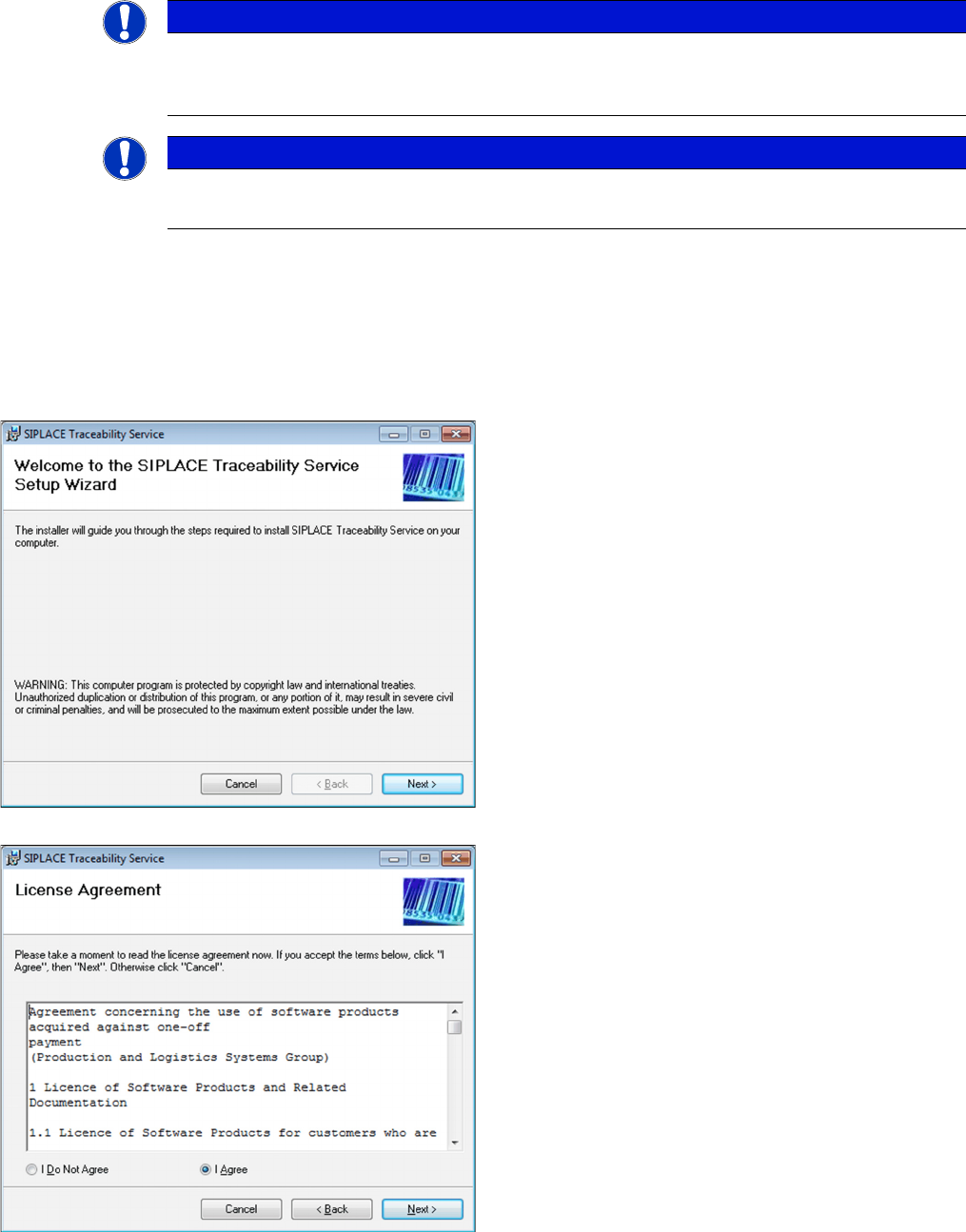
► Place the SIPLACE Traceability CD into the CD-ROM
drive of your computer.
► Open the TraceService folder and execute TraceSer-
viceSetup.msi
⇨ The Welcome dialog will appear.
► Click on Next to continue the installation procedure.
► Read the license agreement. If you agree with the
conditions, click on I Agree, otherwise click on I Do
Not Agree. If you select I Do Not Agree, the installa-
tion procedure will be terminated.
► Click on Next to continue the installation procedure.