LCMS_006.pdf - 第7页
7 a Open Solution Application Configuration - Open Solution Analytical - X 勒 Application 昌 Settings Archive... Q OK Q Cancel Apply [Folder for LabSolutions data files] : 数 据文件 存储的 路径。 [Sub-folder format for user files] :…
6
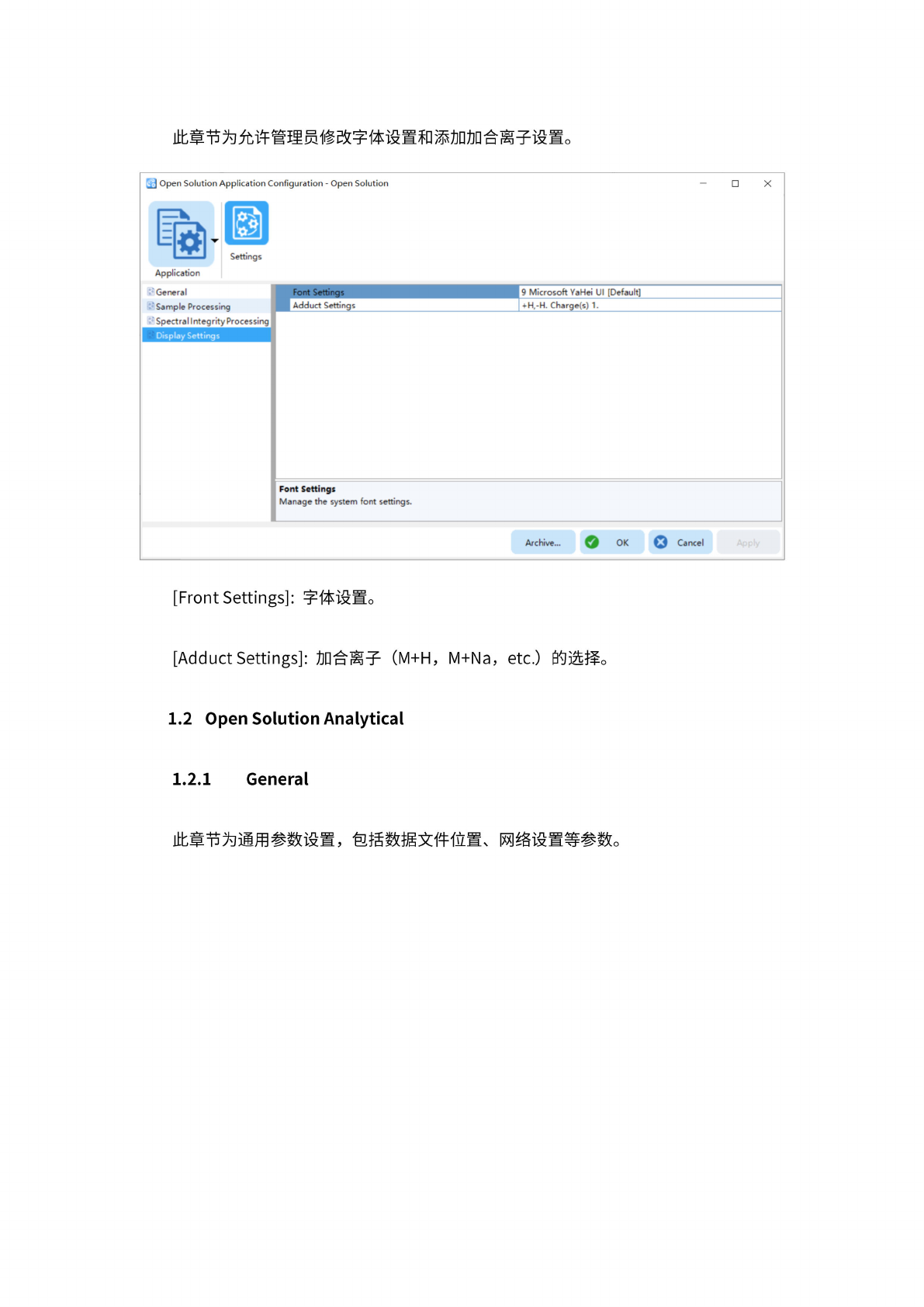
此
章节为
允许管
理员修
改字体
设置和
添加加
合离子
设置。
Open
Solution
Application
Configuration
-
Open
Solution
X
新
Application
Settings
Font
Settings
|
Adduct
Settings
9
Microsoft
Ya
Hei
UI
[Default]
+H.-H,
Charge(s)
1.
Font
Settings
Manage
the
system
font
settings.
'
General
Sample
Processing
;sing
Display
Settings
Archive...
。
OK
Cancel
[Front
Settings]:
字体
设置。
[Adduct
Settings]:
加
合离子
(M+H,
M+Na,
etc.)
的
选择。
1.2
Open
Solution
Analytical
1.2.1
General
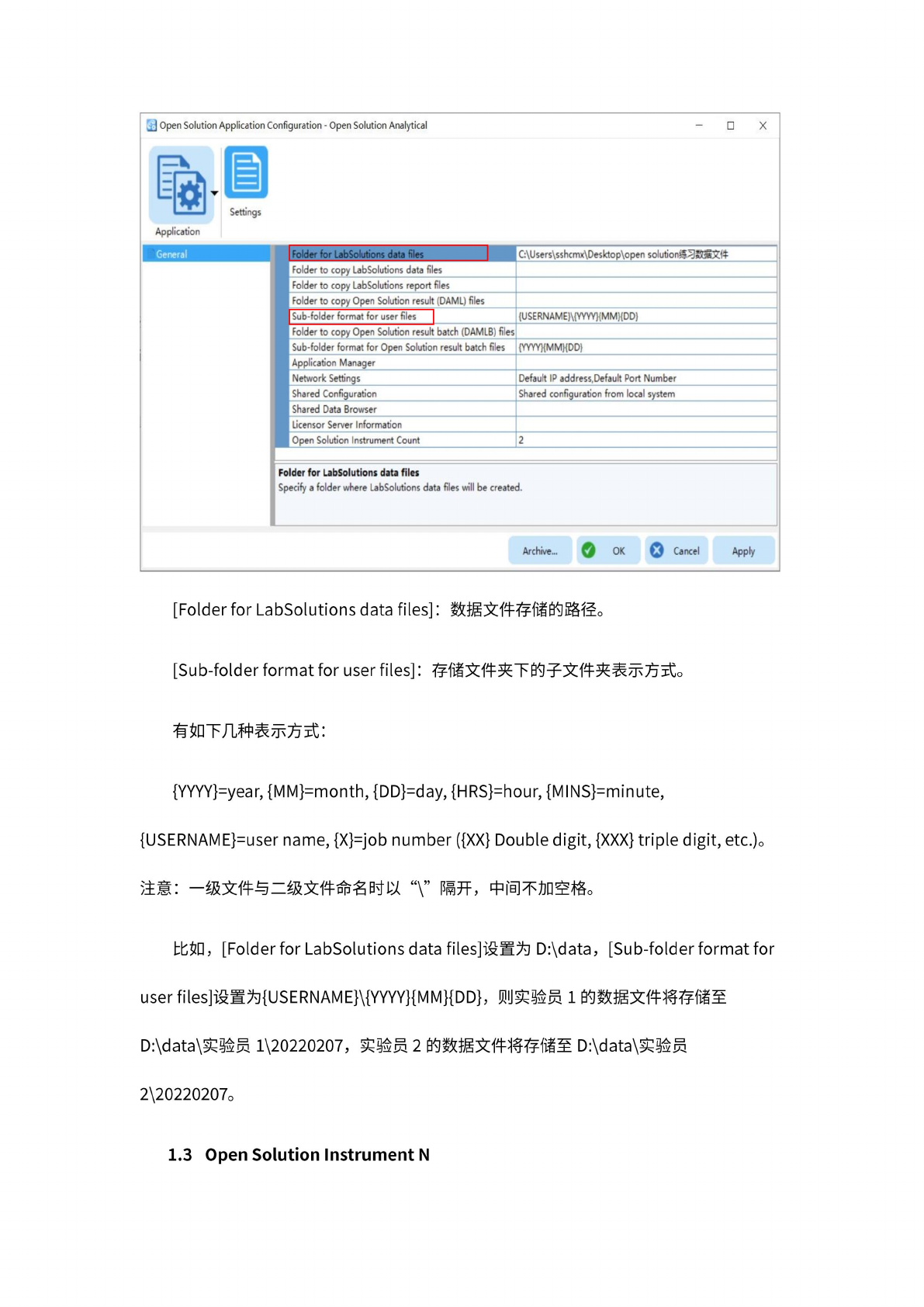
此章
节为通
用参数
设置,
包括数
据文件
位置、
网络
设置等
参数。
7
a
Open
Solution
Application
Configuration
-
Open
Solution
Analytical
-
X
勒
Application
昌
Settings
Archive...
Q
OK
Q
Cancel
Apply
[Folder
for
LabSolutions
data
files]
:
数
据文件
存储的
路径。
[Sub-folder
format
for
user
files]
:
存
储文件
夹下的
子文件
夹表示
方式。
有
如下几
种表示
方式:
{YYYY}=year,
{MM}=month,
{DD}=day,
{HRS}=hour,
{MINS}=minute,
{USERNAME}=user
name,
{X}=job
number
({XX}
Double
digit,
{XXX}
triple
digit,
etc.)。
注意:
一
级文件
与二级
文件命
名时以
“\”
隔开,
中
间不加
空格。
比如,
[Folder
for
LabSolutions
data
files]
设置为
D:\data,
[Sub-folder
format
for
user
files]
设置为
{USERNAME}\{YYYY}{MM}{DD},
则
实验员
1
的数据
文件将
存储至
D:\data\
实验员
1\20220207,
实验员
2
的数据
文件将
存储至
D:\data\
实验员
2\20220207。
1.3
Open
Solution
Instrument
N
8
1.3.1
Instrument
1
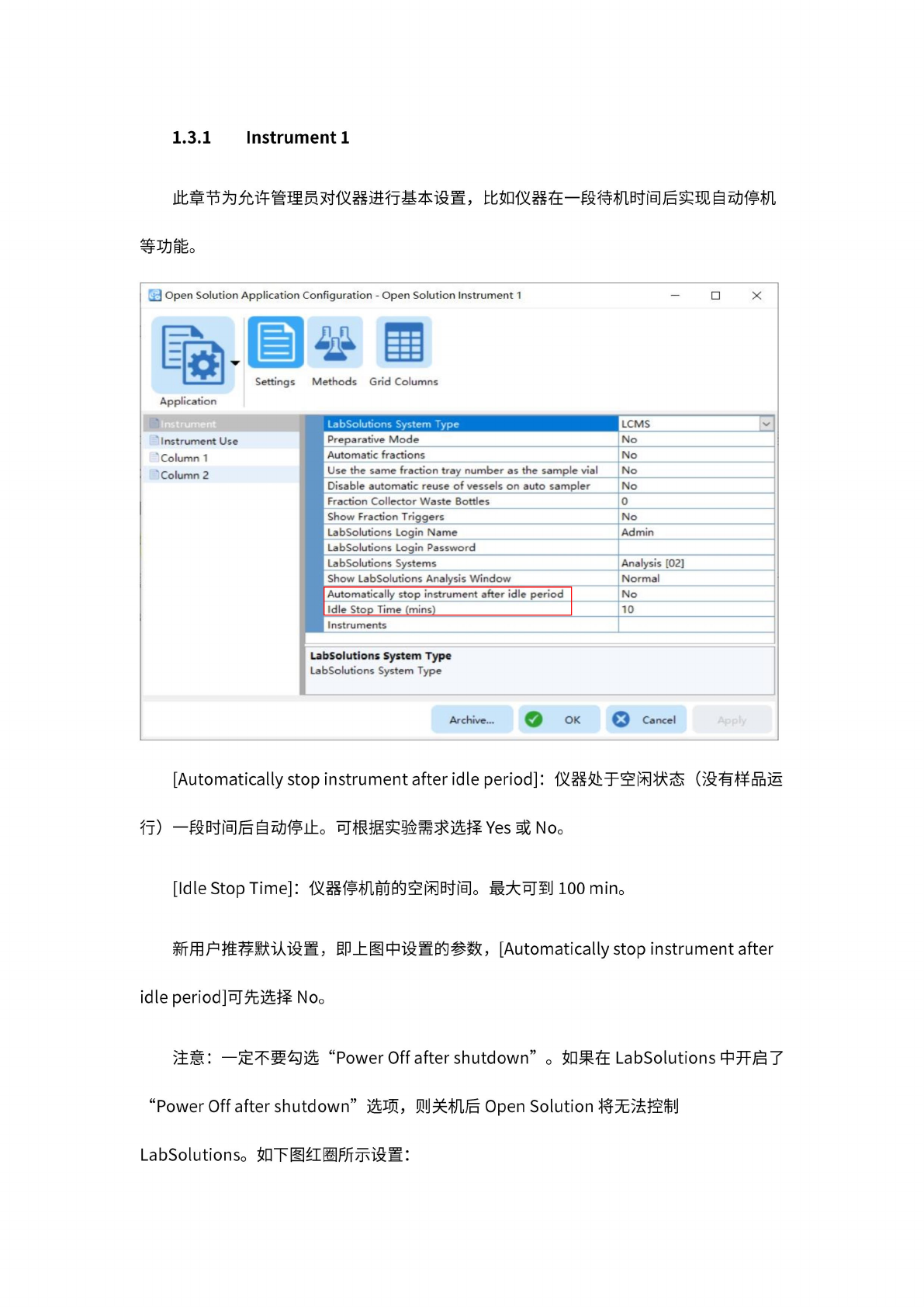
此章节
为允许
管理员
对仪器
进行基
本设置
,比
如仪
器在一
段待机
时间后
实现自
动停机
等
功能。
[Automatically
stop
instrument
after
idle
period]:
仪器
处于空
闲状态
(没有
样品运
行)
一
段时间
后自动
停止。
可根据
实验需
求选择
Yes
或
No。
d?
Open
Solutior
孰
Application
WWWBW
'
Instrument
Column
1
Column
2
Application
Con
iguration
-
Open
Solution
Instrument
1
冬
a
•thods
Grid
Columns
X
J
Settings
LabSolutions
System
Type
LCMS
\z
1
Preparative
Mode
No
Automatic
fractions
No
Use
the
same
fraction
tray
number
a<
the
sample
vial
No
Disable
automatic
reuse
of
vessels
on
auto
sampler
No
Fraction
Collector
Waste
Bottles
0
Show
Fraction
Triggers
No
LabSolutions
Login
Name
Admin
LabSolutions
Login
Password
LabSolutions
Systems
Analysis
[02]
Show
LabSolutions
Analysis
Window
Normal
Automatically
stop
instrument
after
idle
period
Idle
Stop
Time
(mins)
No
10
Instruments
>Solutions
System
Type
7
Solutions
System
Type
Archive...
O
OK
Cancel
[Idle
Stop
Time]:
仪器
停机前
的空闲
时间。
最
大可到
lOOmin。
新
用户推
荐默认
设置,
即
上图中
设置的
参数,
[Automatically
stop
instrument
after
idle
period]
可
先选择
No。
注意:
—定不
要勾选
“Power
Off
after
shutdown”
。
如果在
LabSolutions
中
开启了
“Power
Off
after
shutdown”
选项,
贝
U
关机后
Open
Solution
将无
法控制
LabSolutionSo
如
下图红
圈所示
设置: