YSM20R_YSM20WR_Mainte_E.pdf - 第171页
6-15 6 How to replace consumable parts 9 Detach the belt from the conv ey or . Detach the conveyor belt through the clearance between the shaft and drive pulley. Go on to Step 12. n Replacing the conveyor belt (Other tha…
6-14
6
How to replace consumable parts
n
Differences in conveyor belt replacement depending on the machine stage type
Regarding W2 and W3 conveyor belts for YSM20R Dual-stage type, belt replacement procedure is different from other
conveyor belts. Go on to Step 10 for replacement procedures other than W2/W3 conveyor belts for YSM20R Dual-stage type.
n
Replacing the conveyor belt (YSM20R Dual-stage W2/W3)
5
Read desired board data.
1. Read desired board data.
2. If the value on "B. Board Size Y (mm) on
"Board" screen is 380 mm or more, enter
the value less than 380 mm.
6
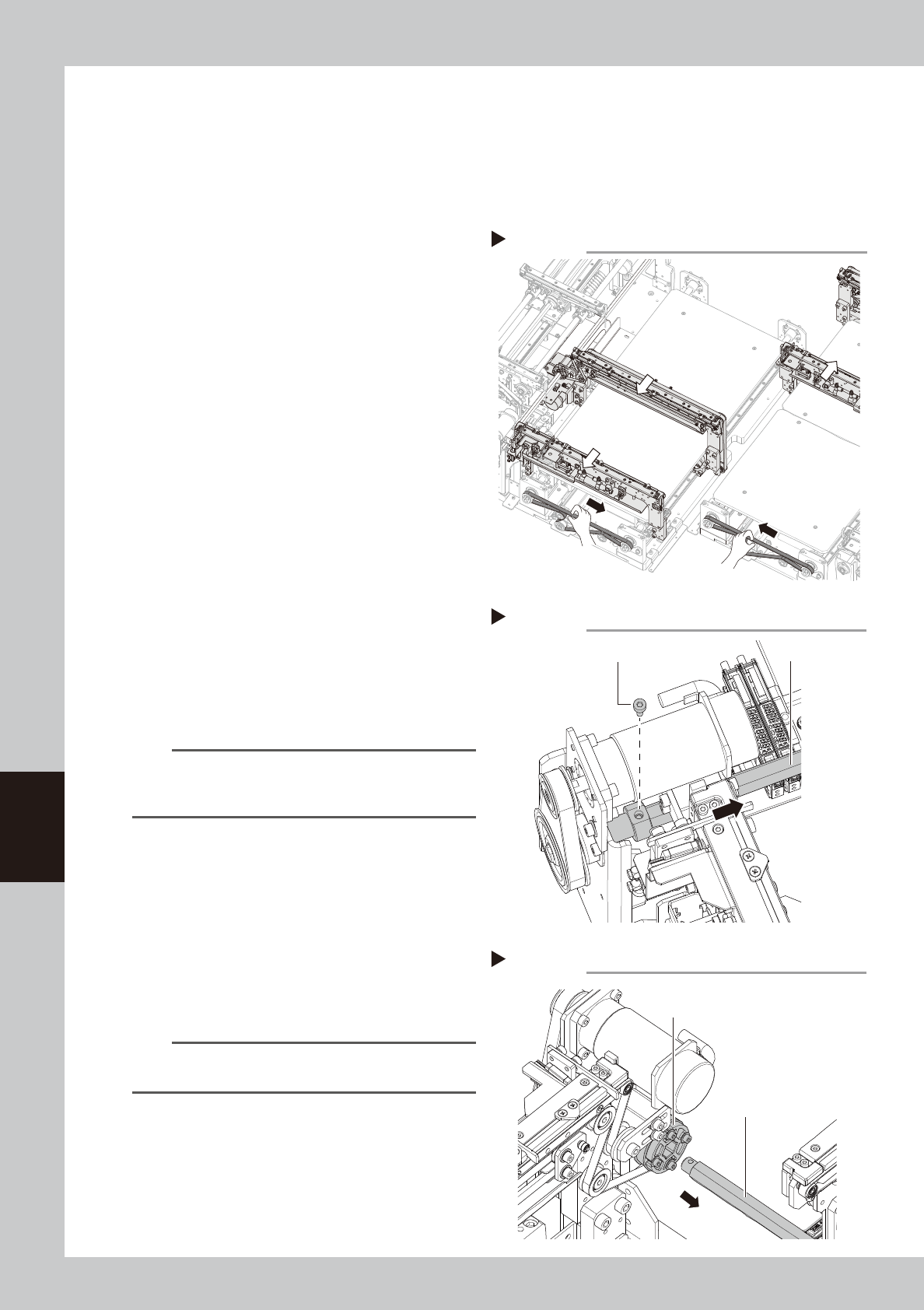
Move the conveyor U-axis.
1. Close the machine safety cover and
cancel the emergency stop. Set the
carriage if the machine is the carriage
type.
2. Press the [Mount Position] button on the
[Setup] screen to move the conveyor to
the component mounting position.
e
3. Press the emergency stop button and
then open the machine safety cover.
4. Detach the carriage if the machine is the
carriage type.
5. Moving the U-axis belt manually moves
the entire conveyor. For the W2-axis, fully
move the conveyor to the rear side by
moving the U-axis belt in the direction
indicated by an arrow shown in the
figure on the right. For the W3-axis, fully
move the conveyor to the front in the
same manner.
TIP
The stage 2 (W2-axis) and stage 3 (W3-axis) move back
and forth by pressing [Mount Position] button when
"Board Size Y" is less than 380 mm.
7
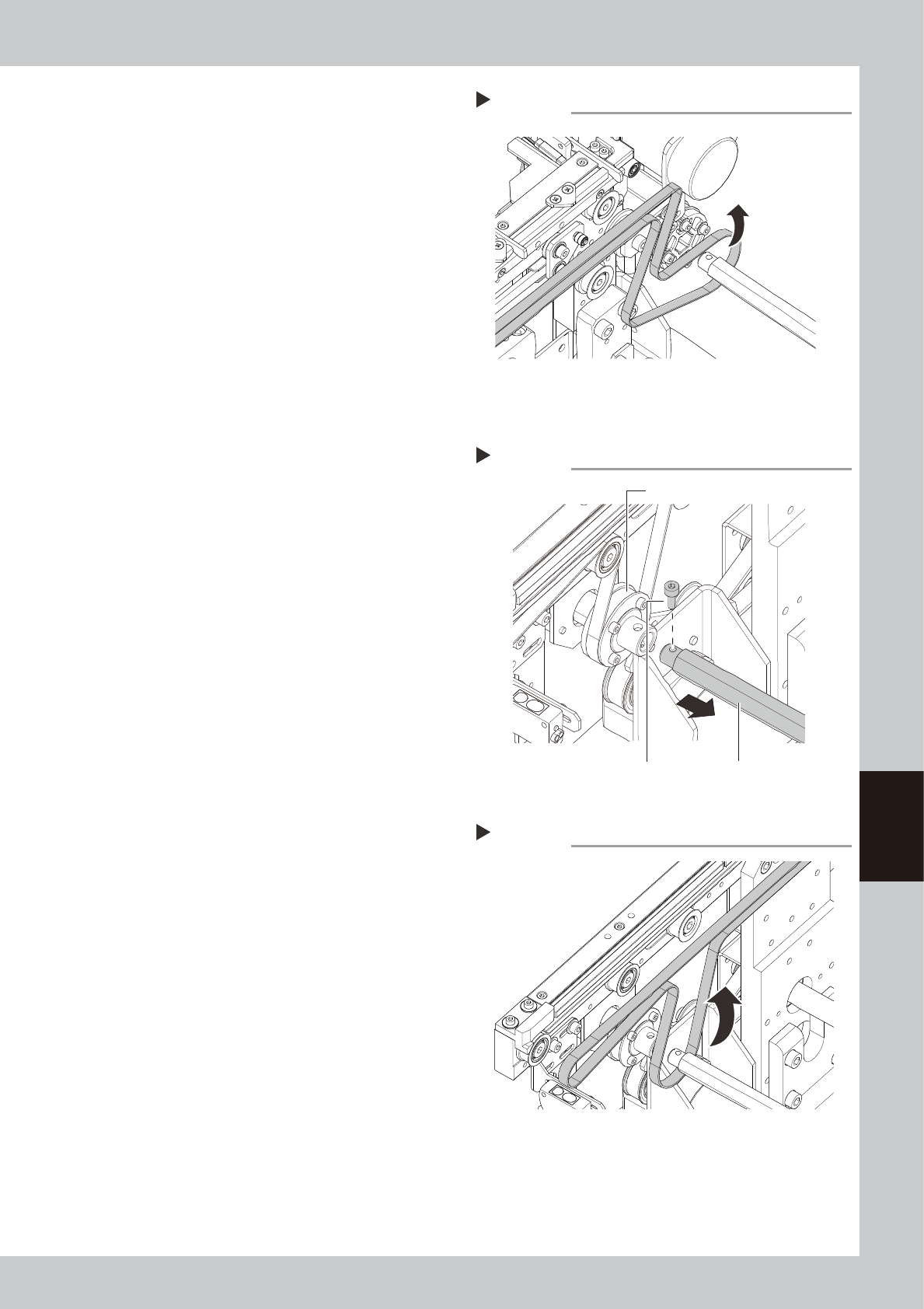
Separate the shaft.
Remove the bolt from the shaft (for the
pulley position, see the figure shown in Step
4) with a hex wrench (3).
8
Pull out the shaft from the belt
drive pulley.
Pull the shaft toward the front for the W2-axis
or the rear for the W3-axis to pull it out from
the drive pulley completely.
n
NOTE
When pulling out shaft, drive pulley comes off easily.
Therefore, pull out the shaft holding pulley with hand.
W2-axis
W3-axis
Moving conveyor U-axis
Step 6
53620-KMK-00
Detaching shaft
Step 7
Shaft
Bolt
53621-KMK-00
Drive pulley
Shaft
Pull out shaft from belt drive pulley
Step 8
53622-KMK-00
6-15
6
How to replace consumable parts
9
Detach the belt from the conveyor.
Detach the conveyor belt through the
clearance between the shaft and drive
pulley.
Go on to Step 12.
n
Replacing the conveyor belt (Other than YSM20R dual-stage W2/W3)
0
Separate the shaft from the drive
pulley.
Remove the bolt from the belt drive pulley
(for the pulley position, see the figure shown
in Step 4) with a hex wrench (3), and then
pull out the shaft to make a clearance.
q
Detach the belt from the conveyor.
Detach the conveyor belt through the
clearance between the shaft and drive
pulley.
Detaching conveyor belt
Step 9
53623-KMK-00
Removing shaft
Step 10
ShaftBolt
Drive pulley
53624-KMK-00
Detaching conveyor belt
Step 11
53625-KMK-00
6-16
6
How to replace consumable parts
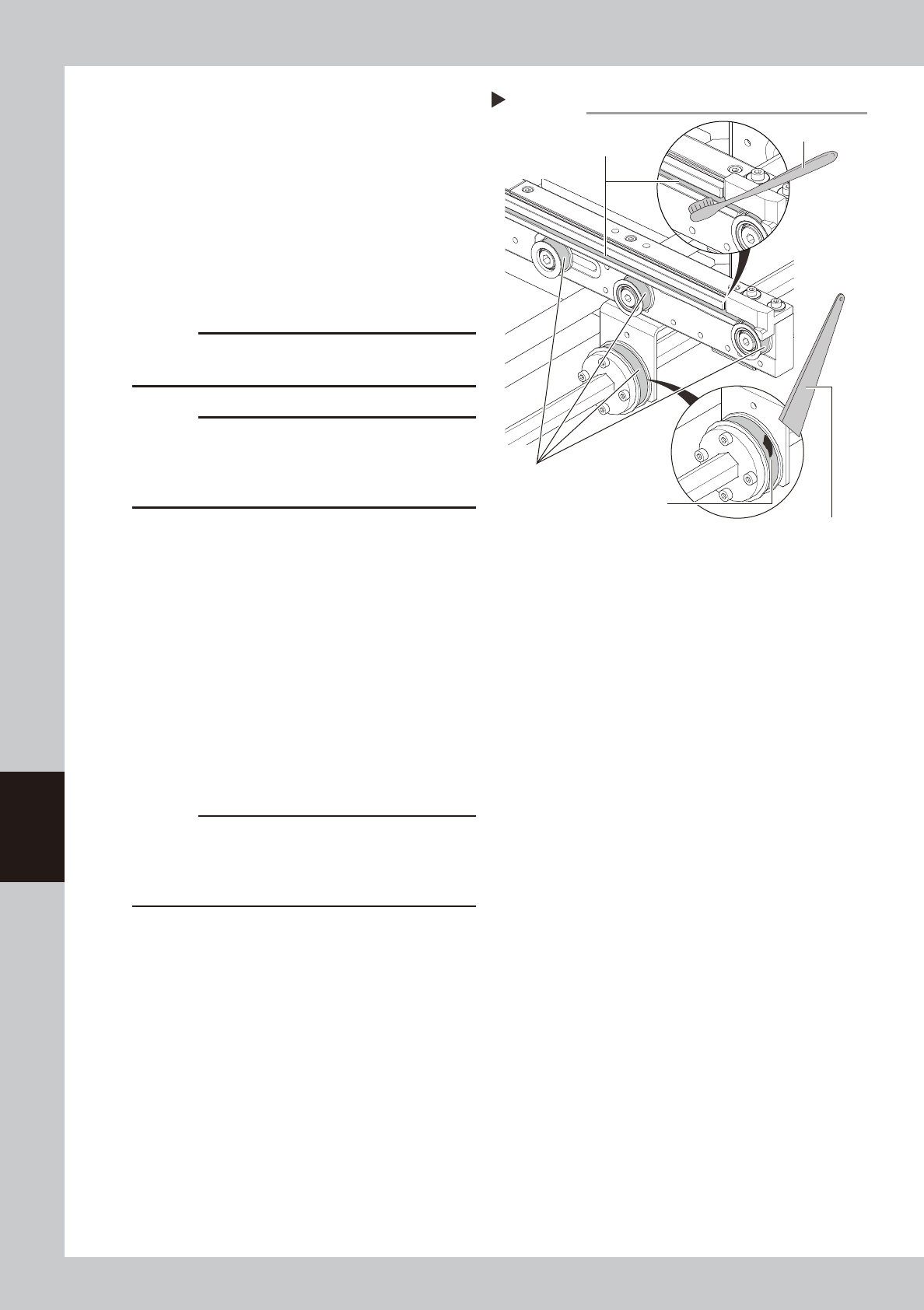
w
Clean the belt guides and pulleys.
1. Use a vacuum assembly (option) to suck
the belt wear debris on the belt guides
and sensors, etc.
2. Use a plastic spatula or similar tool to
remove the belt wear debris adhering to
the outer peripheral surface of the
pulleys.
3. Use a brush or similar tool to remove the
belt wear debris caught in the belt
guides.
c
CAUTION
Use a plastic spatula and brush to avoid scratching the
pulleys and guides.
c
CAUTION
Do not use a solvent (IPA, etc.) unless the guides and
pulleys are excessively dirty. If using ethanol, be careful
not to spill the ethanol on the bearing in the pulleys
during cleaning.
e
Replace the conveyor belt.
1. Reattach a new belt temporarily while
putting it on the pulley.
2. (YSM20R Dual-stage: W2, W3) Pass the
drive pulley through the shaft.
3. Loosen the mounting bolt and connect
the shaft.
4. Move the bracket (YSM20R/YSM20WR
Single-lane/YSM20WR Dual-lane: pulley)
to the position marked in Step 4 and
install the mounting bolts.
5.
If looseness of the belt is found, adjust the
bracket (pulley) position to apply tension.
c
CAUTION
The followings are tightening torques of the tensioner
mounting bolts. Do not tighten the bolt excessively.
Pulley bracket mounting bolt : 3.8 N•m.
Pulley mounting bolt : 5.5 N•m.
Cleaning belt guide and pulley
Step 12
Plastic spatula
Belt guide
Belt wear debris
sticking to pulley
Outer peripheral
surface of pulley
Brush
53626-KMK-00