00192267-02.pdf - 第38页
HS-50 Changeover Instructions Cont rol PCB Convey or 2.5 Schematics and Settings 04/2002 Issue 38 3OXJ$OO RFDWLRQRQ763 X2: to Conv eyor 1 subsequ ent mach ine X1: to conveyor 1 preceden t mach ine X13: Sen…
Changeover Instructions Control PCB Conveyor HS-50
04/2002 Issue 2.5 Schematics and Settings
37
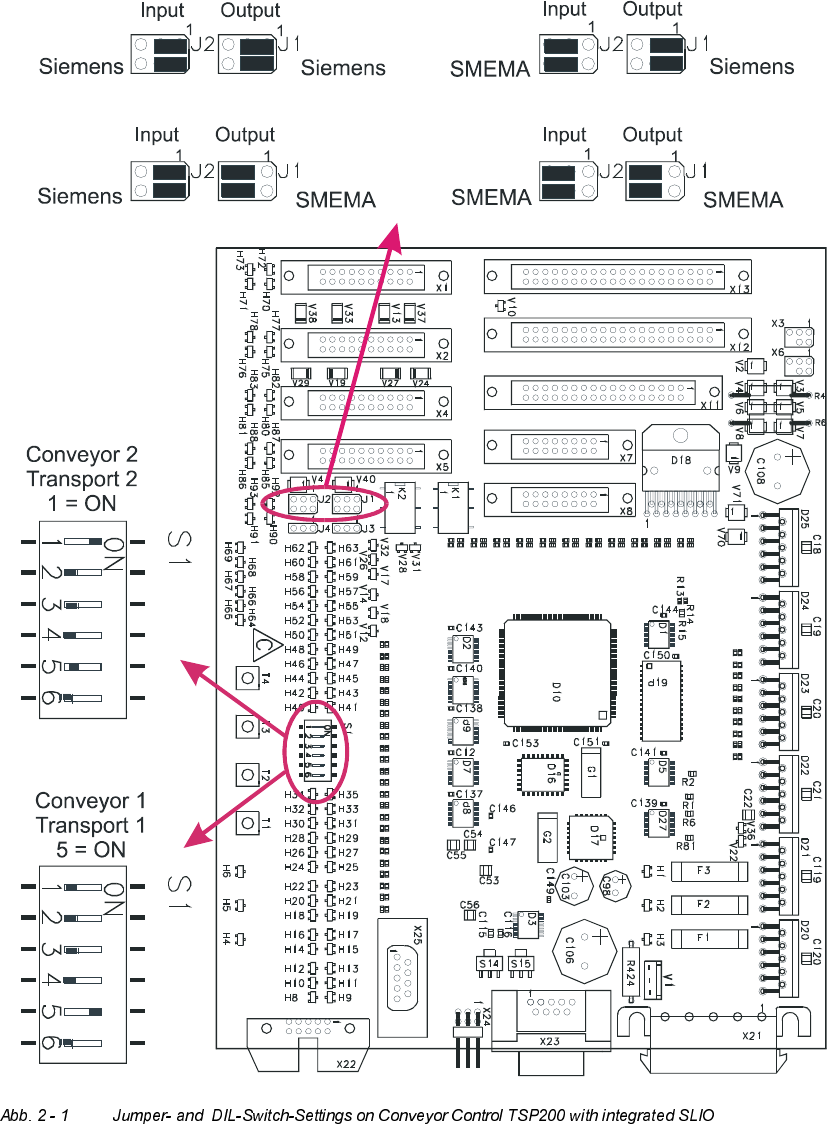
-XPSHU6HWWLQJVRQ&RQYH\RU&RQWURO763
Output Input
Output Input
Output Input
Output Input
HS-50 Changeover Instructions Control PCB Conveyor
2.5 Schematics and Settings 04/2002 Issue
38
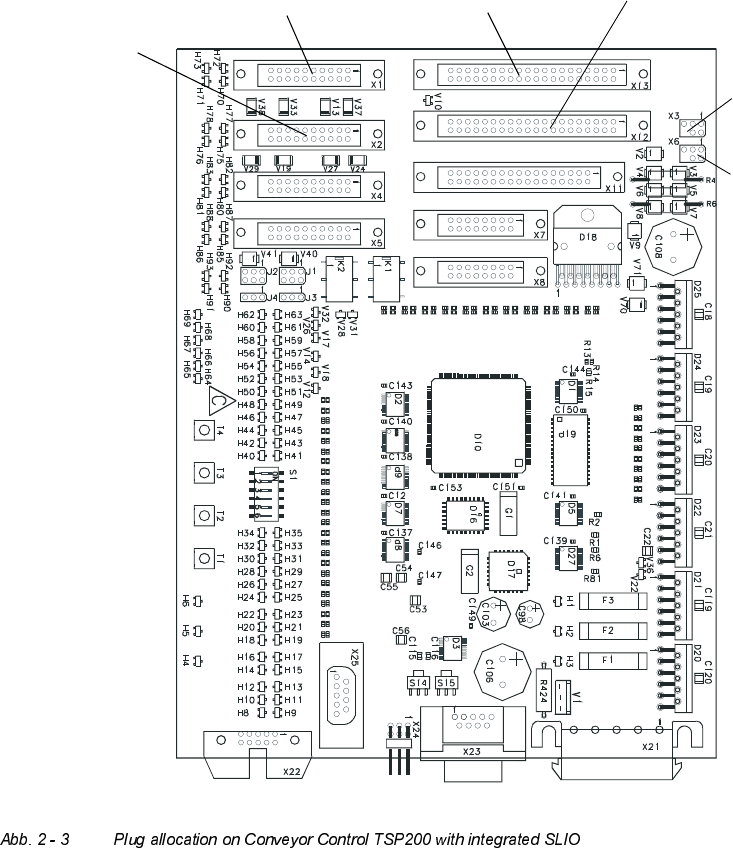
3OXJ$OORFDWLRQRQ763
X2: to Conveyor 1
subsequent
machine
X1: to conveyor 1
precedent
machine
X13:
Sensor cord 2
to conveyor 1 resp. 2
X3:
lifting table
X12:
Sensor cord 1
to conveyor 1 resp. 2
activation 1
X6:
lifting table
activation 2
Changeover Instructions Control PCB Conveyor HS-50
04/2002 Issue 2.5 Schematics and Settings
39
/RDGLQJ)LUPZDUH&RQYH\RU
The conveyor control is not supplied with firmware. Correspondingly the firmware must be in-
stalled on it.
The firmware conveyor is on the supplied disk 00356219-01 for the software version 501.xx.
From the software version 502 please create an installation disk with the aid of the supplied instal-
lation CD (see installation instructions in the software version description).
How to install the firmware conveyor:
➠ insert installation disk with firmware conveyor in disk drive machine controller (M54).
➠ turn on machine.
To display, change to the view on the monitor.
MS-DOS is started on the machine controller. Finally the firmware is automatically transmitted
via CAN-Bus to the conveyor control. With double conveyor both conveyor controls are auto-
matically reinstalled.
➠ Following successful download, the version and the date of creation of the installed software
are displayed.
Importance of the LEDs on the conveyor control:
– red LED "Fail" - this LED
* lights up continously the module is defect
* is continuously lit up for approx. 10 seconds when turning on
* flashes - conveyor control is in reinstall mode (or is waiting for the reloading of the firmware)
– green LED "RUN", this LED
* flashes - firmware conveyor control is running
– yellow LED "CAN", this LED
* lights up briefly if a CAN telegram has been received
* lights up continously during reinstallation of the firmware.