00197443-02_IM_707_1_DE_EN.pdf - 第26页
Station S oftware 70 7.1 / Ins tallation Man ual Ausgabe 05/2014 E dition 26 5.2.3 Calibrating the T ouch S cre en The touc h screen has to be insta lled b y the sof tware c onfigurator dur ing the operating s ystem inst…
Station Software 707.1 / Installation Manual Ausgabe 05/2014 Edition
25
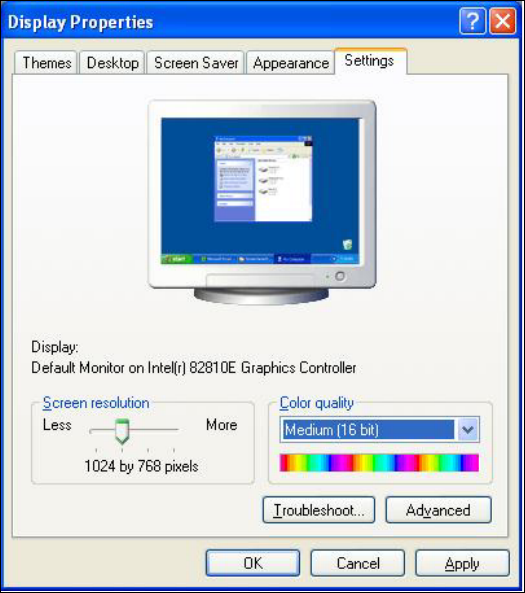
5.2.2 Changing the Display Settings
► Select Start
Settings
Control Panel
Display.
► Click the Settings tab.
► Set the Screen resolution slider to 1024 by 768 pixels.
Figure 5-2: Screen settings
► Confirm the settings by clicking OK.
Station Software 707.1 / Installation Manual Ausgabe 05/2014 Edition
26
5.2.3 Calibrating the Touch Screen
The touch screen has to be installed by the software configurator during the operating system
installation. If the calibration does not start automatically after installation:
► Select Start
Settings
Control Panel
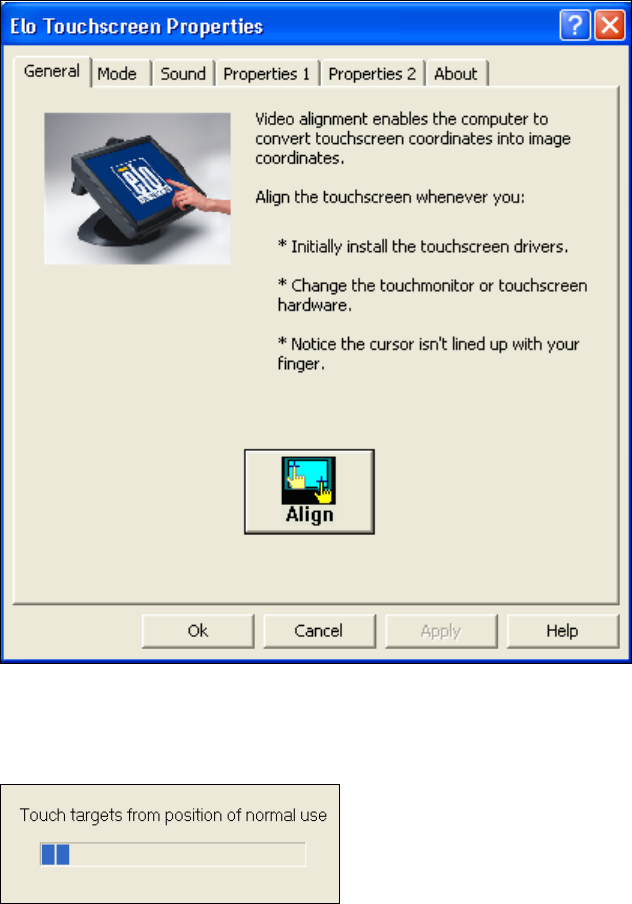
Elo to go to EloTouchscreen Properties:
Figure 5-3: Elo Touchscreen properties
► Click the Align button.
The following message then appears:
Figure 5-4: Instruction for the screen to be calibrated
► Follow the instructions on the screen.
Station Software 707.1 / Installation Manual Ausgabe 05/2014 Edition
27
5.3 Performing BIOS Update/Settings on the Machine Computer and
Vision Computer
The image files for the BIOS update/BIOS settings and the corresponding installation instruction
(readme file) are available on the V1.0 BIOS CD that can be ordered via the service technician or
downloaded from the SIPLACE Software Download Center.