TM4670.Conveyor Transfer Way Setting.pdf - 第3页
SMT Software En gineering G roup IM Operati ons Y AMAHA MOTOR CO., L TD. MDOC-SOFT50 184 3/ 5 3. Functi on In th is function, the conveyor transf er way cha nged by m achin e s etting can be changed now on [Boar d]-[B oa…
SMT Software Engineering Group
IM Operations YAMAHA MOTOR CO., LTD.
MDOC-SOFT50184
2/5
1.
Introduction
Until now, in order to have changed the conveyor transfer way of the board, it needed to
change by machine setup. It comes to be able to perform a setup of the conveyor transfer way
for every production board in this function, without changing a machine setup by having the
conveyor transfer way setup in board data.
2. Target
The target model and version are as follows.
Table 1.1 Target Model and Version
Target Model, Software Traget Version Remarks
YG12, YG12F, YS12,
YS12P, YS12F, YS88,
YS100, YS24, YS24X,
YC8, YSH20, Y.FacT
VGOS V3.32 STD R1.000 and later
Y.FacT V1.32 STD R1.000 and later
YG300 is excluded
SMT Software Engineering Group
IM Operations YAMAHA MOTOR CO., LTD.
MDOC-SOFT50184
3/5
3. Function
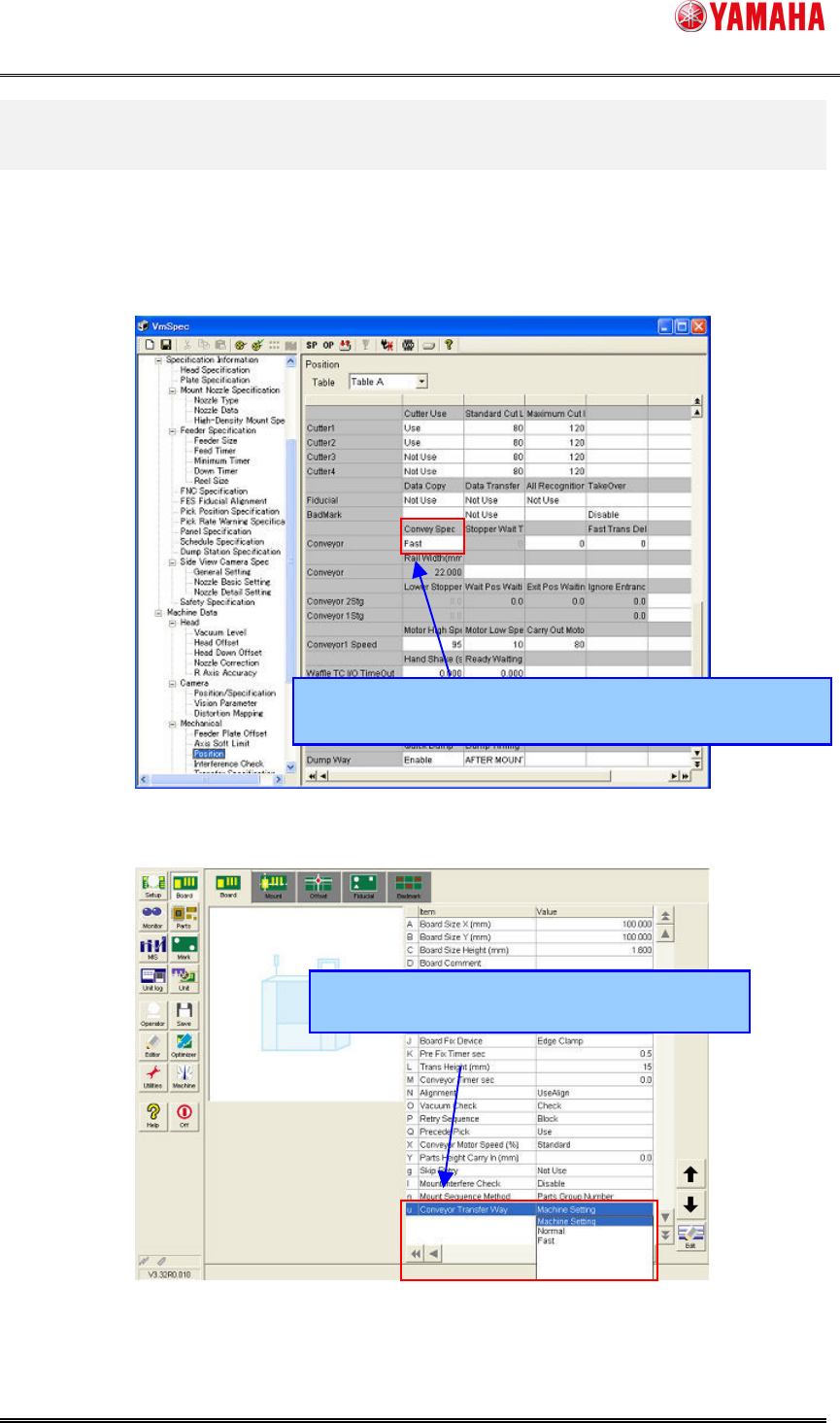
In this function, the conveyor transfer way changed by machine setting can be changed now
on [Board]-[Board]-[ConveyTransferWay]. *Change of the conveyor transfer way by machine
setting is also possible as the present condition.
Fig.2.1 Machine setting screen
Fig.2.2 [Board] - [Board] screen
Until now, it had changed by [Setting]-[Machine Data]-
[Mechanical]-[Position]-[Conveyor]-[Convey Spec].
A setup became possible in [Board]-[Board]
-
[Conveyor Transfer Way].
SMT Software Engineering Group
IM Operations YAMAHA MOTOR CO., LTD.
MDOC-SOFT50184
4/5
4. Setting
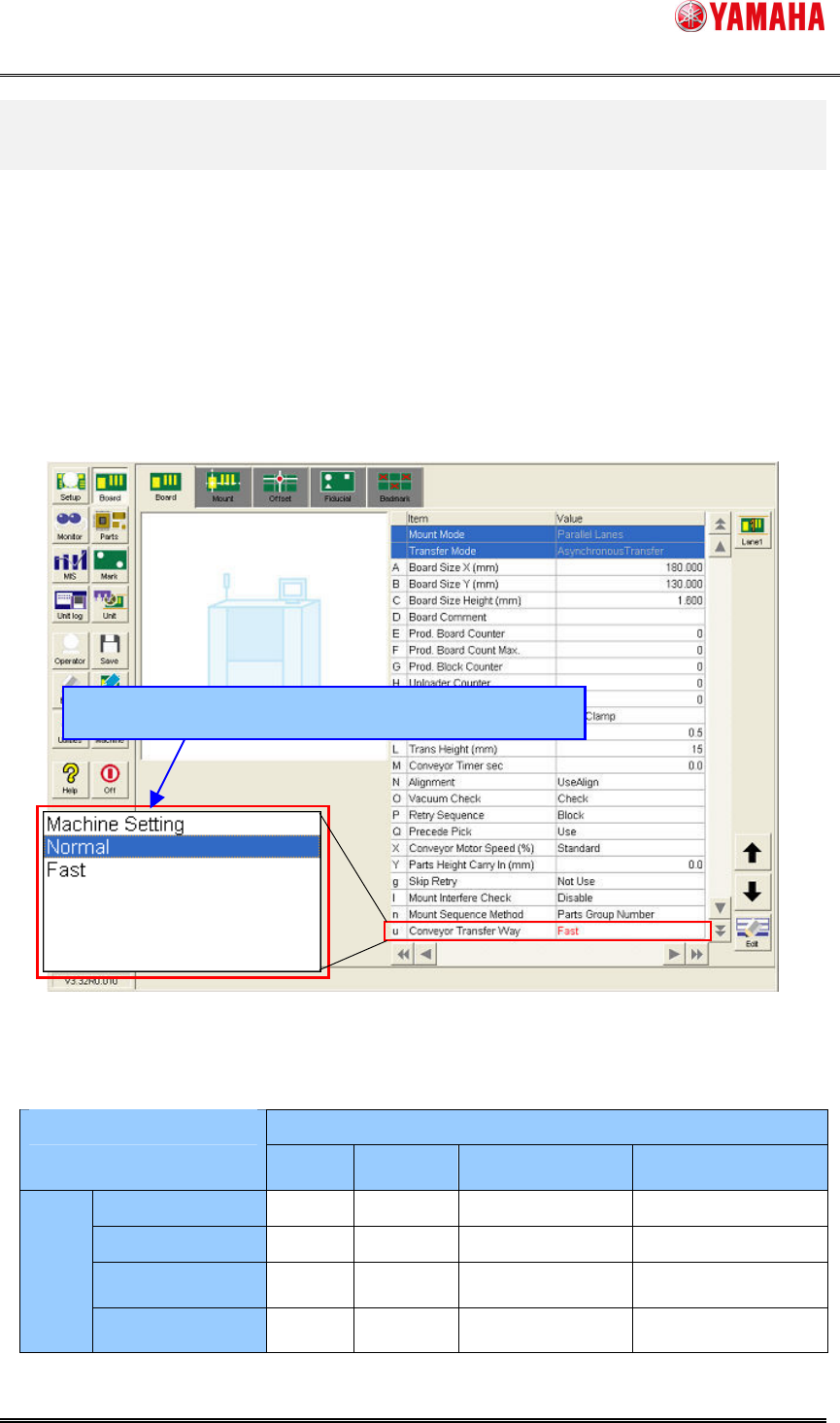
In order to set up the "Conveyor Transfer Way", set up the conveyor way used for [Board]-
[Board] - [Conveyor Transfer Way]. The choices are "Machine Setting", "Normal", and "Fast"
*1
.
When "Machine Setting" is chosen, it becomes the conveyor transfer way set as the machine
setup
*2
. When the [Conveyor Transfer Way] set as each lane differs in the case of a dual lane, a
red display is carried out as follows. Moreover, the conveyor transfer way at that time becomes
as in Table 2.1.
*1
About YSM40, "Normal" changes "Each" and "Fast" changes a display to "Quasi-Simul", respectively.
*2
An initial value serves as "Machine setting".
Fig.3.1 [Board] - [Board] screen
Table.2.1 Conveyor transfer way for dual lane
Lane2
Normal
Fast
Machine Setting
(Normal)
Machine Setting
(Fast)
Normal Normal
Normal Normal Normal
Fast Normal
Fast Normal Fast
Machine Setting
(Normal)
Normal
Normal Normal -
Lane1
Machine Setting
(Fast)
Normal
Fast - Fast
*
When setup of each lane differs, it becomes for safety "Normal Transfer Way".
The choices are "Machine Setting", "Normal", and "Fast".