TK32351.BoardDataSettingforPSCSolderRemainingQuantityDetection.pdf - 第4页
Product Engineering Division SMT Sect ion Robotics Operations Y AMAHA MOTOR CO., L TD. MDOC-SOFT50716 4/10 3 Fun ction Det ail s Y o u can switch PSC to/from Solder Remaining Quantity Detection in board data. Also, y o u…
Product Engineering Division
SMT Section
Robotics Operations
YAMAHA MOTOR CO., LTD.
MDOC-SOFT50716
3/10
1 Model and Version
Supported models and software version for this function are as follows.
Table 1.1 Model and Version
Model Version Note
YSP, YSP20 V3.49STD_R1.000 or later
Y.FacT V1.63STD R1.000 or later
2 Overview
This function allows you to switch PSC function and Solder Remaining Quantity Detection
function by the board data. These have ever switched only in Machine Setting.
Please use this function if you want to switch PSC from/to Solder Remaining Quantity
Detection by products.
* For details of the functions of PSC and Solder Remaining Quantity Detection, please refer
to the product manual.
Product Engineering Division
SMT Section
Robotics Operations
YAMAHA MOTOR CO., LTD.
MDOC-SOFT50716
4/10
3 Function Details
You can switch PSC to/from Solder Remaining Quantity Detection in board data. Also, you
can switch them in the machine setting ([Machine Information]-[Installation Setting]-[Solder
Remaining Quantity Detection]) as before.
3.1 Board data setting
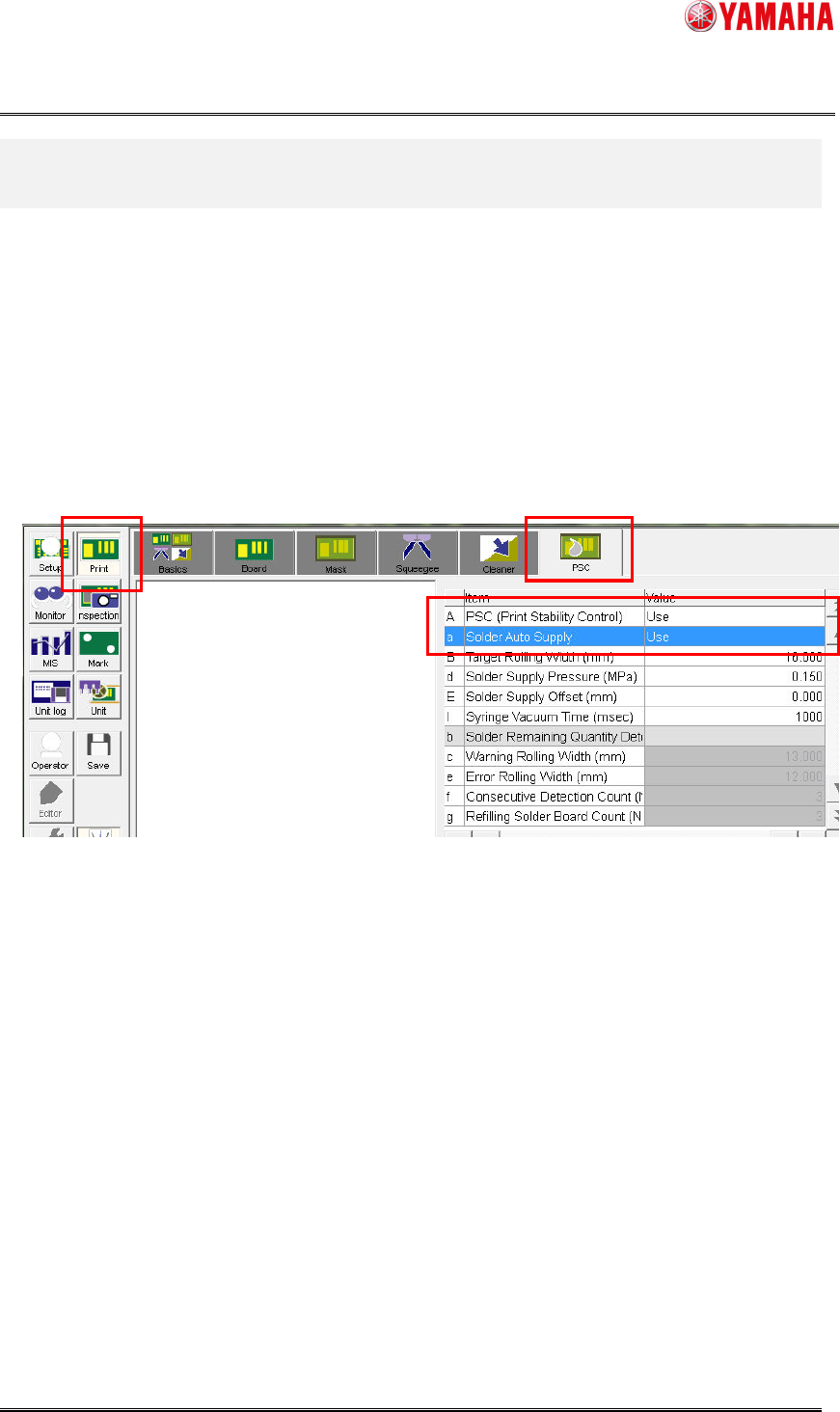
You can switch PSC to/from Solder Remaining Quantity Detection in [Print]-[PSC]-[PSC
(Print Stability Control)] and [Solder Auto Supply]. If you set [PSC] to “Not Use”, the
functions are not switched.
Product Engineering Division
SMT Section
Robotics Operations
YAMAHA MOTOR CO., LTD.
MDOC-SOFT50716
5/10
3.2 Additional items in board data
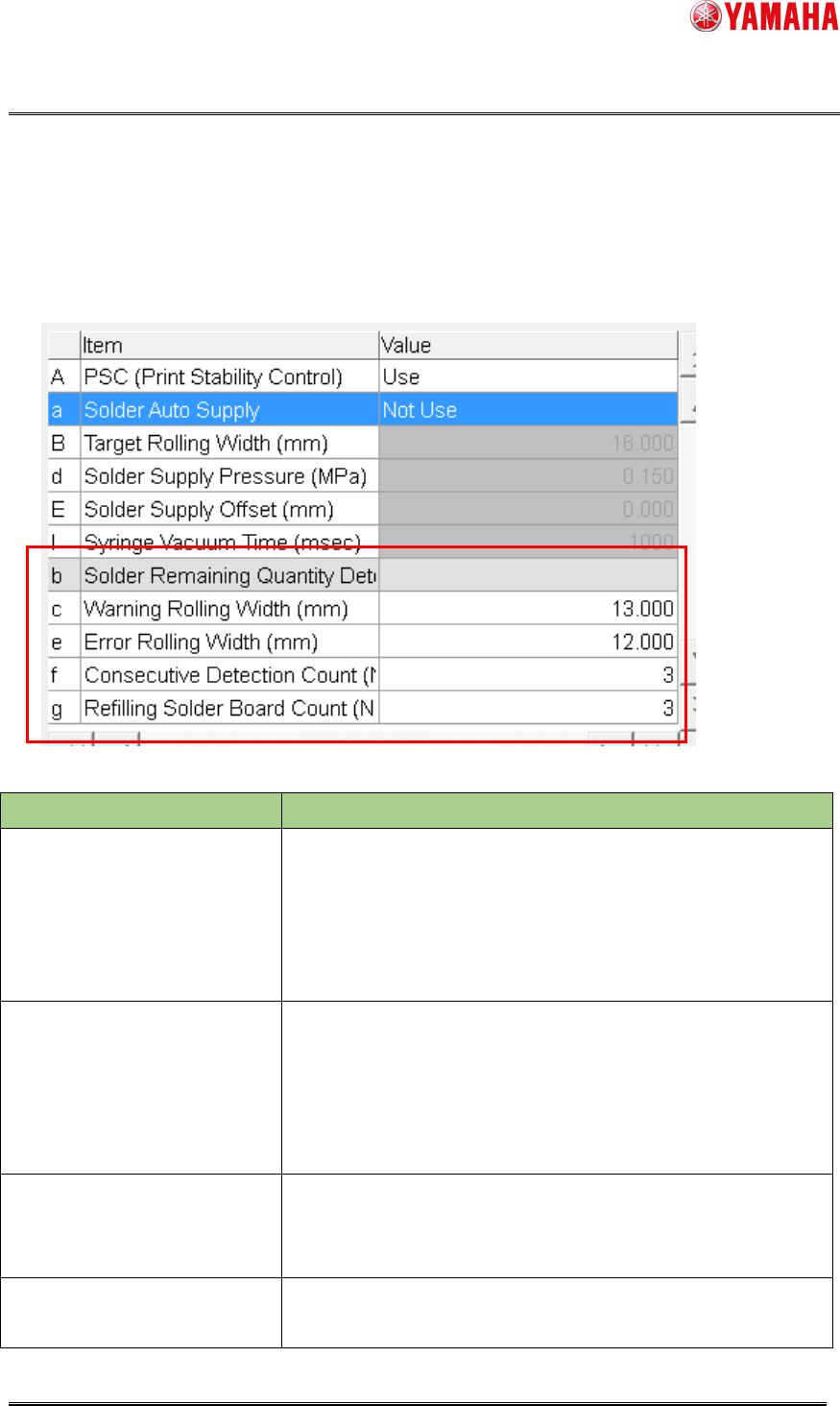
When [Solder Auto Supply] is set to “Not Use”, the items concerned to Solder Remaining
Quantity Detection are displayed. In that case, those of PSC are grayed out.
Below explains details of each item.
Item Description
Warning Rolling Width (mm) Set a rolling width which is a trigger for “Ea8986: Solder
Empty Warning”. The message is displayed when the
measured value goes below this value as many times as
[Consecutive Detection Count]. Auto-running continues
while the message is displayed.
Error Rolling Width (mm) Set a rolling width which is a trigger for “Ea8987: Solder
Empty Error” The message is displayed when the
measured value goes below this value as many times as
[Consecutive Detection Count]. Auto-running is stopped
while the message is displayed.
Consecutive Detection Count
(Number of times)
Set a number of continuous measurement times which is a
trigger for “Ea8986: Solder Empty Warning” or “Ea8987:
Solder Empty Error”.
Refilling Solder Board Count
(Number of boards)
Set a number of production boards which are ignored at
rolling measurement after solder is supplied.