00194888-02_DE_EN_Installationsanleitung.pdf - 第44页
Installation Manual, Station Software Version 603.01 SP1 Issue 03/2007 Fig. 4-33: Finaliz ing uninstallation → Click the Finish button. The Vision computer software has now been uninstalled correctly. 44 of 48
Installation Manual, Station Software Version 603.01 SP1 Issue 03/2007
4.8 Uninstalling the Vision computer software
If it is necessary to uninstall the Vision computer software manually, this must be done in one of the ways
described below.
Note:
You must be logged in as administrator to uninstall the software.
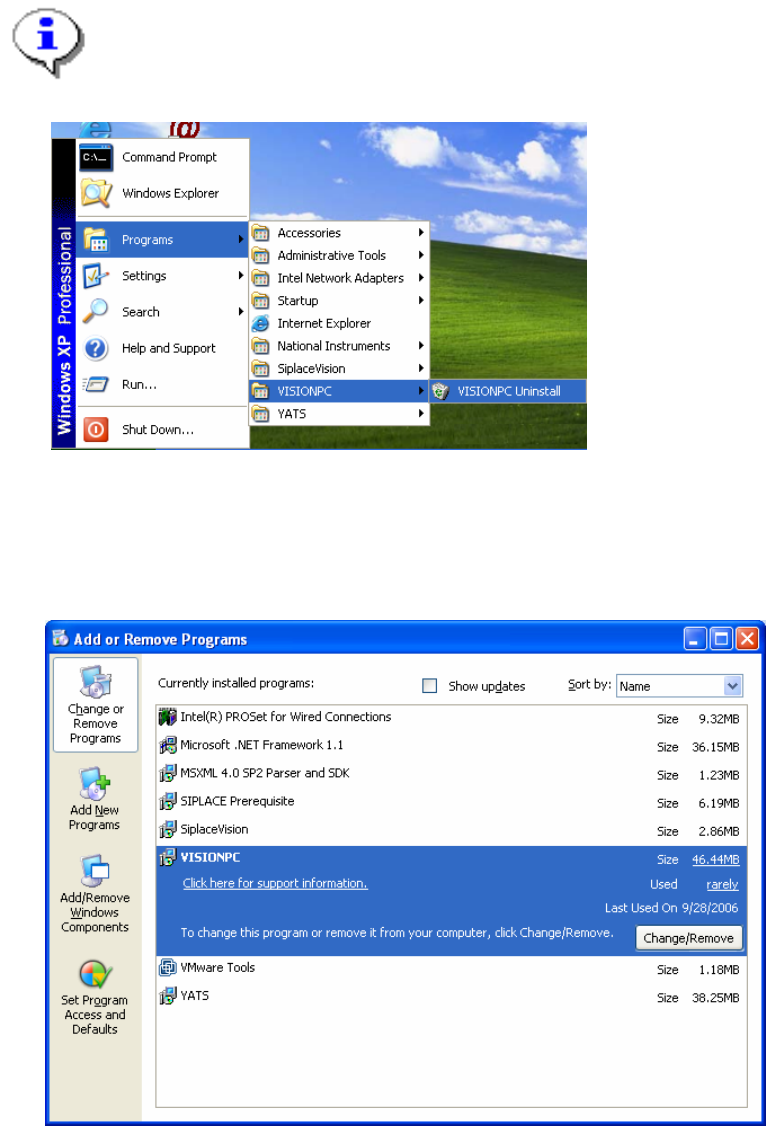
→ Open the Start menu and choose Programs Æ VISIONPC Æ VISIONPC Uninstall.
Fig. 4-31: Starting uninstallation (alternative 1)
Or:
→ Open the Start menu and choose Settings Æ Control Panel.
→ Double-click Add/Remove Programs.
Fig. 4-32 Starting uninstallation (alternative 2)
→ Select VISIONPC from the list of installed programs.
→ Click the Change/Remove button.
43 of 48
Installation Manual, Station Software Version 603.01 SP1 Issue 03/2007
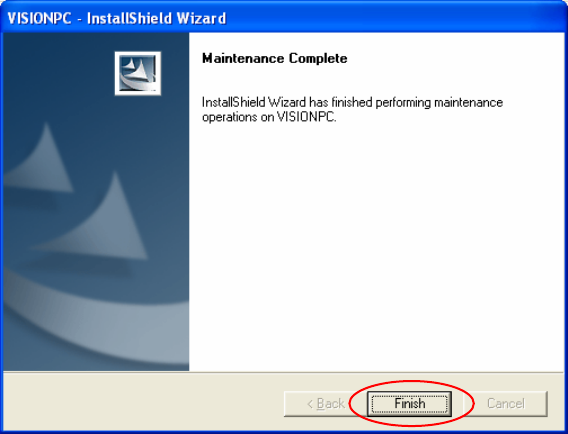
Fig. 4-33: Finalizing uninstallation
→ Click the Finish button.
The Vision computer software has now been uninstalled correctly.
44 of 48

Installation Manual, Station Software Version 603.01 SP1 Issue 03/2007
4.9 Finish the Installation
4.9.1 Machine files
There are 2 databases in Version 603 of the software, MA-Daten.mdb and MA-Achsen.mdb.
Machine-related configuration, measurement and parameter data is stored in *.XML and *.MA files.
The MA-Daten.mdb database contains all standard data except the standard data for the axes. This data is
stored in the MA-Achsen.mdb database.
Note:
All machine data and the database (see machine data database feature) must be of revision
level 70 (version 70.603.01). Current machine data must not
be replaced by revision levels o
f
an earlier version, either completely or partially, e.g. revision level 60 (version 60.601.03).
4.9.2 Miscellaneous
Check the firmware version and download if necessary
Start the reference run of the machine
45 of 48