00194923-01_OIS_DB.pdf - 第18页
Schnittstellenbeschreibung OIS Datenbank Version 4.1 Interface Description OIS Database Version 4.1 18 von 47 6 Appendix 6.1 T ime slices The configuration of time slices is describ ed below. A time slice is a combinatio…
Schnittstellenbeschreibung OIS Datenbank Version 4.1
Interface Description OIS Database Version 4.1
5.2 Machines with two processing areas (HS-50, HS60, HF, X3, D4)
There is a separate state machine for machines with two processing areas.
Note: If an HS-50 spends one minute placing a PCB in processing area 1 and then spends another minute
placing a PCB in processing area 2, the machine should show 50% of its time in placement state and
50% in waiting state if a PCB is inserted into the machine every two minutes.
On this basis, it is necessary to map an HS-50 to at least two state machines. In other words, one state
machine for each processing area. The machine for a processing area is therefore the same as the machine
for a SIPLACE S-20, for example. This means that the states of processing areas 1 and 2 each account for
half of the state of the HS-50 machine.
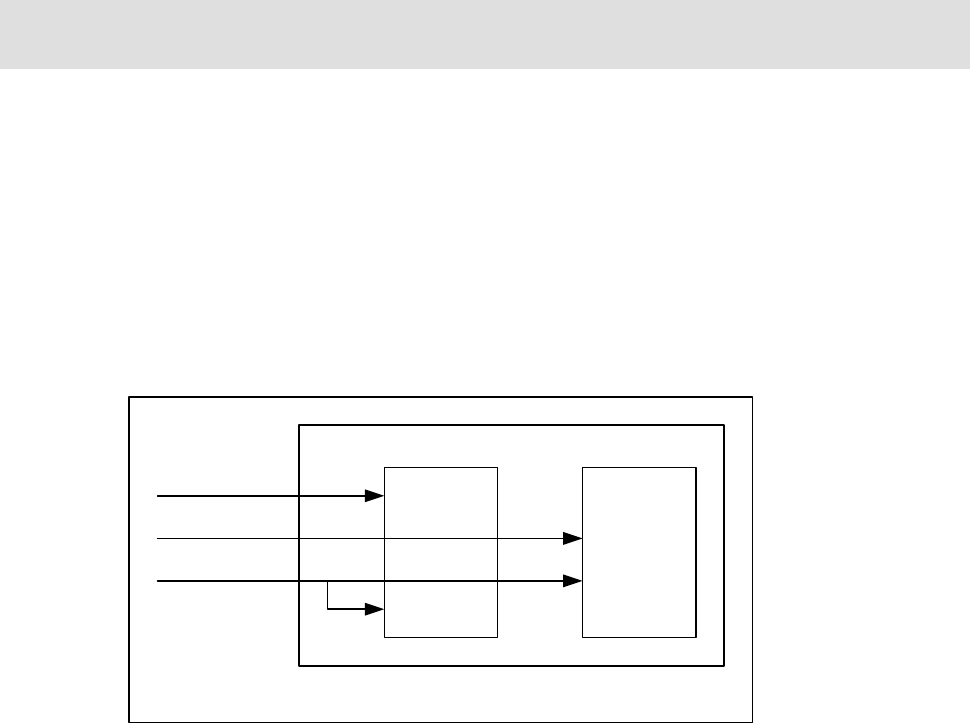
When an event occurs on the HS-50, this event is only forwarded to the appropriate machine for the
processing area, depending on the assignment of event to processing area. If an event is not assigned to
any processing area, it is forwarded to both processing area machines. See also the following diagram.
PA1
machine
PA2
machine
HS-50 machine
Event (PA=1)
Event (PA=2)
Event (PA=0)
PA: processing area
Figure 1: HS-50 state machine

Schnittstellenbeschreibung OIS Datenbank Version 4.1
Interface Description OIS Database Version 4.1
18 von 47
6 Appendix
6.1 Time slices
The configuration of time slices is described below. A time slice is a combination of states of a placement
machine. A state can be assigned to a time slice from 0% to 100%. The time slice can be freely defined by
the customer.
The following setting (table) is supplied as the SIPLACE standard. This table corresponds to the assignment
of states to time slices (shares of time) in MaDaMaS.
MaDaMaS shares of time: T
1
= running; T
2
= waiting; T
3
= blocked; T
4
= interrupted;
T
5
= fault; T
6
– T
8
= not used
Available /s of time: T
a
= technical availability, manufacturer responsibility
T
b
= allocation time (on-period)
Displayed state: T
9
= state display in the "States" view table.
0 = not displayed; 1 = displayed.
No. State Description T
1
T
2
T
3
T
4
T
5
T
a
T
b
T
9
1 OIS_PCB_BEGIN ||
OIS_PCB_BEGIN2
Start PCB production 100 0 0 0 0 100 100 0
2 OIS_PCB_END ||
OIS_PCB_END2
End PCB production 0 100 0 0 0 100 100 0
3 OIS_BREAK_BEGIN
A
bort, production interrupted 0 0 0 100 0 100 100 0
4 OIS_EMERGENCY_STOP EMERGENCY STOP button was pressed 0 0 0 100 0 100 100 1
5 OIS_AIR Compressed air supply malfunction 0 0 0 0 100 100 100 1
6 OIS_STOP Stop button was pressed 0 0 0 100 0 100 100 0
9 OIS_WAIT_PCB_IN Waiting for PCB in input conveyor 0 100 0 0 0 100 100 0
10 OIS_WAIT_PCB_INSIDE Waiting for PCB in center conveyor 100 0 0 0 0 100 100 0
11 OIS_WAIT_PCB_OUT Waiting for output conveyor to become free 0 0 100 0 0 100 100 0
12 OIS_WAIT_DATA Waiting until data has been sent 0 100 0 0 0 100 100 0
14 OIS_FIDUCIAL_ERROR
A
fiducial was not recognized 0 0 0 0 100 100 100 0
15 OIS_TRACK_ERROR Track empty 0 0 0 0 100 100 100 0
16 OIS_MACHINE_ERROR Fatal machine error has occurred 0 0 0 0 100 0 100 1
17 OIS_TRANSPORT_ERROR Fatal transport error has occurred 0 0 0 0 100 100 100 0
18 OIS_BARCODE_ERROR Fatal barcode error has occurred 0 0 0 0 100 100 100 0
20 OIS_HEAD_STEP Cycle mode active 0 0 0 100 0 100 100 1
21 OIS_KEY_SLOW Key switch on slow 0 0 0 100 0 100 100 1
22 OIS_VISION_BEGIN Vision system active 0 0 0 100 0 100 100 0
23 OIS_FUNCTION Single functions active 0 0 0 100 0 100 100 0
24 OIS_INIT Placement machine is initializing 0 0 0 100 0 100 100 0
25 OIS_HOLIDAY Manual input, vacation 0 0 0 0 0 100 100 1

OIS Datenbank Version 4.1 Schnittstellenbeschreibung
OIS Database Version 4.1 Interface Description
19 von 47
26 OIS_MAINTENACE Manual input, planned maintenance 0 0 0 0 0 100 100 1
27 OIS_SETUP Manual input, setting up machines 0 0 0 0 0 100 100 1
28 OIS_DOWN_PLAN Manual input, planned downtime 0 0 0 0 0 100 100 1
29 OIS_DOWN_ILL Manual input, unplanned downtime 0 0 0 0 0 100 100 1
30 OIS_PROTOTYPE Manual input, product move 0 0 0 0 0 100 100 1
Configuration of shares of time
A customer can save a time model centrally in the database. This customer configuration is shown in the
following tables:
• STATE
• STATESHARE
The customer configuration can be accessed via these views
6.2 OIS relevant machine error messages
16 Seg. not airtight
28 The nozzle in the reject position is contaminated
43 Component not at nozzle after pick-up
44 Component not at nozzle before placement
48 Results of vacuum measurement of pick-up and reject station reversed
103 Pitch of a lead group outside tolerance
121 Lead tip: No result
203 Track deactivated by operator
272 No measurement from vision system.
398 Coplanarity: Row not available
403 Coplanarity: Too many leads measured
455 Component not on nozzle during placement
486 Coplanarity: Component outside measuring range
487 Coplanarity: Lead missing or row not measured correctly
488 Coplanarity: Measuring on one lead finished
489 Coplanarity: Lead outside position tolerance
490 Coplan.: Placement level not found
499 Lead tip: component outside tolerance
500 Lead tip: evaluation not possible
503 Waffle pack tray is empty.
2000 Component outside feed tolerance
2001 Component outside feed tolerance (Size)
2002 Component outside feed tolerance (Row)
2003 Component outside feed tolerance (Corner)
2004 Component outside feed tolerance (Lead)