InstallationManual_EDM_1.7_en.pdf - 第50页
Installation Manual SIPLACE EDM 1.7 Edition05/2009 An example for Table 9 : < customConfig > < add key =“ templateName “ value =“ All Component Shapes “/> </ customConfig > Module: Fixed Objects Key For…

Installation Manual SIPLACE EDM 1.7 Edition 05/2009
<!--
<transition name="selectIdentities" currentState="selectObjects"
event="selectIds"
class="Siemens.SiplacePro.EDM.DataExchange.Actions.SelectIdentitiesAction,
DataExchange">
…
</transition> -->
<!-- Use fixed selection -->
<transition name="useIdentities" currentState="selectObjects" event="selectIds"
class="Siemens.SiplacePro.EDM.DataExchange.Actions.UseConfiguredIdentitie
sAction,DataExchange">
…
</transition>
5.3.2.2.2 Additional configuration
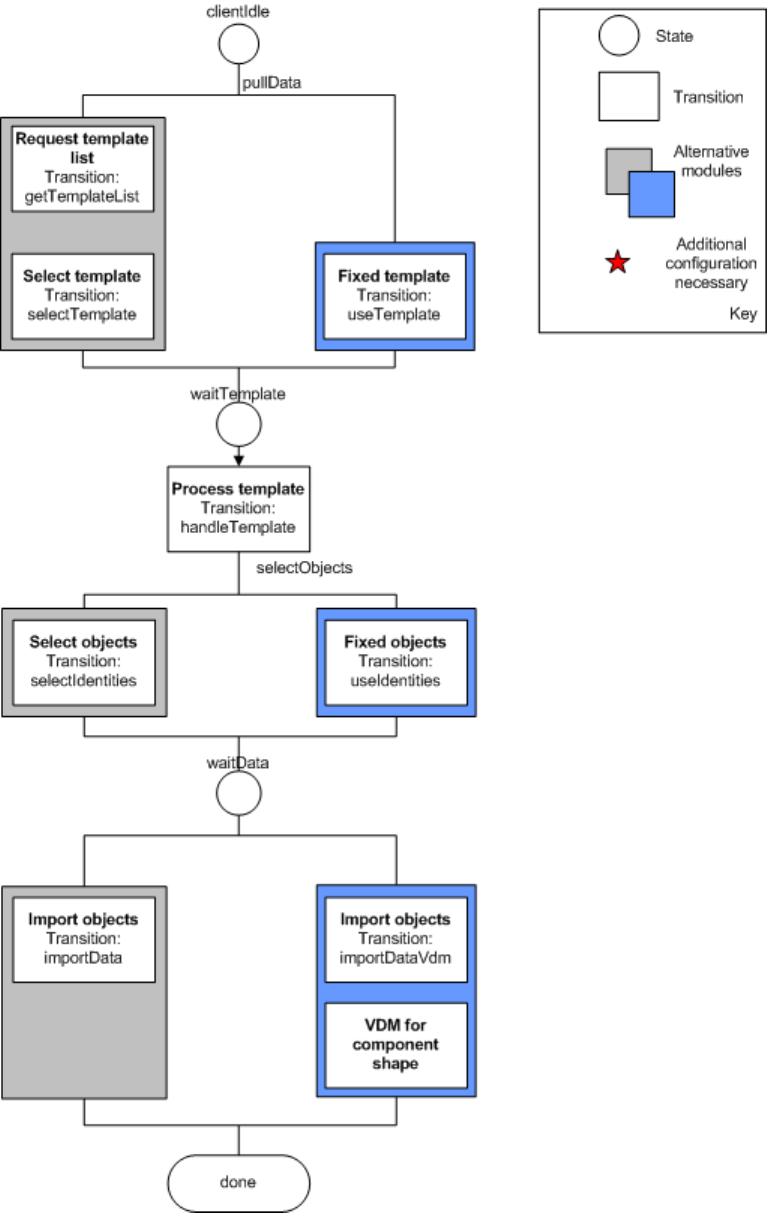
Some of the modules require you to specify additional settings. The affected modules are labeled
accordingly in Figure 15. The custom section of the application configuration was used to make
room for the additional configuration attributes.
The module “VDM for CS” adds the VDM Blob handling option to each application template that
affects component shapes. When this module is activated, the Vision data is also transferred for
each component shape pulled.
Module: VDM for CS
Key Form Contents
Configure VDM as described.
Table 8 Additional settings for "VDM for CS"
Module: Fixed Template
Key Form Contents
templateName String Name of the application template to
be used
Table 9 Additional settings for "fixed templates"
49 of 66

Installation Manual SIPLACE EDM 1.7 Edition05/2009
An example for Table 9:
<customConfig>
<add key=“templateName“ value=“All Component Shapes“/>
</customConfig>
Module: Fixed Objects
Key Form Contents
objectNames A semicolon-separated (“;”), full SIPLACE Pro path.
The following generalized constructs are allowed for
the object names:
Type:* - All objects of this type
Type:Path\* - All objects of this type in this
path (not in subfolders of this
path)
List containing the names of the
objects to be transferred.
Table 10 Additional settings for "fixed objects"
An example for Table 10:
<customConfig>
<add key=“objectNames“ value=“Import\100.gf;System\12.gf;System\100*“/>
</customConfig>
Installation Manual SIPLACE EDM 1.7 Edition 05/2009
Figure 15 Current configuration options for client workflows
51 of 66