00195044-13_UM_VisionTeachStation_DE EN.pdf - 第115页
Vision Teach Station User Manual 4 Setting up the vision teach station 12/2014 Edition 4.1 Requirements for the installation site 115 4 Setting up the vision teach station 4.1 Requirements for the installation site 4.1.1…

3 Ordering information and package supplied Vision Teach Station User Manual
3.2 Cameras and assembly kits 12/2014 Edition
114
NOTE 3
Figure 3.2 - 8, page 113, shows the position at which the component camera (item 1) is mounted
on the vision teach station. The camera is turned 180° about the horizontal on the placement
machine. Only components that are no larger than the field of vision of the component camera
(single measurement) can be taught at the vision teach station. Multiple measurements must be
taken on the machine. Detection of the orientation of asymmetrical package forms is not suppor-
ted on the vision teach station.
Vision Teach Station User Manual 4 Setting up the vision teach station
12/2014 Edition 4.1 Requirements for the installation site
115
4 Setting up the vision teach station
4.1 Requirements for the installation site
4.1.1 Ambient conditions
The vision teach station is approved for use in production and in the office. The area around it must
be clean and free from dust.
4.1.2 Electrical connection
4
Tab. 4.1 - 1 Electrical ratings
4
4.1.3 Set-up location for the base module
CAUTION 4
The base module weighs around 30 kg.
You should therefore place the base module on a stable surface that is clean and level.
Two people will be needed to move the base module because of the weight.
Component Supply voltage
Base module 100 VAC to 240 VAC, 50/60 Hz
PC with wide-range power supply
PC with 115 VAC/230 VAC changeover switch
100 VAC to 240 VAC, 50/60 Hz
100 VAC to 127 VAC, 200 VAC to 240 VAC
TFT monitor with wide-range power supply 100 VAC to 240 VAC, 50/60 Hz
4 Setting up the vision teach station Vision Teach Station User Manual
4.2 Connections and LED displays on the base module 12/2014 Edition
116
4.2 Connections and LED displays on the base module
4
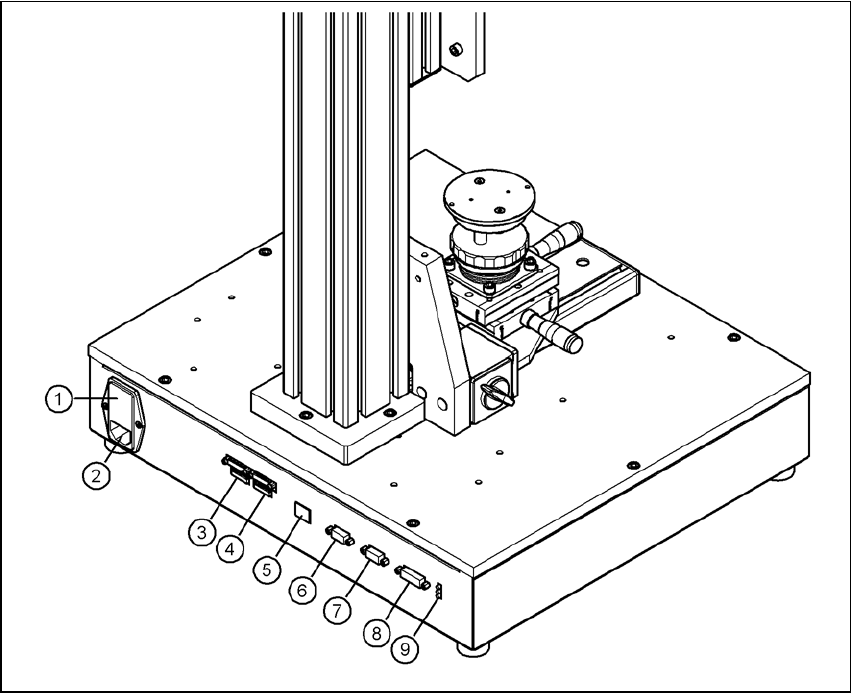
Fig. 4.2 - 1 Connectors and LED displays on the base module
(1) Power switch and fuse holder for the 2.5 A fuse
(2) Power socket (110 VAC to 240 VAC)
(3) Connection for cable, head camera 1 (03040353-W1: 26-pin, 03040353-W2: 12-pin)
(4) Connection for cable, head camera 2 (03040353-W1: 26-pin, 03040353-W2: 12-pin)
(5) Connection for camera bus cable to the PC (03040359-xx) (only if head camera is installed)
(6) Connection for CAN bus cable to the PC (03040362-xx)
(7) Connection for CAN bus cable to the stationary camera (03040355-W2)
(8) Connection for the power supply cable for the stationary camera (03040355-W1)
(9) LED displays for supply voltages, from top to bottom:
+ 24 VDC- (red)
+ 15 VDC- (yellow)
+ 42 VDC- (green)