00198013-02_IM_OIS_SIS_13.1_DE_EN.pdf - 第23页
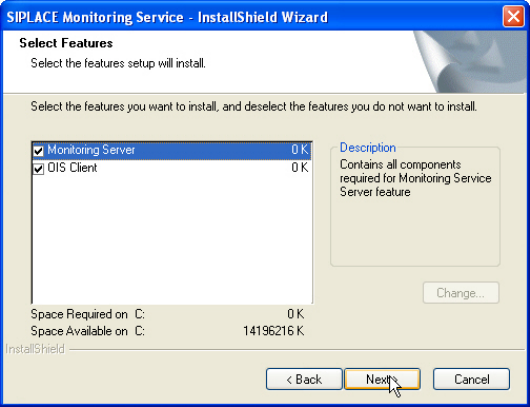
SIPLACE OIS V13.1 / Installat ion Manual Ausgabe 05/2016 Edition 23 The following dial og box is opened. Figure 3-27: Selecting features ► Select the feat ure(s) that you wo uld like to modify . ► Click Next >. ► Perf…
SIPLACE OIS V13.1 / Installation Manual Ausgabe 05/2016 Edition
22
3.3 Modifying the Installation
The Modify option allows you to change the installation entries made to date. This allows you, for
instance, to add or remove a language.
► Click the Windows Start button and select Settings and then Control Panel.
► Start the Add/Remove Programs dialog, by double-clicking on Add/Remove Programs.
► Select the program from the list (SIPLACE OIS / SIPLACE Monitoring Service) and click on
Change/Remove.
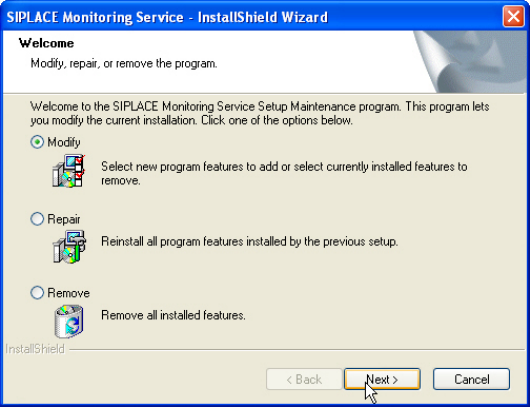
The setup program will start and display the following dialog box.
Figure 3-26: Modifying program
► Select Modify.
► Click Next >.
SIPLACE OIS V13.1 / Installation Manual Ausgabe 05/2016 Edition
24
3.4 Repairing the Installation
This Repair option is used to repair an existing installation. The program is restored using the
specifications and entries originally specified.
► Click the Windows Start button and select Settings and then Control Panel.
► Start the Add/Remove Programs dialog, by double-clicking on Add/Remove Programs.
► Select the program from the list (SIPLACE OIS / SIPLACE Monitoring Service) and click on
Change/Remove.
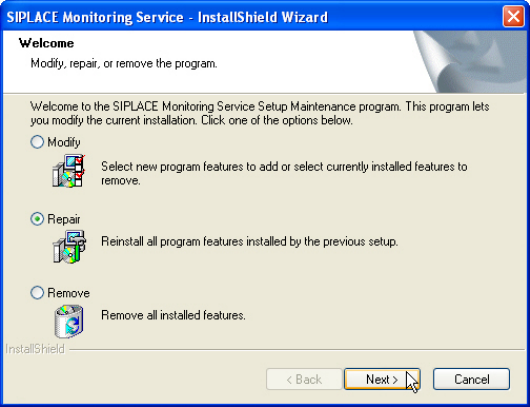
The setup program will start and display the following dialog box.
Figure 3-28: Repairing program
► Select Repair.
► Click Next >.