1OM-1086-002.pdf - 第215页
2.4 "Auto Stop Information" T ab V arious set values for the manual operation are displayed. • Sheet Layout When the [Auto Stop Info] tab is pressed at the "AUTO OPERA- TION" window (submenu), the fol…

*7 Separate Distance
Displayed is the distance of the squeegee to be kept when it is
separated from the screen frame after the end of printing.
*8 Separate Speed
Displayed is the speed at which the squeegee should be sepa-
rated from the screen frame after the end of printing.
*9 Sep.Acc.Spd.
Displayed is the acceleration rate at which the squeegee should
be separated from the screen frame after the end of printing.
*10 Chuck Stage
Displayed is the method to be used to fix the P.C.B.
*11 Print Area
Displayed are the distances on the origin and rear (depth) sides
which represent the range of printing.
*12 Cleaning Area
Displayed are the distances on the origin and rear (depth) sides
which represent the range of cleaning.
*13 Cleaning Speed
Displayed is the speed at which the cleaning operation should be
performed.
*14 Clean.Intval
Displayed is the number of P.C.B.’s to be printed before the subse-
quent cleaning operation.
2.3 "Crnt.Prgm.Info." Tab
0211-005 Chapter 2 5-10 Tg0582-PM-D1
2.4 "Auto Stop Information" Tab
Various set values for the manual operation are displayed.
• Sheet Layout
When the [Auto Stop Info] tab is pressed at the "AUTO OPERA-
TION" window (submenu), the following tab sheet opens.
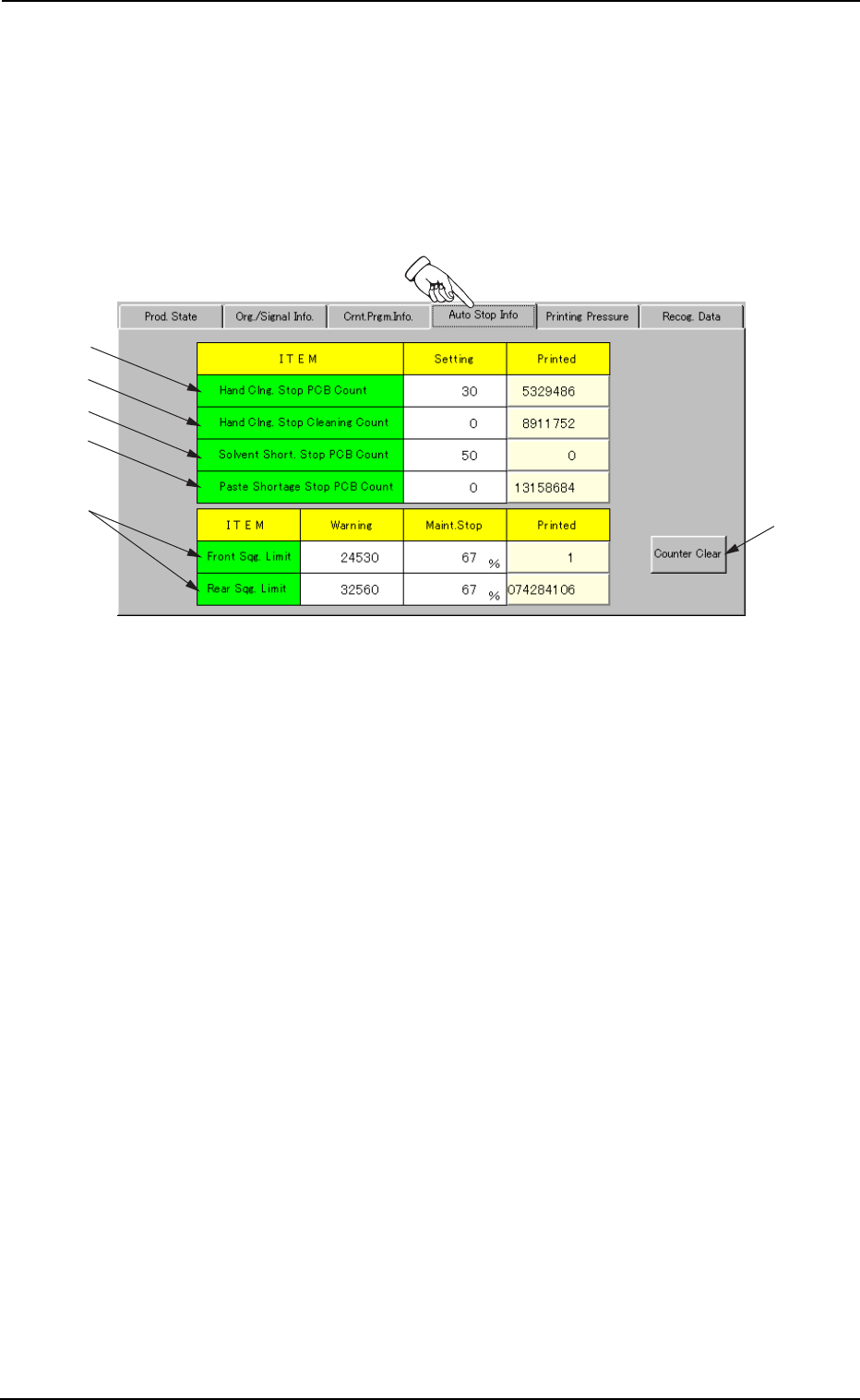
Fig. 2E7 "Auto Stop Information" Tab Sheet
• Sheet Composition
*1 Hand Clng. Stop PCB Count
Displayed in the "Setting" text box is the number of P.C.B.’s to be
produced before the machine is stopped for manual cleaning
operation. The number of processed P.C.B.’s at present (since
the previous machine stop) is in the "Printed" text box.
*2 Hand Clng. Stop Cleaning Count
Displayed in the "Setting" text box is the number of cleaning
operations before the machine is stopped for manual cleaning
operation. The number of processed P.C.B.’s at present (since
the previous machine stop) is in the "Printed" text box.
*3 Solvent Short. Stop PCB Count
Displayed in the "Setting" text box is the number of P.C.B.’s to be
produced before the machine is stopped for replenishment of
screen frame cleaning solvent. The number of processed
P.C.B.’s at present (since the previous machine stop) is in the
"Printed" text box.
2.4 "Auto Stop Information" Tab
*1
*5
*2
*3
*6
*4
0211-005 Chapter 2 5-11 Tg0582-PM-D1

*4 Paste Shortage Stop PCB Count
Displayed in the "Setting" test box is the number of P.C.B.’s to be
produced before the machine is stopped for replenishment of sol-
der paste. The number of processed P.C.B.’s at present (since the
previous machine stop) is in the "Printed" text box.
*5 Front Sqg. Limit, Rear Sqg. Limit
Displayed in the "Warning" text boxes are the numbers of P.C.B.’s
to be produced before the machine is stopped for squeegee re-
placement.
Displayed in the "Maint.Stop" text boxes are the rates (the rates
compared with the numbers of P.C.B.’s in the "Warning" text boxes)
of produced P.C.B.’s. The numbers of produced P.C.B.’s at present
(since the previous machine stop) are indicated in the "Printed" text
boxes.
*6 [Counter Clear] Button
When this button is pressed, the numbers of processed P.C.B.’s at
present (since the previous machine stop) in the "Printed" text boxes
are cleared to "0" (zero).
2.4 "Auto Stop Information" Tab
0211-005 Chapter 2 5-12 Tg0582-PM-D1