Instructions for Maintenance Guide EN.pdf
Page 1 , 3 (1- Machine Levelling) Ensure that the machine is level and locking nuts are tightened. Ensure that the rear centre leg is not in contact w ith the floor and four corner legs are in contact with the floor.…
Page 1, 3 (1- Machine Levelling)
Ensure that the machine is level and locking nuts are tightened.
Ensure that the rear centre leg is not in contact with the floor and four
corner legs are in contact with the floor.
Page 5 (2- Print Height Check)
Check that the Print Height setting is correct.
Go to Ready Page, Setup, Alignment, View Alignment.
Check the contact between the top of the board clamps and the
screen.
The correct print height is when the top of the board clamps are just
touching the screen.
If not use Technical Reference Manual Volume 3 as a guide.
Page 7, 9, 11, 13 (3 Rail Parallelism Check)
Check the rail parallelism using engineering square or spirit
level.
If the parallelism is not correct, escalate to an engineer.
Check the rail width using a board and feeler gauge.
On all three position of the board in the rails (Upline, downline
and centre) the gap between right and the left side of the board
and the inner face of the belt guide should be equal.
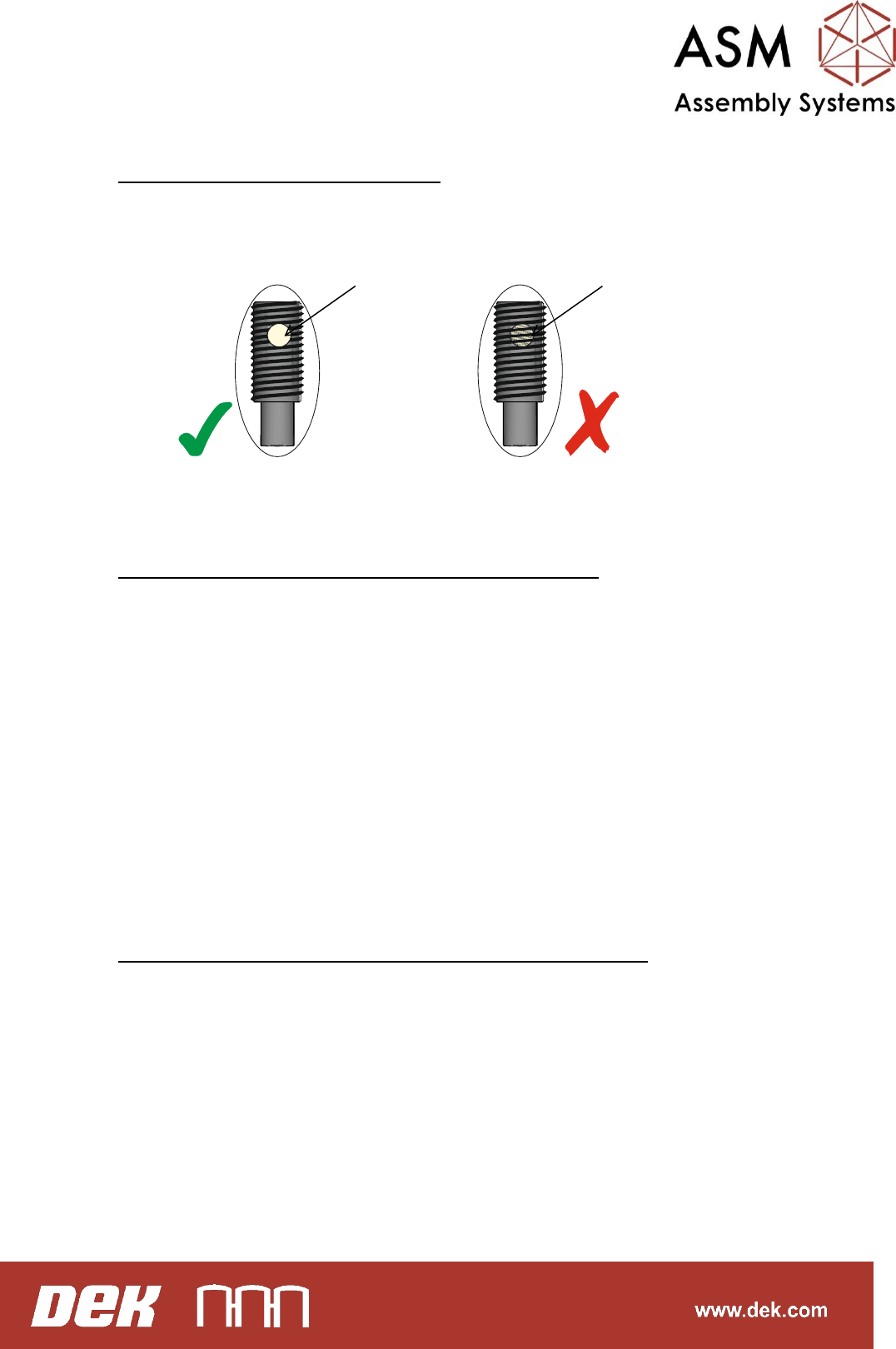
Page 15 (4 Foil-less Board Clamp)
If height setting grub screws are removed, do not use the same grub
screws again. Nylon insert on the grub screws will wear out.
Customer should keep spare height setting grub screws (ASM Part
Number: 178214)
Page 17 (4-a Foil-less Board Clamp Height Setting)
Manually load the customer board into the rails.
Manually push the rails down and adjust the height setting grub screws
until the top surface of the board clamp is flush with the board surface
on 6 positions as shown on the graphic Page 17.
Load the board automatically and toggle the board clamps.
Check the setting again.
If further adjustment is required carefully adjust the grub screws when
board is loaded.
Note: Turning the grub screws clockwise will lift the board clamps.
Turning the grub screws anti clockwise will lower the board clamps.
Page 19, 21, 23 (5 Blue Under Screen Cleaner / Cyclone)
Grip both ends of cyclone body, push the body with your left hand pull
using your right hand and then repeat this in the opposite direction
(Page 19). Check that the cyclone unit does not twist. If you feel that
there is a twisting motion then re-tighten screws on linear bearings, as
shown in Page 21.
Ensure that the home magnets are parallel and in line with the magnet
plates, as shown in Page 23.
If not, escalate to an engineer.
Nylon insert
Nylon insert
Page 25, 27 (6 Cyclone Cleaner Height Checking)
Manually load stencil / screen upside down.
Push the stencil / screen until the front edge of the stencil aligns with
the far edge of the cyclone head, as shown in Page 25.
From the rear of the machine, while one person triggering the cyclone
solenoid to lift the cyclone (Page 27), measure the gap between the
underneath the stencil and the chase stencil support plate as shown in
Page 29.
If the gap is not equal to 1.5mm +/- 0.2mm, escalate to an engineer.
Page 31 (7 Cyclone Cleaner Lift Cylinders Check)
From the rear of the machine, while one person triggering the cyclone
solenoid, observe the movement of the cyclone to ensure the left and
right side of the cyclone lift and lower simultaneously.
Page 33 (8 Blue Under Screen Cleaner (USC) Height Checking)
Using stencil/screen position the front edge of the screen over the USC
wipers.
Using the feeler gauges ensure that the gap between squeegee wipers
and the screen frame is 3.25mm+/-0.25mm.
If not, escalate to an engineer.