00191987-02.pdf - 第29页
External Power Supply Unit for the HS-50 / HS-60 / D 4 Component Table User Manual 03/2006 Edition 2.11 Servicing Work If the Power Supply Unit Fails 29 2.1 1 Servicing Wo rk If th e Power Supply Unit Fails 2.1 1.1 Fuses…
User Manual External Power Supply Unit for the HS-50 / HS-60 / D4 Component Table
2.10 Maintenance 03/2006 Edition
28
2.10 Maintenance
2.10.1 Compressed Air Filter
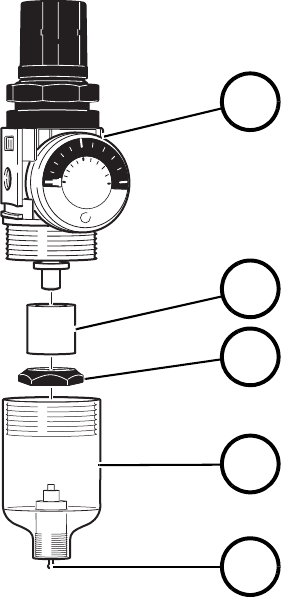
If the flow rate decreases dramatically, exchange the microfilter (2 in Fig. 2.10 - 1). Unlock the cou-
pling and pull it off the compressed air connection (1 in Fig. 2.3 - 2). Afterwards, screw the con-
tainer for condensed water (4 in Fig. 2.10 - 1) off the pressure reducer (1). After you tighten down
the little separating cap (3), you can remove the microfilter (2). 2
To install the new microfilter, perform the same steps in exactly reverse order. 2
Fig. 2.10 - 1 Compressed Air Filter Unit
2.10.2 Condensed Water
The transparent container for condensed water (4 in Fig. 2.10 - 1) must be emptied before the level
of the condensed water reaches the little separating cap (3). To do so, push the manual drain (5)
up. 2
2
2
01
0.5
SMC
MPa
5
10
0
2
3
4
5
1
(1) Pressure reducer
(2) Microfilter
(3) Little separating cap
(4) Container for condensed water
(5) Manual drain
External Power Supply Unit for the HS-50 / HS-60 / D4 Component Table User Manual
03/2006 Edition 2.11 Servicing Work If the Power Supply Unit Fails
29
2.11 Servicing Work If the Power Supply Unit Fails
2.11.1 Fuses on the outside of the device
DANGER 2
: Switch the device off and remove the power plug.
2
: If the power supply unit has failed, first check the two fuses in the power supply/connector com-
bination (Fig. 2.5 - 1) above the main switch.
: Release the snap lock on the fuse drawer and pull out the plastic insert with the two fuses.
: Check the two fuses and replace them if necessary.
2.11.2 Fuses inside the device
If neither of the two fuses in the power supply/connector combination is defective, it is also possi-
ble to check the fuses inside the device. 2
This step must only be carried out by a trained specialist, however. 2
DANGER 2
: Switch the device off and remove the power plug.
2
2
2
2
2
2
User Manual External Power Supply Unit for the HS-50 / HS-60 / D4 Component Table
2.11 Servicing Work If the Power Supply Unit Fails 03/2006 Edition
30
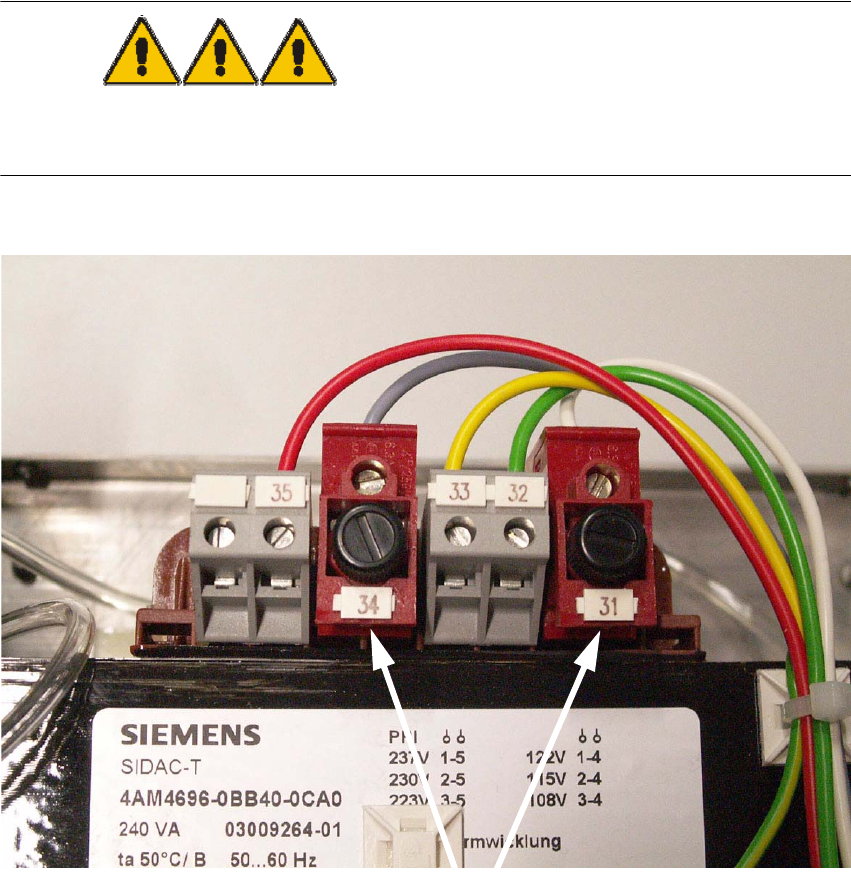
2.11.2.1 Checking the fuses on the transformer:
The two fuse inserts are located directly on the transformer (T5,0H terminal 31 and T2,0L terminal
34). 2
: Check the two fuses and replace them if necessary.
DANGER 2
: Remember to close the power supply housing correctly before using the power supply unit.
2
2
2
2
Terminals